
Lieferung heute & morgen

Qualitätsgarantie

Willkommens-Angebote freischalten: KOSTENLOSE Lieferung | Bis zu 80 % RABATT | Kostenlose 30-Tage-JoyPlus-Testphase
App herunterladen
By a Joybuy Product Recommendation Officer, August 28, 2026
A laptop battery dying in the middle of your workday can bring productivity to a grinding halt. A high-performance laptop power bank seems like the logical solution. However, the market is flooded with technical specs and marketing promises that often create more confusion than clarity. Many users invest in a device only to find it won't charge their laptop at all, or does so at a painfully slow pace.
Before you make a purchase, it's crucial to understand the most common pitfalls that can lead to a costly mistake:
To ensure your investment is worthwhile, you should check three core technical parameters. These determine whether a portable fast charger is right for your needs.
The power output, measured in watts (W), is the most critical factor. It determines how quickly your laptop will charge.
Capacity indicates how much energy the power bank can store. This requires a closer look.
The functionality of a power bank heavily depends on its ports and practical features.
Based on the criteria above, we have identified a few models that are particularly well-suited for specific user groups in the UK and Europe.
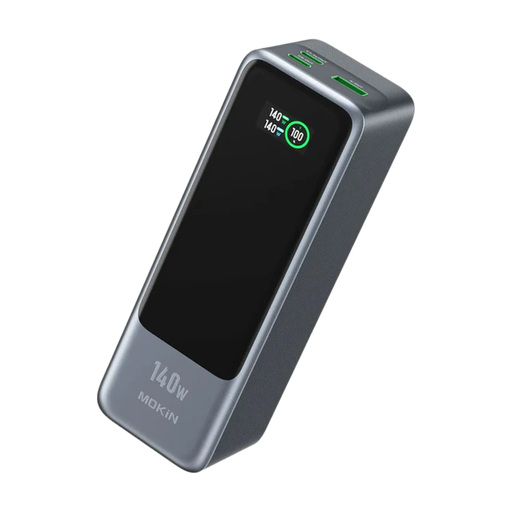
Why This Fits Their Persona: For professionals on business trips who need a no-compromise charging solution for high-end laptops like the MacBook Pro. The high power and capacity guarantee productivity, whether on a train, at the airport, or in a café.
The device supports the PD 3.1 standard and delivers up to 140W from a single port. The LCD display shows the power distribution in real-time, exposing the "split power" pitfall.
High capacity of 24000mAh (86.4Wh, flight-safe) and the ability to fast-charge three devices simultaneously (e.g., laptop, tablet, smartphone).
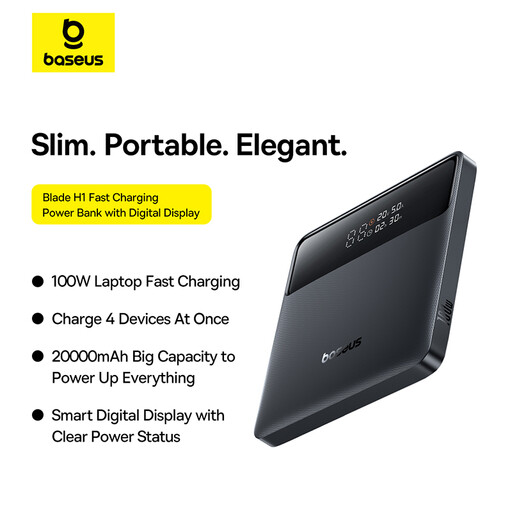
Why This Fits Their Persona: Ideal for students and commuters who need a slim, lightweight, yet powerful solution for the daily trip to university or the office. Its flat design fits easily into any laptop bag or backpack.
With 100W PD 3.0 power via USB-C, it's strong enough for most laptops. The display shows the remaining charging time, providing transparency about actual performance instead of just relying on the mAh figure.
Extremely slim design (only 1.8 cm thick) and low weight. It offers bidirectional fast charging, so the power bank itself can be recharged in about 1.2 hours (with a 65W charger).
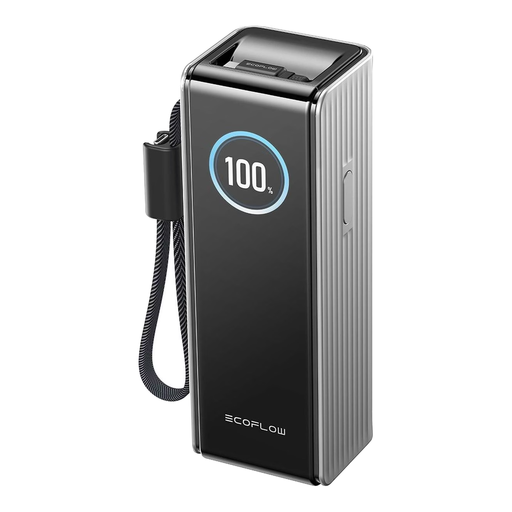
Why This Fits Their Persona: For users who demand maximum performance and functionality. Perfect for digital nomads or tech fans who want to charge their laptop, drones, cameras, and other gadgets on the go at top speed.
With a total output of 170W and three 100W-capable USB-C options (port, integrated cable, retractable cable), power is intelligently distributed. The TFT display provides detailed information on power allocation per port.
Integrated and retractable 100W cables make separate cables obsolete. The advanced TFT display shows battery health and temperature in addition to power output.
We have compiled a complete, real-time updated list of products that fully meet these strict selection criteria and European safety regulations.
Yes, as a general rule. Most airlines limit the capacity of lithium-ion batteries in carry-on luggage to 100 watt-hours (Wh). A typical 20000mAh power bank uses cells with a 3.7-volt rating. The calculation is: 20,000 mAh / 1,000 x 3.7 V = 74 Wh. This value is well below the 100 Wh limit. Always check the manufacturer's Wh rating to be safe, but a standard 20000mAh power bank is an airline-approved power bank.
There could be several reasons for this. First, the USB-C cable you are using must also be rated for 100W of power. Look for cables with an "E-Marker" chip. Second, both the power bank and the laptop must support the same Power Delivery protocol. Third, if you are charging multiple devices at once, the total power output is split among the ports, which reduces the power available to the laptop.
The rated capacity is the realistic, usable amount of energy that a power bank can deliver. The advertised capacity (e.g., 20000mAh) refers to the sum of the internal battery cells at their nominal voltage (approx. 3.7V). During charging, this voltage is converted to the 5V, 9V, 15V, or 20V required by USB. This conversion process results in energy loss. The rated capacity specifies the capacity after these losses and is therefore a more honest indicator of how many times you can actually charge your device.