
Lieferung heute & morgen

Qualitätsgarantie

Willkommens-Angebote freischalten: KOSTENLOSE Lieferung | Bis zu 80 % RABATT | Kostenlose 30-Tage-JoyPlus-Testphase
App herunterladen
By a Joybuy Product Recommendation Officer, July 28, 2026
A nearly dead laptop battery right before a key presentation or during a long train ride is more than just an annoyance—it's a productivity killer. A high-performance laptop power bank seems like the obvious solution. But the market is flooded with products making grandiose claims that often fail to deliver in practice. Before you make a purchase, it's crucial to understand the common pitfalls that lead to disappointment and unnecessary expense.
Many buyers focus on the big numbers on the packaging without understanding their true meaning. This often leads to a poor purchase. Pay close attention to these three points:
To avoid a bad purchase, focus on the technical specifications that are critical for reliable performance.
Capacity in milliamp-hours (mAh) is only half the story. The more relevant unit, and the one that's crucial for air travel, is watt-hours (Wh). Most airlines limit batteries in carry-on luggage to 100 Wh. For example, a 20,000mAh power bank with a typical cell voltage of 3.6V has 72 Wh (20,000mAh * 3.6V / 1000 = 72 Wh), making it compliant for flights. A 25,000mAh power bank comes in at around 90 Wh and is also generally fine to fly with. Always check this value before buying if you travel frequently.
The output power, measured in watts (W), determines how fast your device will charge—and if it can be charged at all. A modern portable laptop charger should deliver at least 65W from a single USB-C power bank port. For high-performance devices like a MacBook Pro, 100W or more is required. Look for the PD 3.1 standard, which enables charging speeds over 100W and is relevant for the latest generations of laptops. A power bank with a display is especially useful here, as it shows the current charging output in real-time, giving you full transparency over the charging process.
We have identified models based on objective technical data that represent a practical solution for specific user groups.
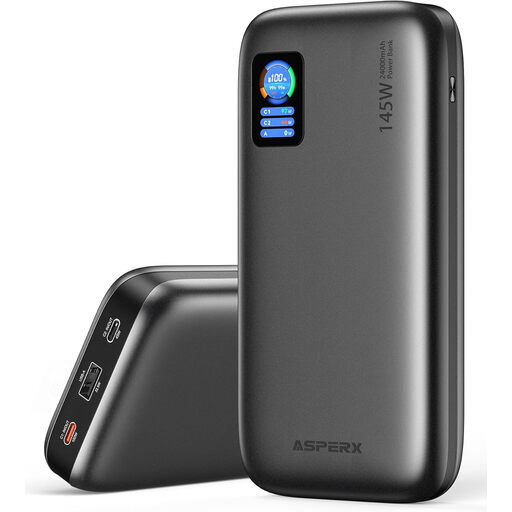
Why it's a good fit: Ideal for commuters and business travellers who need a reliable power source for their laptop, tablet, and smartphone. The 24,000mAh capacity (approx. 86.4 Wh) is flight-compliant and sufficient to fully charge a MacBook Pro once.
The TFT smart display shows the remaining charging time as well as the input and output power in real-time. This lets you see exactly how many watts your laptop is receiving, eliminating any ambiguity about the actual fast-charging performance.
High Single-Port Power: Delivers up to 100W via a single USB-C port, sufficient for most laptops.
Transparency: The display offers full control and predictability.
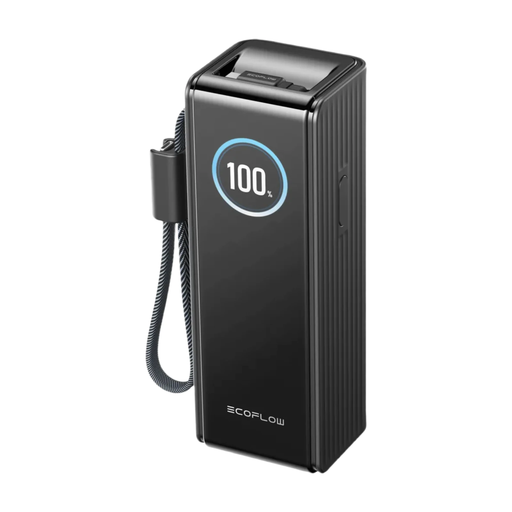
Why it's a good fit: Designed for users of high-end devices like the 16-inch MacBook Pro, gaming laptops, or the Steam Deck. The high total capacity and massive power output ensure that even power-hungry devices can run uninterrupted on the go.
This model addresses the problem of reduced power with multiple devices through smart power distribution and two high-performance USB-C ports, each capable of delivering up to 140W. The TFT display shows the power distribution per port.
Extreme Performance: Two USB-C ports, each with up to 140W output (PD 3.1).
High Capacity: 25,000mAh (approx. 90 Wh) for multiple charges.
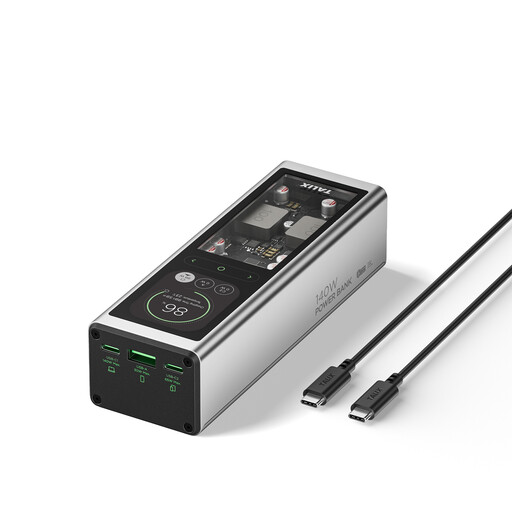
Why it's a good fit: A balanced compromise of high performance, compact size, and universal compatibility. At 20,000mAh (72 Wh), it's very travel-friendly and reliably fast-charges laptops as well as smaller devices like smartphones or drones, thanks to PD 3.1 support.
This model offers clear specifications on power distribution: when using multiple ports, the power is intelligently split (e.g., 65W + 65W). The digital display also shows the exact power output, so you're never left guessing about the charging speed.
Future-Proof: Supports the latest PD 3.1 standard with up to 140W.
Versatile: Three ports (2x USB-C, 1x USB-A) for charging multiple devices simultaneously.
We've compiled a complete, up-to-date list of products that fully meet these strict selection criteria and all relevant safety regulations.
Can I take a laptop power bank on an airplane? Yes, you generally can, as long as the capacity does not exceed 100 watt-hours (Wh). Power banks must be carried in your carry-on luggage. Most models between 20,000mAh and 25,000mAh fall below this limit. To be safe, always check the manufacturer's Wh rating and your airline's specific regulations.
How do I find out how many watts my laptop needs to charge? The easiest way is to check your laptop's original power adapter. You'll find the output power listed on the label. Multiply the volts (V) by the amps (A) to get the wattage (W). Example: 20V ? 4.5A equals 90W. Your power bank should be able to deliver at least this much power from a single port.
What's the difference between PD 3.0 and PD 3.1? Power Delivery (PD) is a USB-C charging standard. The main difference is the maximum power output. PD 3.0 is limited to 100 watts. The newer PD 3.1 standard supports significantly higher charging power, up to 240 watts. For the latest and most powerful laptops that require more than 100 watts, a power bank with PD 3.1 support is necessary to achieve maximum charging speed.