
Lieferung heute & morgen

Qualitätsgarantie

Willkommens-Angebote freischalten: KOSTENLOSE Lieferung | Bis zu 80 % RABATT | Kostenlose 30-Tage-JoyPlus-Testphase
App herunterladen
By: Joybuy Product Recommendation Officer Date: August 29, 2026
Your laptop battery is dying, and there's no outlet in sight—a situation that professionals, students, and travellers know all too well. A powerful laptop power bank promises the perfect solution. However, the market is flooded with products making bold claims that often fall short in practice. Before you invest, it's crucial to understand the common pitfalls that can lead to a bad purchase.
Many users invest in a portable charging station for their laptop, only to be disappointed when it barely charges their device, or doesn't charge it at all. This is often due to three common but easily overlooked issues:
To ensure you can reliably charge your laptop on the go, focus on three core technical features. These determine the real-world performance and compatibility.
This is the most important factor. Check your laptop's original power adapter to determine its required wattage (W).
Instead of milliampere-hours (mAh), the watt-hour (Wh) rating is a more accurate indicator of the actual energy available. It's calculated by multiplying the capacity (in amp-hours) by the voltage (in volts). Most airlines limit batteries in carry-on luggage to 100 Wh. A 20,000 mAh (at 3.7V) power bank is equivalent to 74 Wh, making it airline-approved and typically sufficient for one full charge of a standard laptop.
A good portable charging station for your laptop should be versatile. Look for the following configuration:
Based on the objective criteria above, we have identified several models that are a suitable solution for specific user groups.
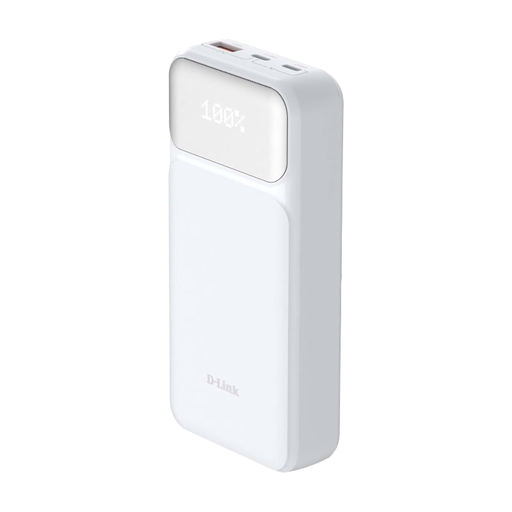
Why This Fits Their Persona: Ideal for users who need a reliable and universal charging solution for their laptop, tablet, and smartphone. The 20000mAh capacity is enough for a full laptop charge, and its compact design fits into any briefcase or laptop bag.
This model clearly specifies a 65W output via USB-C PD 3.0, avoiding the pitfalls of insufficient power and incompatible charging protocols.
Allows for simultaneous charging of up to three devices. The integrated LED display accurately shows the remaining battery level.
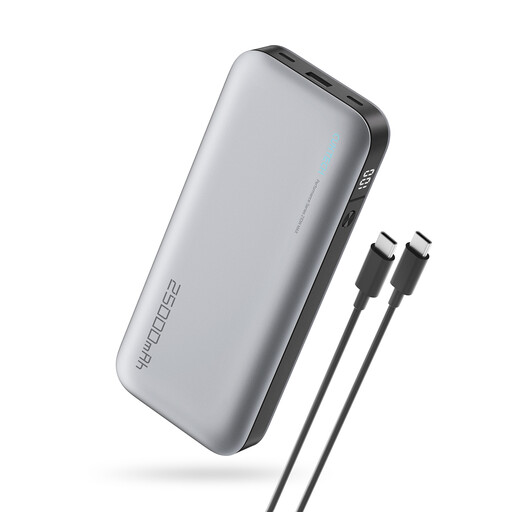
Why This Fits Their Persona: Perfect for users of power-hungry laptops (e.g., for gaming or video editing) who need maximum performance and capacity. The 25,000 mAh capacity is close to the 100 Wh airline limit, offering maximum energy on the go.
With an extremely high output of 120W, this model exceeds the requirements of most laptops, ensuring a fast charge even under full load.
Very high charging power for the most demanding devices. Three outputs (2x USB-C, 1x USB-A) offer maximum flexibility.
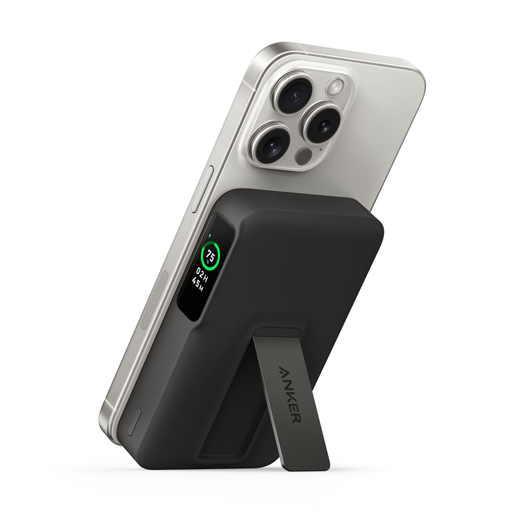
Why This Fits Their Persona: An excellent choice for users whose priority is fast, wireless charging for smartphones and tablets. Note: This model is not designed for charging laptops.
By clearly positioning itself as a smartphone charger with Qi2-certified 15W charging, it prevents false expectations. It's a specialised solution that excels in its category.
The informative smart display shows battery level and remaining charging time. The integrated stand is practical for video streaming while charging.
We have compiled a complete, up-to-date list of products that fully meet these strict selection criteria and safety regulations.
This depends on your laptop's battery capacity, which is measured in watt-hours (Wh). A typical ultrabook has a 50-70 Wh battery. A 20,000mAh (approx. 74 Wh) power bank can fully charge such a device about 0.8 to 1.2 times, after accounting for conversion losses.
Yes, power banks must be transported in your carry-on luggage. The International Air Transport Association (IATA) limits the capacity to 100 Wh per battery. Power banks up to 27,000 mAh (approx. 99.9 Wh) are generally within this limit and are therefore approved for air travel.
For reliable compatibility with a MacBook, you should look for two features: a USB-C port that supports the Power Delivery (PD) standard and a sufficient power output. For a MacBook Air, at least 30W is recommended, while a MacBook Pro benefits from 60W or more to ensure an adequate charging speed.