Which laptops suit different learners?

Learners tackling long questions

If you spend a lot of time reading, typing answers and keeping notes in view, check the display and input devices on the specific model. A larger screen can give you more room to view content side by side, but it will also take up more space on your desk.

Learners without a fixed workspace

If you regularly move between desks, portability and a suitable charging option matter. Check whether the charger is included and what charging power the device needs.

Learners considering a second-hand device

For a second-hand laptop, check that its condition, battery, operating system support and included accessories suit the way you plan to use it. The terms also differ depending on whether you buy from a business or a private seller.

What should you look for when buying?

Compact laptop around 14 inches

A good fit if: you often move between workspaces and usually tackle one question at a time.

The trade-off: there’s less screen space for viewing a question, your answer and your notes at the same time than on a larger device.

Larger laptop around 15 to 16 inches

A good fit if: you want to view questions and notes side by side and have enough desk space.

The trade-off: check how much desk space it needs and whether the larger device, with its accessories, suits the way you move between workspaces.

What matters What to check before buying Who should consider it?
Readability and typing Display size and resolution of the exact model, whether the screen is matte or anti-glare, keyboard layout and available desk space. If I’m reading long questions and want to keep my notes in view while answering, I look at the display and keyboard. Around 28% of consumers put readability and typing first.
Second-hand device and condition Device condition, battery, operating system support, what’s included and whether you’re buying from a business or a private seller. If I’m considering a second-hand laptop, I want to be able to assess its condition and the seller’s terms in advance. Around 22% of consumers prioritise the terms of buying a device.
Portability and power Weight of the specific configuration, test conditions behind battery-life claims, whether a charger is included and the charging power required. If I move between shared desks, I don’t want to rely on finding a free power socket. Around 22% of consumers prioritise portability and power.
Learning platform compatibility Requirements for the operating system, browser and processor architecture, as well as any additional software or drivers. If my practice platform requires specific software or drivers, I want to check compatibility before buying. Around 17% of consumers put having the right software environment first.
Privacy and network security Your seating position and who can see your screen, the screen-lock function and how to use the Wi-Fi network you’re connected to safely. If other people might see my screen or I’m using an unfamiliar Wi-Fi network, I want to take care to secure my session and connection. Around 11% of consumers prioritise privacy and network security.

Which buying mistakes should you avoid?

  • Assuming the claimed maximum battery life will match your study time

    Battery life can differ from the manufacturer’s claims depending on how you use the laptop, including your browser, screen brightness and wireless connection. A charger isn’t included with every offer, either.

    Only compare test results if they cover the same model and use clearly explained test conditions. Also check what’s included with the specific offer.

  • Comparing only the name of a model range

    Display, memory, keyboard and accessories can vary within the same range. A similarly named listing doesn’t prove that an offer has the same configuration.

    Compare the full model or item number with the specifications of the version on offer.

  • Choosing a second-hand device without checking it

    Condition, battery performance, software support and the terms of purchase depend on the specific device and the type of seller.

    Check these details and what’s included with the individual offer before making your decision.

Relevant brands at a glance

Lenovo

The ThinkPad E14 Gen 7 is a documented compact Windows option for reading and typing.

  • For model 21SX000RGE, Lenovo lists a matte 14-inch WUXGA display, a backlit German keyboard, 16 GB RAM and a 512 GB SSD.
  • These specifications apply to the item number listed, not to every E14 configuration.

ASUS

The Vivobook 16 is worth considering if you’d like more screen space for questions and notes at a fixed desk.

  • For M1605NAQ-MB077W, ASUS lists an anti-glare 16-inch WUXGA display with 1920 × 1200 pixels.
  • These specifications apply to this model; other M1605 configurations may differ.

HP

The OmniBook 3 14-hu0750ngx is a documented compact option for everyday study tasks.

  • For this model, HP lists 16 GB RAM, a 512 GB SSD and a 14-inch display with 1920 × 1200 pixels.
  • The charger is sold separately with this specific offer. Advertised battery life is based on the manufacturer’s claims, not on testing while practising.

Acer

The Aspire Go 15 is a documented alternative with a 15.6-inch display.

  • For AG15-72P-51GW, Acer specifies a matte IPS display with 1920 × 1080 pixels, as well as 16 GB RAM and a 512 GB SSD.
  • According to Acer, this model’s keyboard isn’t backlit. These specifications don’t automatically apply to other Aspire Go devices.

Laptops available at Joybuy

The laptops below include compact and larger formats for reading and answering digital practice questions.
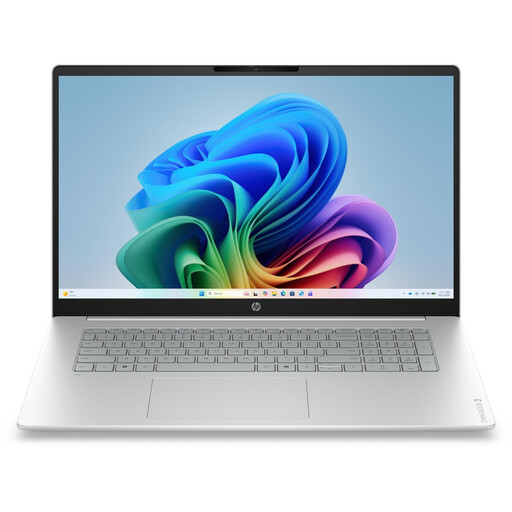
HP OmniBook 3 17-dg0050ngx, 17.3 inches, FHD, Intel Core Ultra 5 225U, 8 GB RAM, 256 GB SSD, Windows 11 Home

HP OmniBook 3 17-dg0050ngx, 17.3 inches

The large display could suit you if you have enough room at your study desk for a 17.3-inch laptop.

FHD display, Intel Core Ultra 5 225U, 8 GB RAM, 256 GB SSD and Windows 11 Home.

View at Joybuy

HP ProBook 4 16 G1i, Intel Core Ultra 7 255U, 32 GB RAM, 1 TB SSD, 16 inches

HP ProBook 4 16 G1i

The 16-inch format is an option if you’d like more room for questions and notes at your desk.

Intel Core Ultra 7 255U, 32 GB RAM, 1 TB SSD, 16-inch IPS display with 1920 × 1200 pixels and Windows 11 Pro.

View at Joybuy

HP OmniBook Ultra Flip 14-fh0670ng, 14 inches, touchscreen, Intel Core Ultra 7 258V, 32 GB RAM, 1 TB SSD, OLED

HP OmniBook Ultra Flip 14-fh0670ng

The 14-inch format may be handy if you move between workspaces. Check that the specific exam platform supports the software you need.

Touchscreen, Intel Core Ultra 7 258V, 32 GB RAM, 1 TB SSD, 2.8K OLED and Windows 11 Home.

View at Joybuy

Ruzava 14-inch laptop, 8 GB RAM, 256 GB SSD, N5095 processor, FHD display

Ruzava 14-inch laptop

The compact format could suit study tasks across different workspaces, as long as it meets the requirements of the software you need.

8 GB RAM, 256 GB SSD, N5095 processor up to 2.9 GHz and FHD display. The product name describes the SSD as upgradeable to up to 1 TB.

View at Joybuy

Ninkear A15 pro, 15.6-inch FHD IPS, 16 GB RAM, 512 GB SSD, Windows 11

Ninkear A15 pro, 15.6 inches

The 15.6-inch display gives you more workspace, provided there’s enough room at the shared desk.

FHD IPS display, 16 GB DDR4 RAM, 512 GB SSD, 55.4 Wh battery and Windows 11.

View at Joybuy

Frequently asked questions

Is a basic laptop enough if I only answer questions in a browser?

First, check the published requirements for your specific learning platform and consider whether you’ll want to open other materials at the same time. If you need an additional app, driver or controlled exam environment, you can’t determine compatibility from browser use alone. Microsoft says most Windows applications run on Windows 11 Arm devices, sometimes through emulation. Still, check the specific application and any required drivers before buying.

What should I set up before my first study session at a shared desk?

Test the platform and your login in advance, keep your operating system and browser up to date, and lock your screen when you leave your desk. Germany’s Federal Office for Information Security recommends taking care when using unfamiliar Wi-Fi. The fact that a network is available doesn’t mean it’s secure.

Does a new laptop automatically come with a suitable charger?

No, it depends on the specific offer: HP notes that the charger for the OmniBook 3 14-hu0750ngx is sold separately. Check what’s included, the charging port and the power required. EU rules on common charging ports have applied to affected laptops since 28 April 2026, but that doesn’t mean a charger is included.

What are my rights when buying a laptop online in Germany?

For a consumer purchase made at a distance, you generally have a 14-day right to cancel; exceptions and the specific terms of the contract should be taken into account. If goods are faulty, a business seller is generally responsible under statutory consumer rights for at least two years. For second-hand goods from a business seller, a shorter period of at least one year may be agreed under the applicable conditions; purchases from private sellers aren’t covered by the same EU consumer sales rules. The EU’s Your Europe information portal and the Council of the European Union explain these terms. A voluntary manufacturer’s guarantee is separate from these rights.