A clear display is important for exported PDF plans. If you often carry your laptop to the library, weigh up screen size against weight and the accessories you’ll need. For local DWG files or Revit models, start by checking which application you use: Autodesk lists 64-bit Windows 10 or 11, 8 GB RAM and 1920 × 1080 pixels for DWG TrueView 2026, while Revit has its own requirements. Before buying, check the file format, operating system and exact configuration rather than relying on the product range name alone.
Which laptop is right for you?
Reviewing PDF plans
If you view exported drawings at a library desk, readability and a device that’s easy to carry are important factors to consider. Adobe lists separate system requirements for Acrobat Reader; these shouldn’t be confused with the requirements for modelling software.
Viewing DWG files
If you need to open native DWG files, decide whether you want to use a browser-based viewer or a local application. Autodesk describes an online viewer for DWG files; for DWG TrueView 2026, it lists 64-bit Windows 10 or 11.
Editing Revit models
If you run Revit and edit models, you’ll need to meet that application’s requirements, rather than those for simply viewing PDFs. For the entry-level configuration of Revit 2026, Autodesk lists 64-bit Windows and 16 GB RAM; more complex models may need additional resources.
What should you look for when buying?
First, work out which files and programmes you’ll actually use in the library. Then weigh up the display, portability and the specifications of the exact configuration you’re considering.
| Priority |
What to check before buying |
Who is this especially important for? |
| Seeing plan details |
Compare the screen size, resolution, finish and brightness of the exact configuration. |
If I’m comparing plans on the built-in screen, I want to see the details that matter to me clearly. Around 33% of consumers put having enough screen space first. |
| Portability and power |
Check the weight, including any accessories you’ll need, as well as the battery capacity and charging options; a Wh rating doesn’t guarantee a particular battery life. |
If I regularly take my laptop with me and can’t count on having a socket nearby, weight and a suitable charging plan matter. Around 27% of consumers prioritise portability and the ability to work without a socket. |
| File compatibility |
Check the file format, specific application, operating system and whether you’ll need offline access. For DWG TrueView 2026, Autodesk lists 64-bit Windows 10 or 11, 8 GB RAM and 1920 × 1080 pixels. |
If I need to open DWG or model files in a particular programme, I want to know in advance that my intended workflow will work. Around 27% of consumers consider compatibility with files and software their top buying priority. |
| Getting the right configuration |
Check the full model number, pre-installed operating system and power adapter listed with the specific offer. |
If I want to start using a local application straight away or charge the device on site, I need a suitable configuration. Around 13% of consumers focus primarily on the operating system and the charging accessories they need. |
Avoid common buying mistakes
-
Choosing Revit-level hardware just to view PDFs
Viewing PDFs and editing in Revit are different tasks. You can’t automatically apply the requirements of modelling software to reading exported plans.
First, check the file format and which application you’ll need, then look up the requirements for that software.
Specifications your actual workflow doesn’t require can make your purchase unnecessarily expensive.
-
Assuming the operating system and what’s included from the product range name
Configurations within a product range can vary. For example, the HP ProBook 460 G11 A23HLEA#ABD is listed with FreeDOS, while no power adapter is specified for one Dell Pro 16 configuration.
Before buying, check the full model or offer number, the operating system and what’s included.
Depending on the configuration, you may need to set it up yourself or buy a compatible power adapter.
-
Assuming a browser-based viewer works like a local offline application
A browser-based viewer and a locally installed application require different workflows. An online viewer won’t necessarily let you access files without an internet connection.
If you need to work offline, check in advance with a sample file which local application and operating system you’ll need.
Brands to consider
Lenovo
The ThinkPad E16 Gen 3 AMD, model 21ST001YGE, is a specific 16-inch Windows configuration for viewing plans on the built-in display.
- For this model, Lenovo lists a matt IPS display with 1920 × 1200 pixels, 32 GB RAM, Windows 11 Pro and a German keyboard layout.
- These details apply to the configuration specified. They don’t confirm the specifications of every E16 variant or guarantee a particular battery life.
ASUS
The Vivobook 16 X1607CA is a 16-inch option. Check the display, weight and exact operating system version together.
- For the model page reviewed, ASUS lists an anti-glare display with 1920 × 1200 pixels, 42 Wh and a weight of 1.88 kg.
- The model page lists different processor and memory options, so the specifications of one variant won’t necessarily apply to every offer. A 42 Wh rating alone doesn’t indicate a specific battery life.
Dell
The Dell Pro 16 PC16250 is an example of a 16-inch business configuration with an IPS display.
- For the listed configuration, Dell specifies 16 GB RAM, a 512 GB SSD and an IPS display with 1920 × 1200 pixels.
- No power adapter is listed as included with this specific configuration. Don’t assume the same applies to other Dell models.
HP
The ProBook 460 G11 A23HLEA#ABD shows why the operating system should be part of your configuration comparison.
- For this model, HP lists 16 GB RAM, a 1 TB SSD and a display with 1920 × 1200 pixels.
- The specified configuration comes with FreeDOS rather than pre-installed Windows. This doesn’t apply to every ProBook variant.
Apple
A MacBook Air may suit PDF or browser-based workflows, provided the software you actually need works with macOS.
- For a 13-inch model, Apple lists a display with 2560 × 1664 pixels and 16 GB of unified memory.
- Autodesk lists Windows for DWG TrueView 2026. Before choosing a Mac, check that a suitable application supports your specific drawing workflow.
Laptop offers at Joybuy
The following Joybuy laptops are suited to mobile PDF and plan viewing. Before buying, check that the file format, application you need and exact configuration suit your workflow.
 No image available
Acer TravelMate TMP216-41-TCO, Ryzen 3 PRO 7335U
Could be worth considering if you want to view plans on a 16-inch screen with Windows.
This configuration is listed with a 16-inch WUXGA IPS display with 1920 × 1200 pixels, 16 GB DDR5, a 512 GB SSD and Windows 11 Pro Education. The listed weight is 1.80 kg.
View at Joybuy
 No image available
Lenovo ThinkPad E16 Gen 3 21ST, Ryzen 7 250
This 16-inch configuration may suit you if you review plans on an anti-glare Windows display.
The offer lists a WUXGA IPS display with 1920 × 1200 pixels, 32 GB RAM, a 1 TB SSD and Windows 11 Pro. The listed weight is 1.71 kg.
View at Joybuy
 No image available
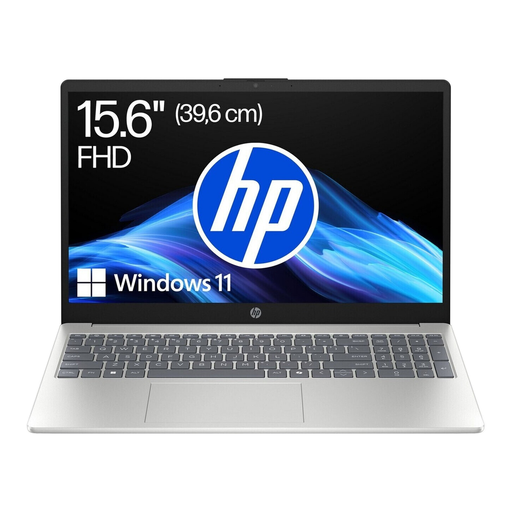
HP Laptop 15-fc1054ngx, Ryzen 5 7520U
A 15.6-inch option for viewing PDFs if you’re considering a more compact screen size.
The offer is listed with an FHD display, Windows 11 Home, 8 GB RAM and a 256 GB SSD. The stated weight is 1.59 kg.
View at Joybuy
 No image available
MSI Prestige N16 Flip AI+ C1XMT-027Y
Could suit you for viewing plans on a larger display, provided the exact specifications meet the needs of your files and programmes.
This configuration is listed with a 16-inch UHD+ OLED display with 3840 × 2400 pixels, Windows 11 Pro, 128 GB RAM and a 2 TB SSD. The listed weight is 1.9 kg.
View at Joybuy
 No image available
Auusda T173A laptop, 17.3 inches
The screen size may be worth considering if you want a larger built-in display for viewing plans and are happy to accommodate the size when carrying it.
The product name lists a 3250C processor, 8 GB DDR4 RAM and a 512 GB SSD.
View at Joybuy
Frequently asked questions
Is a laptop for reading PDFs enough for project drawings?
Yes, if you’re viewing suitable PDF exports and don’t need any other application. Adobe lists its own system requirements for Acrobat Reader; before buying, check whether you’ll also need to open native DWG or model files.
Can I view DWG files without installing CAD software?
Autodesk describes a browser-based viewer that supports DWG files, among others. DWG TrueView 2026, on the other hand, is a local Windows application. If you need to work in the library without an internet connection, check in advance that your intended workflow will work locally.
What should I consider when using a laptop in the library?
Before you go, open a sample file of your own in the application you plan to use and check that you can see the plan details clearly enough at your intended workspace. For DWG TrueView, Autodesk recommends using the latest graphics drivers from the relevant manufacturer.
What requirements apply if I want to edit Revit models?
For the entry-level configuration of Revit 2026, Autodesk lists 64-bit Windows and 16 GB RAM. Requirements may increase with the size of the model; they don’t automatically apply to viewing exported PDFs.


