For approved PDF plans, choose a laptop based on readability, ease of use and the desk space available; you don’t automatically need a particularly powerful graphics card. To run Autodesk DWG TrueView 2027, your device must meet its operating system requirements. If you’ll be editing CAD files or reviewing larger 3D projects, check the processor, memory and graphics against the requirements of the specific software you use.
Which option is right for you?
Reviewing PDF plans
If you mainly read and annotate approved drawings as PDFs, focus on how clearly you can see the details and whether the controls work well with your chosen application. Adobe lists the system requirements for Acrobat Reader, and also offers drawing and commenting tools for adding mark-ups.
Viewing DWG files
If you receive original DWG files, check which application and version you plan to use before buying. Autodesk lists Windows 11 64-bit, along with other system requirements, for DWG TrueView 2027.
Editing CAD files or reviewing 3D projects
If you’ll be doing more than simply viewing files, such as editing CAD files or reviewing larger 3D models, the requirements of your specific software and project type are what matter. For AutoCAD 2026, Autodesk sets out minimum, recommended and additional requirements.
What should you look for when buying?
First, establish the file format and application you’ll use, then work out how much performance you need. Finally, compare the display and laptop dimensions with the space you actually have at the kitchen table.
| What matters to you |
What to look for |
Who is it important to? |
| Readability and desk space |
Check the screen size, resolution and screen finish listed for the exact configuration. If possible, open a typical drawing of your own in the application you plan to use. |
If I want to see plan lines and labels clearly without losing sight of the space available at the kitchen table, the right screen size matters. Around 36% of consumers put readability first. |
| File format and software |
For DWG TrueView 2027, Autodesk lists Windows 11 64-bit, 8 GB RAM and 1920 × 1080 pixels. Check these requirements against the version and configuration you’ll be using. |
If I receive original DWG files, I want to know whether the viewer I’m planning to use will run on my operating system. Around 29% of consumers prioritise file format and software compatibility. |
| CAD and 3D performance |
For AutoCAD 2026 on Windows, Autodesk recommends 32 GB RAM and a graphics card with 8 GB of memory. Check your specific software version and project type against these requirements. |
If I want to edit CAD files or review larger 3D projects, I choose the specification to suit my application rather than the requirements for simply reading PDFs. Around 21% of consumers put CAD and 3D performance first. |
| Space, portability and total cost |
Compare the laptop’s dimensions and weight with the space available on your table. Make sure the software and specification you need suit the way you’ll actually work. |
If I need to clear the laptop away after reviewing plans because the table is shared, its dimensions and a suitable level of performance matter to me. Around 14% of consumers prioritise desk space and total cost. |
Common buying mistakes
-
Assuming viewing PDFs is the same as editing CAD
Adobe Reader and AutoCAD have different published system requirements. Treating them as the same kind of work could lead you to choose a laptop that doesn’t meet the needs of the software you actually use.
First, make a note of your file formats, applications and versions. Then compare the relevant requirements with the exact laptop configuration.
-
Assuming similar model names mean the same specification
Processor, memory and graphics can vary between configurations in the same range. You can’t assume that a specification listed for one version also applies to another.
Check the full model or product number and compare the details of the configuration on offer, especially if you plan to use CAD or 3D applications.
-
Confusing a manufacturer’s warranty with your statutory rights
Your statutory rights if goods are faulty are against the seller; a voluntary warranty comes with its own terms and conditions.
Check who the seller is, understand your statutory rights and review the terms of any additional warranty or service offer separately.
Key brands at a glance
Lenovo
The ThinkPad P16s range includes mobile workstations for workflows where the specification needs to suit the application.
- For the 21XE001SGE configuration, Lenovo lists a matt 16-inch display with 1920 × 1200 pixels, 32 GB RAM and an NVIDIA RTX PRO 500 Blackwell with 6 GB.
- These manufacturer specifications don’t independently prove that the laptop is suitable for a particular CAD application; check the software and configuration you plan to use.
Dell
The Dell Pro Max 16 Plus is a configurable workstation range for users who want to match the specification carefully to their software requirements.
- Dell lists various processor and operating system options for model MB16250.
- Dell says the chosen specification affects the features. So assess the configuration you’re buying, rather than going by the model name alone.
HP
The ZBook range includes mobile workstations; for CAD, it’s particularly important to check the graphics option in the specific device.
- For the DK2Z4ET#ABD configuration, HP lists a 16-inch display with 1920 × 1200 pixels, 32 GB RAM and integrated Intel graphics.
- HP promotes the range for CAD and architecture, but check the specific graphics against your software requirements rather than assuming the product range alone makes it suitable.
ASUS
The ProArt P16 could be a creator-focused option if your work involves graphics-intensive creative tasks as well as reviewing drawings.
- For the H7606WX-SE008X, ASUS lists a 16-inch OLED touchscreen with 3840 × 2400 pixels, 64 GB RAM and an RTX 5090 Laptop GPU.
- These specifications apply to the configuration listed. This level of performance isn’t automatically necessary for simply reading PDF plans.
Apple
A MacBook Pro could suit a PDF-focused macOS workflow, provided the applications you need are compatible.
- Apple offers a 16-inch MacBook Pro model with different memory configurations. Adobe supports Acrobat Reader on macOS.
- The Autodesk DWG TrueView 2027 version covered here requires Windows 11. If you’ll be working with DWG or CAD files, check how you plan to run the software before buying.
Joybuy products
The laptops below are selected with reviewing project drawings at a desk in mind. Before buying, check that the display, operating system and specification suit the application you’ll be using.
 No image available
HP ZBook Fury 16 G1i Mobile Workstation
The 16-inch version gives you more screen space for drawings at the table; the right configuration depends on the application you use.
Intel Core Ultra 9 285HX, Windows 11 Pro, RTX PRO 4000 Blackwell, 64 GB RAM, 2 TB NVMe SSD and a 16-inch IPS display with 3840 × 2400 pixels.
View at Joybuy
 No image available
Auusda T156A laptop, 16 GB RAM, 512 GB SSD
The 15.6-inch display is an option if you want to view drawings at the table; just make sure it’s compatible with the application you plan to use.
15.6-inch FHD IPS display with 1920 × 1080 pixels, 16 GB DDR4 RAM, 512 GB SSD and 3050E processor. For AutoCAD 2026 on Windows, Autodesk recommends 32 GB RAM; check the requirements for your software version.
View at Joybuy
 No image available
Ninkear A15 pro, 15.6-inch, 16 GB RAM, 512 GB SSD
At 1.6 kg, the stated weight may be worth considering if you’ll be setting the laptop up and putting it away at the kitchen table.
15.6-inch FHD IPS display, 16 GB DDR4 RAM, 512 GB SSD and Windows 11. For AutoCAD 2026 on Windows, Autodesk recommends 32 GB RAM; check the configuration against the way you actually work.
View at Joybuy
 No image available
Ninkear A15 pro, 16-inch, 16 GB RAM, 1 TB SSD
The 16-inch version could be useful for viewing project drawings at the table; also check how much space the laptop itself will take up.
FHD display, 16 GB RAM, 1 TB SSD and Windows 11; the stated weight is 1.8 kg. For AutoCAD 2026 on Windows, Autodesk recommends 32 GB RAM.
View at Joybuy
 No image available
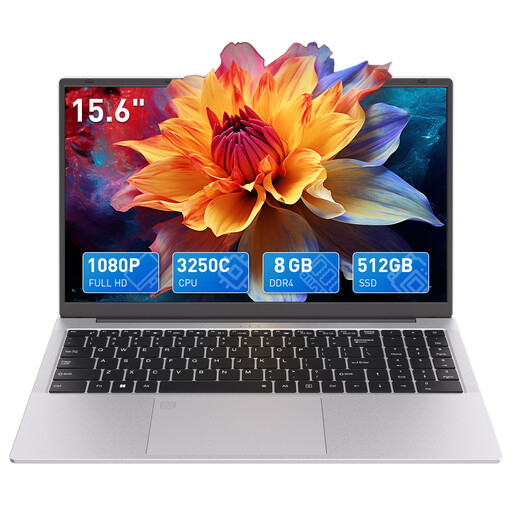
Auusda T156A laptop, AMD 3250C, 8 GB RAM, 512 GB SSD
The 15.6-inch FHD display gives you a clear screen size to consider when viewing drawings at the table.
15.6-inch display with 1920 × 1080 pixels, 8 GB DDR4 RAM and 512 GB SSD. For AutoCAD 2026 on Windows, Autodesk recommends 32 GB RAM; check the requirements of the application you actually plan to use.
View at Joybuy
Frequently asked questions
Do I need a dedicated graphics card to read PDF project drawings?
Adobe’s published system requirements for Acrobat Reader don’t specify a dedicated graphics card as a general requirement. Check for any additional requirements for the applications and project files you actually use.
Can I open a DWG file with DWG TrueView 2027 on any laptop?
No. Autodesk lists Windows 11 64-bit for DWG TrueView 2027, along with other requirements, including 8 GB RAM and 1920 × 1080 pixels. Check the software version and your exact device configuration before installing it.
How can I mark up PDF plans while reviewing them?
Adobe describes drawing and commenting tools for Acrobat. Try the mark-ups you need on a typical plan file in the application you’ll be using, and check that you can save the result in the way you need.
What should I consider when buying online and arranging after-sales service in Germany?
When buying online from a business in Germany, consumers generally have a 14-day right to cancel, starting from the day they receive the goods; statutory exceptions and possible return costs may apply. If goods are faulty, you have statutory rights against the seller. The Verbraucherzentrale distinguishes these rights from a voluntary manufacturer’s warranty, which has its own terms and conditions.


