What should you look for in a laptop for creating a puzzle book?
Start by choosing your layout software and print workflow. Then check the workspace available to you, and finally make sure the ports and included accessories work with your existing equipment.
| What matters |
What to check before buying |
Who is this especially important for? |
| Page layout and PDF output |
Check the page and frame features of your chosen software, along with its PDF export and print output. For InDesign on Windows, Adobe specifies at least 8 GB of RAM from version 21.3 and recommends 16 GB; these figures don’t automatically apply to other layout programmes. |
If I want to arrange grids and clues across several pages and check the PDF export, the entire layout process matters to me. Around 33% of consumers put designing and exporting the book first. |
| Software compatibility |
Check the programme version, operating system and processor architecture against the exact model. For Windows ARM devices, also check support for the apps and printer drivers you need. |
If I’ve already chosen particular layout software, I want to check its requirements before choosing a device. Around 27% of consumers prioritise compatibility with the software they want to use. |
| Space and portability |
Compare the laptop’s dimensions and screen area. If you already have a monitor, check that it can connect to the specific device. |
If I need space for study materials on my small desk or want to take my laptop with me, its everyday footprint matters to me. Around 20% of consumers prioritise desk space and portability. |
| Ports and included accessories |
Check that you can connect your monitor and existing accessories, and that the box includes any power adapter you need. For USB-C, check the required charging power. |
If I want to keep using my existing accessories, I want to check the ports and what’s included before buying. Around 20% of consumers pay particular attention to whether a device suits their existing workspace and accessories. |
Joybuy laptops for layout work and study
The models below include compact devices for limited workspace and larger screens for layout work at a desk. Before choosing, check that the software, ports and accessories suit your specific workflow.
 No image available
HP ZBook 8 G1i 14 Ultra 9 285H, 64 GB RAM, 1 TB SSD
If you’re looking for a compact Windows laptop for layout work with several applications open, you can assess this configuration based on its specific features.
14-inch WQXGA IPS display; Windows 11 Pro; 64 GB RAM; 1 TB SSD; HDMI 2.1; 1.43 kg.
View at Joybuy
 No image available
Microsoft Surface Laptop 7 Snapdragon X Plus, 16 GB RAM, 512 GB SSD
If you’re considering a compact Windows laptop, check that your layout software and printer are supported on this ARM model.
13.8-inch touchscreen with 2,304 × 1,536 pixels; Windows 11 Pro; Snapdragon X Plus; 16 GB RAM; 512 GB SSD; 1.34 kg. Microsoft notes that some apps and printer installations may have limitations on Windows ARM devices.
View at Joybuy
 No image available
Lenovo ThinkBook 16 Gen 9, Intel Core Ultra 5 325, 32 GB RAM, 512 GB SSD
If you mainly work at a desk and prefer a larger built-in view, compare the 16-inch format with the space available on your desk.
16-inch WUXGA IPS display with 1,920 × 1,200 pixels; Windows 11 Pro; 32 GB DDR5; 512 GB PCIe SSD; HDMI 2.1; Thunderbolt 4; 1.7 kg.
View at Joybuy
 No image available
Apple 15-Inch MacBook Air M5 (2026), 10-core CPU and GPU, 16 GB, 512 GB SSD, Midnight, German QWERTZ keyboard layout
If your layout software runs on macOS and you want a larger built-in view, check this specific display and memory configuration.
15.3-inch display with 2,880 × 1,864 pixels; 16 GB unified memory; 512 GB SSD; support for up to two external displays; 1.51 kg. According to the product description, a power adapter isn’t included; a USB-C power adapter rated at least 35 W is required separately.
View at Joybuy
 No image available
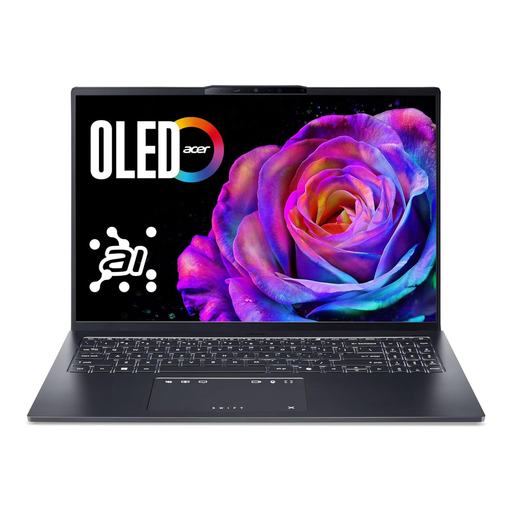
Acer Swift Go 16 OLED SFG16-73-7943, Intel Core Ultra 7 255H, 16 GB RAM, 1 TB SSD
If you prefer a larger integrated display for viewing pages, compare this 16-inch laptop with the space you have available.
16-inch WUXGA+ OLED display with 2,048 × 1,280 pixels and 120 Hz; Windows 11; 16 GB RAM; 1 TB SSD; HDMI 2.1; Thunderbolt 4; around 1.6 kg; QWERTZ keyboard.
View at Joybuy
Frequently asked questions
Do I need my own printer to create a puzzle book?
No, you don’t need your own printer to create and export a PDF. If you want to have the book printed, check the format, fonts, bleed and other PDF requirements with the print service. Adobe explains how to prepare files for print in InDesign.
What should I check when using a Windows ARM laptop with my printer?
Check that your specific printer model is supported. Microsoft notes that installing software from the printer manufacturer can cause problems on some ARM PCs, and also explains how to install a printer through Windows.
Should a new laptop sold in Germany come with a power adapter?
Devices covered by EU rules can be sold without a charger. So check what’s included and the charging power required by the specific product, rather than assuming a power adapter will be supplied.
What are my rights if my laptop is faulty or I bought it online?
For a consumer purchase, your statutory rights against the seller are separate from a voluntary guarantee. If a product is faulty, the first step may be repair or replacement. Online contracts generally come with a 14-day right to cancel. The conditions and when the period starts depend on the contract. The Verbraucherzentrale explains these differences and requirements.
Has USB-C been compulsory for every laptop sold in Germany since 2026?
No, EU requirements don’t automatically apply to every device on offer. The common charging requirements have applied to covered laptops since 28 April 2026; stock placed on the EU market before the rules came into effect can still be sold. Check the ports and charging specifications of the specific device.


