Python beginners who move between workspaces
You want to set up Python locally, put your laptop away after studying and connect devices at your desk. Check the ports on the specific model and make sure you can install the software you need.


For your first Python projects, choose a laptop that lets you install Python 3, VS Code and the Python extension; Microsoft's VS Code guide doesn't recommend a particular brand. At a shared desk, what matters is the size and ports of the specific model, and whether you can use an external monitor. If you also share the Windows laptop, separate user accounts are a good idea; sharing a desk alone doesn't mean you need them.
You want to set up Python locally, put your laptop away after studying and connect devices at your desk. Check the ports on the specific model and make sure you can install the software you need.
If there's no monitor permanently available at your shared workspace, you'll need to fit your code and learning materials on the laptop display. Weigh up screen size against desk space and portability.
You want to get started with basic exercises and only consider extra features if they suit the applications you have in mind. Compare the exact configuration rather than the top specifications in a model range.
| What matters | What to check before buying | Who is it important to? |
|---|---|---|
| Setting up Python | Check the operating system and whether you can install Python 3, an editor and the packages you need. | If I want to set up Python locally, I want to know in advance whether I can install the software I need. Around 29 % of consumers put this first. |
| Desk space and ports | Compare the laptop's dimensions and the USB-A, USB-C, HDMI and charging features you need with the connections available at your workspace. | If I connect my laptop at a shared desk and put it away afterwards, I want to avoid unnecessary unplugging and reconnecting. Around 29 % of consumers prioritise having suitable desk space and ports. |
| Specifications and cost | Compare the RAM, SSD, operating system and what's included for the exact configuration on offer. | If I'm planning to start with basic exercises, I want the specifications to match what I actually need for learning. Around 18 % of consumers put the purchase price first. |
| Portability | Consider the weight and charger for the specific model; don't assume the manufacturer's battery-life figures reflect how long it will last for you. | If I regularly take my laptop away from my desk, I want to know how much I'll have to carry when I move. Around 12 % of consumers prioritise moving between workspaces frequently. |
| Sharing a device | Only if you're sharing the laptop too: check which user accounts the operating system supports and who can set them up. | If other people use the same Windows laptop, I want to keep my settings and files separate. Around 12 % of consumers prioritise being able to share a device. |
The connector's shape alone doesn't tell you whether a port supports video output or charging. Check the features of the specific laptop port and the requirements of your monitor or dock.
Before buying, compare the port specifications for the laptop, monitor and, if applicable, dock. Depending on the connection, you may need a suitable adapter or dock.
Manufacturer specifications may refer to specific versions or state figures of “up to” a certain amount. RAM, SSD, display and operating system can vary by configuration.
Check the full model number against the details of the specific offer.
No power supply is listed as included with either the ASUS Zenbook 14 OLED UX3405CA-QL205W configuration or the Dell Pro 14 Plus PB14250 configuration mentioned here.
Check what's included and whether a power supply you already own is compatible with the configuration.
If you don't have a compatible power supply, you'll need to budget for one separately.
Separate user accounts matter when several people use the same device, not simply because they share a desk.
If you share a Windows laptop, you can set up separate accounts and sign out when you leave the workspace.
The Intel-powered ThinkPad E14 Gen 7 is one option if you need ports for devices already at your shared workspace.
HP says the OmniBook 5 range includes 14-inch and 16-inch versions to suit different amounts of desk space.
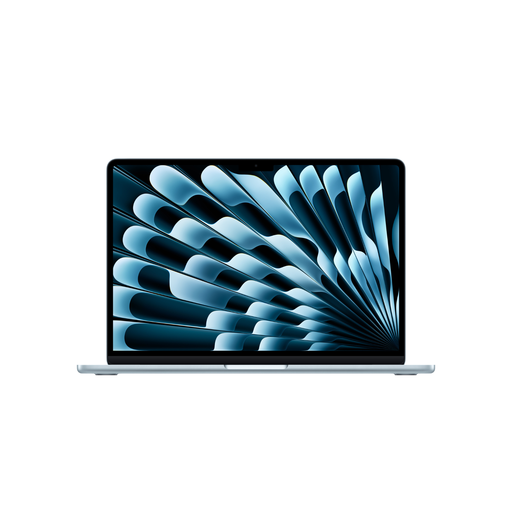
The 13-inch MacBook Air with M5 is a macOS option if its compact built-in display suits your workspace.
The Zenbook 14 OLED UX3405CA-QL205W is a specific 14-inch configuration to compare for its display, ports and what's included.
The Dell Pro 14 Plus PB14250 is a 14-inch business laptop to compare with the devices at your shared workspace.
This selection includes laptops to suit different space and connectivity needs at a shared desk, from models with larger built-in displays to more compact options.
 No image available
The 16-inch display is worth considering if you don't have an external monitor while studying.
The configuration on offer lists an AMD Ryzen 3 PRO 7335U, 16 GB DDR5, a 512 GB SSD and Windows 11 Pro Education. It also lists USB4, USB-A, HDMI and RJ-45, and a weight of 1.80 kg.
 No image available
This 14-inch version is an option if you're looking for a more compact display for a shared workspace.
The configuration lists 64 GB RAM, a 1 TB SSD and Windows 11 Professional. It also lists HDMI, USB4 and USB 3.2, a weight of 1.43 kg and a 140 W power adapter in the box.
 No image available
This 14-inch Windows configuration is one option if you want to connect existing HDMI or USB-A devices.
Specifications include an AMD Ryzen AI 7 350, 16 GB RAM, a 1 TB SSD, Windows 11 Pro and Wi-Fi 6E. The description lists USB-A and HDMI.
 No image available
The larger built-in display could suit you if you study at a shared desk without a monitor permanently available and prefer macOS.
The configuration lists a 10-core CPU, a 10-core GPU, 16 GB of memory and a 512 GB SSD. It also lists a 15.3-inch display and a weight of 1.51 kg.
The offer description says a power supply isn't included, so you'll need to buy one separately.
 No image available
The more compact MacBook Air is worth considering if you regularly put your laptop away and want to use macOS.
The configuration lists a 10-core CPU, an 8-core GPU, 16 GB of memory and a 512 GB SSD. It also lists a 13.6-inch display, a weight of 1.23 kg and two Thunderbolt 4 ports; according to the description, it supports up to two external displays.
The offer description says a power supply isn't included, so you'll need to buy one separately.
No. Microsoft's VS Code guide recommends Python 3, VS Code and the Python extension, but doesn't specify a laptop brand. Check that you can install the software you need on the operating system of the specific configuration.
Install Python 3, VS Code and the Python extension separately, then select the interpreter. The extension doesn't include Python itself.
Set up separate Windows user accounts for each person. Microsoft explains that accounts can have their own settings and documents. You should also sign out when you leave the shared workspace; if you share a desk but not the device, a separate account isn't automatically necessary.
In Germany, consumers who buy a new laptop from a retailer generally have statutory rights covering defects for two years, as the Verbraucherzentrale explains. Many online purchases also come with a 14-day withdrawal period starting from the day you receive the goods, subject to legal exceptions, as explained by the European Union's Your Europe. A voluntary manufacturer's warranty doesn't replace your statutory rights.