For handwritten PDF annotations
If you want to highlight passages or add handwritten notes directly on the page, check that the specific device is pen-compatible and whether the compatible pen is included.


If you want to write directly on document pages, consider a pen-enabled convertible or a device with a detachable keyboard and compatible pen. For typed comments, a traditional laptop may be all you need. Before buying, check the specific app, whether you can access prepared files offline and exactly what’s included in the box. A touchscreen alone doesn’t confirm pen compatibility or mean that a pen is included.
If you want to highlight passages or add handwritten notes directly on the page, check that the specific device is pen-compatible and whether the compatible pen is included.
If you only have short breaks between customer appointments, prepare your files in advance and check whether your chosen app lets you access them offline. Microsoft Support explains how to access printouts inserted into OneNote when offline.
If you mainly write short text comments, a traditional laptop with a keyboard may be all you need; a pen-enabled device isn’t essential for this type of input.
First decide whether you want to write directly on the page or mainly type your comments. Then check app compatibility, how to access prepared files offline and exactly what’s included in the box.
Suitable if: you want to switch between handwritten margin notes and longer typed entries. Lenovo describes the Yoga 7 2-in-1 Gen 10 configuration 83JR000PGE as having a touchscreen and a 360-degree design.
Consider: Lenovo lists the pen as optional for this configuration; bear the glossy display in mind when choosing where you’ll use it.
Suitable if: you mainly want to read and write in a tablet-like format, attaching a keyboard only when needed. Microsoft describes this way of working with the Surface Pro 12-inch, 1st Edition.
Consider: Microsoft lists the Surface Slim Pen and Surface Keyboard as sold separately. If you’re considering an ARM-based Windows model, check that your required apps and peripherals are compatible.
Suitable if: you mainly annotate PDF passages using a keyboard or trackpad. Apple describes the annotation tools in Preview, while ASUS lists the Vivobook 14 X1407QA as a Windows laptop with a 14-inch anti-glare display.
Consider: Handwriting directly on the displays of the laptops mentioned hasn’t been confirmed. Preview also doesn’t edit the original PDF text, and you should check that the software you need works on an ARM-based Windows device.
| Priority | What to check before buying | Who is it important to? |
|---|---|---|
| Handwritten annotations | Check pen compatibility and what’s included for the exact model; try one of your own PDF files in the app you intend to use. | If I want to write directly on a document page, I need a compatible pen and a workflow that works. Around 36% of consumers prioritise handwritten annotations above all else. |
| Getting between appointments | Consider the weight of the device with the keyboard and charger you need; set up access to prepared files when offline. | If I want to carry the device with me during short breaks and quickly access my reading list, a convenient mobile workflow matters. Around 29% of consumers put portability first. |
| Apps and files | Test the programmes you need and, where relevant, the drivers with one of your own files on the operating system you plan to use; check that everything has synced before you leave. | If my PDF files and the apps I need must work reliably together, the specific workflow is what matters. Around 21% of consumers prioritise access to apps and files. |
| Everything you need in the box | Check whether the device, compatible pen and keyboard are included if you need them; distinguish voluntary warranties from your statutory rights. | If I mainly want to make sure I have all the components I need for my preferred input method, I check what’s included. Around 14% of consumers prioritise the total cost. |
Lenovo lists the pen as optional for configuration 83JR000PGE. Microsoft also lists the Surface Slim Pen and Surface Keyboard as sold separately.
Check what’s included and whether the pen is compatible with the exact product number, rather than relying on the product family name alone.
You may need to buy a compatible pen separately for handwritten input.
A listing for a Surface Pro keyboard with Slim Pen refers to accessories and doesn’t necessarily include the Surface Pro computer itself.
Before buying, check the product category and the contents of the pack separately.
Apple distinguishes between annotating a PDF in Preview and editing its original text.
Before choosing a device, decide whether highlights and comments are enough or whether you need to change the document text itself.
The Yoga 7 2-in-1 Gen 10 configuration 83JR000PGE is worth considering if you want to combine touchscreen input with a keyboard.
The Surface Pro 12-inch, 1st Edition, is an option if you prefer a tablet-like approach to annotating, with a keyboard that attaches when needed.
The MacBook Air M5 is worth considering if you want to annotate PDFs on a traditional laptop rather than directly with a display pen.
The Vivobook 14 X1407QA is a traditional Windows laptop option for typed comments on reading lists.
The OmniBook X Flip is a convertible option for buyers considering a keyboard and different device modes.
This selection of Joybuy products features laptops with keyboards for people who mainly type comments on reading lists.
 No image available
For mainly typed comments, the built-in keyboard is a convenient input method; the listed device weight is 1,27 kg.
14-inch 3K OLED touchscreen, 16 GB RAM, 1 TB SSD and Windows 11 Home.
 No image available
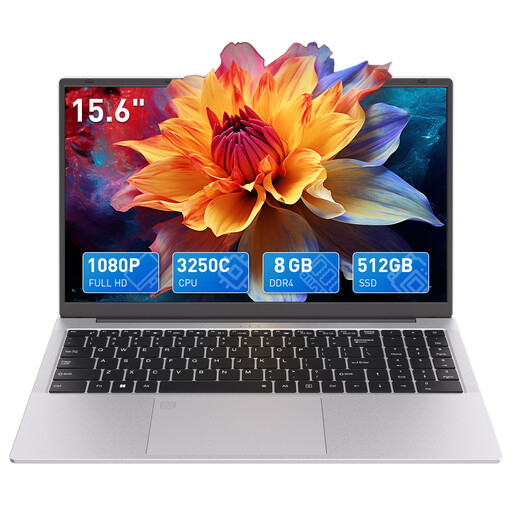
Described as a laptop with a keyboard, this device is suitable for typing comments on reading lists; the listed screen size is 15.6 inches.
FHD display, 8 GB DDR4 RAM and 512 GB SSD. The product name states that a wired mouse is included.
Microsoft Support explains that content printed to OneNote can then be accessed offline. Set up the files you need before your appointment and check that they’ve synced; this doesn’t apply to every annotation app.
No. Apple distinguishes between annotating a PDF and editing its original text; you can keep annotations when saving.
For consumer purchases in Germany, your statutory rights for faulty goods apply against the seller; these are separate from any voluntary guarantee. What additional consumer rights apply depends on the specific type of purchase contract. The Verbraucherzentrale explains the difference between statutory rights and a guarantee.
A 14-day right to cancel generally applies to the distance sales covered by EU consumer information. Don’t assume this applies without checking when buying as a business for business purposes.
Appropriate technical and organisational safeguards are important. The Federal Commissioner for Data Protection and Freedom of Information lists encryption as an important measure for mobile devices; whether your reading list contains personal data depends on its contents.