A standard laptop is usually all you need for reading and typing, as long as its display, keyboard and software suit the way you work; you don’t need a touchscreen for this. A convertible is worth considering if you want to write directly on the screen, while a Chromebook is only suitable if your files and apps work offline too. For longer writing sessions, make sure you have a suitable table: the German Social Accident Insurance advises against working on a laptop on your lap for extended periods.
Which device is right for you?
For reading digital chapters
If you switch between a chapter and your notes while summarising, look for a screen that’s easy to read and a comfortable working position. The German Social Accident Insurance and the IT Service Centre at the University of Kassel identify workspace and portability as important factors when choosing a device.
For frequent writers on the go
For longer summaries, a keyboard that suits you and a usable table matter just as much as the laptop’s weight when you’re travelling. The German Social Accident Insurance recommends using additional input devices for longer work sessions and, where possible, an external monitor.
For offline work or stylus use
If you need to work without reliable hotel Wi-Fi or want to annotate directly on the screen, check that the specific apps, files and stylus you need are supported. Google explains how to access certain Drive files offline once they’ve been prepared; this doesn’t mean every app will work offline.
What should you look for when buying?
First, check that your software runs on the operating system. Then you can choose a display, input method and offline access to suit the way you’ll work in your hotel.
| What you need |
What to check when buying |
Who is this important to? |
| Reading chapters and notes |
Screen size, resolution and whether the specific model has a matte or glossy finish; space on the table for your materials. |
If I want to use a chapter and my notes side by side, I need to be able to read both comfortably. Around 33% of consumers put usable screen space first. |
| Typing longer texts |
The keyboard layout of the exact variant, as well as space and ports for a keyboard or mouse you may bring with you. |
When writing a longer summary, key layout and a comfortable working position matter to me. Around 27% of consumers prioritise typing comfort. |
| Working without reliable Wi-Fi |
File format and required software; test offline access to the specific files before you travel. |
If the hotel connection drops out, I still want to be able to use my chapter and writing tool. Around 20% of consumers focus mainly on offline access and software availability. |
| Portability and workspace |
The weight and dimensions of the variant, access to a power socket and table space; room for additional input devices during longer sessions. |
When travelling, I want a device that’s easy to carry and practical to set up in my room. Around 20% of consumers prioritise portability and workspace. |
The percentages shown refer to the main priority in each case within this selection context. For longer work sessions, the German Social Accident Insurance advises using external input devices where possible and working in a suitable workspace.
Avoid common buying mistakes
-
Choosing based only on screen size
The screen’s aspect ratio, resolution and matte or glossy finish all affect how easily you can read chapters and notes in the lighting in your room.
Compare the screen specifications for the exact model variant and consider whether you want to see your chapter and notes at the same time.
-
Assuming a touchscreen comes with a stylus
A touchscreen doesn’t necessarily mean a stylus is included or that it supports the stylus input you need.
If you want to make handwritten annotations, check stylus compatibility and what’s included with the exact product code.
If a suitable stylus isn’t included, you’ll need to budget for a compatible input device separately.
-
Waiting until you’re at the hotel to test offline access
On supported Chromebook files, offline access and files need to be set up in advance; some apps won’t work without an internet connection.
Before you leave, try opening your chapter and notes without an internet connection, then check whether you can sync any changes afterwards.
-
Assuming a lightweight device is a substitute for a suitable workspace
The German Social Accident Insurance advises against working on a laptop on your lap for extended periods.
Check whether there’s a usable table and plan to do longer writing sessions there.
For longer sessions, an external keyboard or mouse and a suitable workspace may take up extra room in your luggage or hotel room.
Brands and models to consider
Lenovo
The IdeaPad Slim 3 14, product code 82XN009QGE, is a standard Windows laptop for reading and typing.
- For this model, Lenovo Germany lists a matte 14-inch FHD IPS display, a backlit German keyboard, 16 GB of soldered RAM and a 512-GB SSD.
- The display is specifically not a touchscreen. These details apply to the product code listed, not automatically to other configurations in the range.
Acer
The Swift Go 14 SFG14-71, reference NX.KMZEG.006, is a portable Windows model with a 16:10 display.
- For this variant, Acer Store Germany lists a 14-inch OLED display with a resolution of 2880 × 1800 pixels, a German keyboard layout and a weight of 1.25 kg.
- Acer describes the display as glossy. The stated maximum battery life isn’t specific to summarising a chapter in a hotel.
HP
The OmniBook 5 Flip 14-fp0750ng is a convertible designed for direct use on the touchscreen.
- For this model, HP lists a 14-inch touchscreen with a resolution of 1920 × 1200 pixels, a 360-degree hinge, 16 GB of RAM and a 512-GB SSD.
- A touchscreen alone doesn’t tell you whether a stylus is included. If you want to write by hand, check stylus compatibility and what comes with the specific variant.
Apple
The 13-inch MacBook Air with M5 is a compact macOS alternative, provided the software you need runs on it.
- Apple lists a 13.6-inch display with a resolution of 2560 × 1664 pixels and two Thunderbolt 4 ports for this model.
- The stated battery life is based on video streaming or wireless web browsing, not a writing session in a hotel. If you already have any peripherals, also check whether you need a suitable port.
Joybuy products for reading and writing
This selection includes standard Windows laptops and touchscreen convertibles for reading and writing at a hotel desk.
 No image available
HP OmniBook Ultra Flip 14-fh0670ng, 2-in-1
Worth considering if you want to use a touchscreen when working with chapters and notes.
14-inch 2.8K OLED touchscreen, Intel Core Ultra 7 258V, 32 GB RAM, 1 TB SSD and Windows 11 Home.
Joybuy
 No image available
Ninkear YBook15, 2-in-1
An option if you want touchscreen controls as well as a keyboard for longer texts.
15.6-inch FHD IPS touchscreen, 360-degree rotation, 8 GB DDR4 RAM and 512 GB SSD.
Joybuy
 No image available
Ninkear A15 Pro
A standard Windows option if you’ll mainly be working on the keyboard at your hotel desk.
15.6-inch FHD IPS display, Windows 11, 16 GB DDR4 RAM and 512 GB SSD; the stated weight is 1.6 kg.
Joybuy
 No image available
HONOR MagicBook X16 AMD 2025, German keyboard
The 16-inch display may suit you if you want more screen space for reading and writing.
16-inch display, AMD R5 6600H, 16 GB RAM and 512 GB SSD; the product name specifies a German keyboard.
Joybuy
 No image available
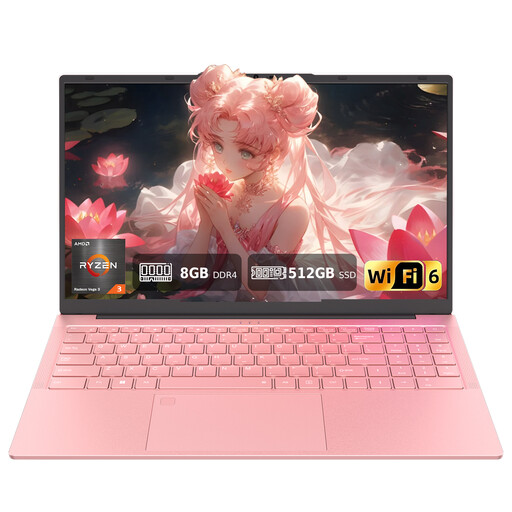
Auusda T156A
A possible choice if you want to read chapters on the screen and type on the backlit keyboard.
15.6-inch FHD display, AMD 3250C, 8 GB DDR4 RAM and 512 GB SSD. The description specifies a US QWERTY layout; check the key layout if you’re used to German QWERTZ.
Joybuy
Frequently asked questions
Is a small laptop enough for writing a longer summary in a hotel?
A compact workspace may be fine for short tasks. For longer writing sessions, make sure you have a table and a comfortable sitting position, and use external input devices if needed; the German Social Accident Insurance advises against working on a laptop on your lap for extended periods. This doesn’t mean there’s a general requirement to choose a particular screen size.
Can I carry on writing on a Chromebook without hotel Wi-Fi?
This can work with supported Google Drive files if you set up offline access in advance and make sure the relevant files are actually available offline. Google notes that some apps don’t work offline. So, before you travel, test your chapter file and writing app without an internet connection.
Do I need a touchscreen or stylus to write text summaries?
No. A touchscreen isn’t essential if you’ll mainly be typing your summaries. A convertible may be useful if you want to make handwritten notes on the screen. Check separately whether the specific model supports the stylus you want and whether it’s included.
What are my rights when buying a laptop online from a trader?
According to consumer information from the European Union, you generally have 14 days to cancel a standard distance purchase, starting from the date of delivery; exceptions and possible return costs should be taken into account. The same information states that faulty goods are covered by a statutory guarantee for at least two years from receipt. This is separate from any additional warranty offered. The same rules don’t apply to purchases from private sellers.


