If you want to handwrite notes directly in the margins of research PDFs, choose a device that explicitly supports a compatible stylus. For longer typed extracts, a built-in keyboard is usually the better fit. Before buying, check what’s included with the specific configuration, whether it’s compatible with your PDF software, and whether files are available locally without an internet connection. Train Wi-Fi and cloud syncing are no substitute for downloaded PDFs, and manufacturers’ battery-life claims aren’t a measure of how long your own PDF workflow will last.
Which type of input is right for you?
For handwritten annotations
If you write directly in the margins of PDFs, check that the specific device model is compatible with a stylus. A touchscreen alone doesn’t guarantee that it supports the stylus you want to use. Microsoft and Lenovo specify stylus support for certain devices or configurations; the stylus may be sold separately.
For researchers working offline on the move
If you want to work on papers when your connection varies, make sure the files are available locally before you travel, then check that they sync afterwards. Deutsche Bahn notes that reception can be unreliable, while Zotero distinguishes between library data and attached files.
For typing up research notes
If you write longer extracts, consider the keyboard, screen size and compatibility with the software you need as a whole. With a detachable 2-in-1 such as the Surface Pro, a compatible keyboard is a separate accessory, so check whether it’s included with the specific offer.
What should you look for when buying?
Detachable 2-in-1 with stylus
A good fit if: you mainly make handwritten annotations and want to hold the device without its keyboard.
Consider: the stylus and keyboard may need to be bought separately. With ARM-based Windows, check that your specialist software and peripherals are compatible. Microsoft outlines some potential compatibility limitations.
Convertible with a 360-degree hinge
A good fit if: you switch between handwritten annotations and longer typed notes, and want to keep the keyboard attached to the device.
Consider: the keyboard stays attached when folded back, so check the weight and available space at your seat too. The stylus for the Lenovo Yoga 7 2-in-1 Gen 10 is optional and sold separately.
Traditional laptop
A good fit if: you mainly read papers, highlight passages and type longer notes, rather than relying on handwritten input.
Consider: don’t assume that touch support means the device works with a compatible stylus. Also check that your PDF software can save annotations and open files offline.
| What matters when buying |
What should you check? |
Who is this especially important for? |
| Handwritten PDF annotations |
Check stylus compatibility for the exact configuration and what’s included. |
If I write formulae or notes in the margins directly on PDF pages, I need a stylus that’s confirmed to be compatible. Around 26% of consumers rank handwritten annotation as their top priority. |
| Working offline |
Open the PDFs you need locally before travelling and test syncing with a sample annotation. |
If you want to work on papers when your connection is unreliable, make sure the files are available locally first. Around 21% of consumers prioritise offline access. |
| Using your device at your seat |
Compare the weight, including any accessories you need, with the available space and seating. |
If I want to use my device in a cramped space or at a seat that may change, the right form factor for my train journey matters. Around 21% of consumers put ease of use at their seat first. |
| Reading PDF pages |
View a typical research PDF at your preferred zoom level and check the display specifications for the exact configuration. |
If you want to read dense pages in your usual lighting and available space, consider the display format and possible reflections. Around 16% of consumers prioritise PDF readability. |
| Typing longer extracts |
Check the keyboard and the PDF, reference management and institutional software you need on the specific platform. |
If I type longer notes, the keyboard and my own software workflow matter more than handwritten input. Around 16% of consumers put longer typing sessions first. |
Common misconceptions
-
Assuming a touchscreen guarantees stylus compatibility
A touchscreen specification doesn’t prove that a particular stylus will work with the device. Check which stylus models are approved and what’s included with the exact configuration.
When checking accessories, factor in a stylus sold separately and, if needed, a compatible keyboard.
-
Assuming a cloud library is fully available offline
Zotero syncs library data and attached PDF files separately. Open the PDFs you need locally before travelling, save a sample annotation and then check that it syncs.
If you need more storage than is available, you may need extra storage space or a suitable storage plan.
-
Treating manufacturers’ battery-life claims as guaranteed annotation time
Microsoft gives different maximum battery-life figures for local video playback and active web use on a Surface Pro for Business model. These tests don’t measure how long you can spend working on your PDFs.
Compare the test methods and the exact configuration, then check battery life with your usual PDF workflow.
Relevant brands and product ranges
Microsoft
The 1st Edition 12-inch Surface Pro is a detachable Windows 2-in-1 for handwritten PDF work, with an optional attachable keyboard.
- Microsoft specifies Slim Pen input and a compatible keyboard.
- Check whether the stylus and keyboard are included with the specific offer. For the ARM platform, check that the specialist software and peripherals you need are compatible.
Lenovo
The Yoga 7 2-in-1 Gen 10 (14-inch, AMD) switches between laptop and tablet modes.
- Lenovo specifies a 360-degree hinge and an optional Yoga Pen.
- For configuration 83JR000PGE, Lenovo specifies a glossy display; the stylus is sold separately. These details don’t automatically apply to other configurations.
ASUS
The Vivobook S14 Flip TP5408 is a 14-inch convertible with manufacturer-specified stylus support.
- ASUS describes a 360-degree hinge and support for the ASUS Pen 3.0.
- Check the exact configuration and whether the stylus is included with the offer.
HP
The ENVY x360 14-FA0000 range has a fold-back keyboard in a 2-in-1 design.
- This range is worth considering if you want a keyboard that stays attached to the device.
- HP notes that components and features vary by configuration and region. Check stylus compatibility and what’s included with the specific offer.
Dell
The Inspiron 14 2-in-1 7440 is a convertible for keyboard work and touchscreen use.
- For the configuration shown, Dell specifies a 14-inch touchscreen with a resolution of 1,920 × 1,200 pixels and 16 GB RAM.
- The touchscreen specification alone doesn’t confirm compatibility with a stylus. Check the features of the configuration actually on offer.
Joybuy product selection
This selection includes traditional laptops for locally stored papers and longer typing sessions, as well as Surface Pro devices in tablet or 2-in-1 form. For Surface models, check stylus compatibility and suitable accessories separately for the specific configuration.
 No image available
Lenovo Yoga Slim 7i Aura Edition, 14-inch, 2.8K OLED, Core Ultra 7 355, 16 GB/1 TB SSD
This traditional laptop is a good fit for typed extracts and locally stored papers; stylus input isn’t assumed.
14-inch OLED display with 2.8K resolution and 120 Hz; 16 GB RAM; 1 TB SSD; Windows 11; German keyboard layout; stated weight: 1.14 kg.
View at Joybuy
 No image available
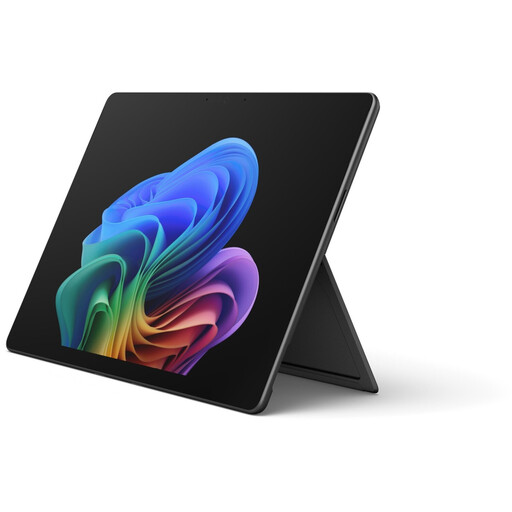
Microsoft Surface Pro 12, Core Ultra 5, 16 GB/512 GB SSD
The touchscreen tablet format may suit browsing PDF pages. Before buying, check that your preferred stylus and keyboard are compatible with this exact configuration and included in the box.
Windows 11; touchscreen; 16 GB RAM; 512 GB SSD.
View at Joybuy
 No image available
Microsoft Surface Pro 12, Snapdragon Plus, 24 GB/1 TB SSD
The lightweight tablet format may be handy for using at your seat while travelling; check stylus compatibility and accessories separately for this exact configuration.
12-inch touchscreen with a resolution of 2,196 × 1,464 pixels; 24 GB RAM; 1 TB SSD; stated weight: 686 g.
View at Joybuy
 No image available
Microsoft Surface Pro 11 for Business, 13-inch OLED, Core Ultra 7 266V, 16 GB/512 GB SSD
The 2-in-1 tablet format with adjustable kickstand may suit working on PDFs at your seat. Check the stylus and keyboard included with the specific configuration.
13-inch OLED touchscreen with a resolution of 2,880 × 1,920 pixels; 16 GB RAM; 512 GB SSD; stated weight: 0.872 kg.
View at Joybuy
 No image available
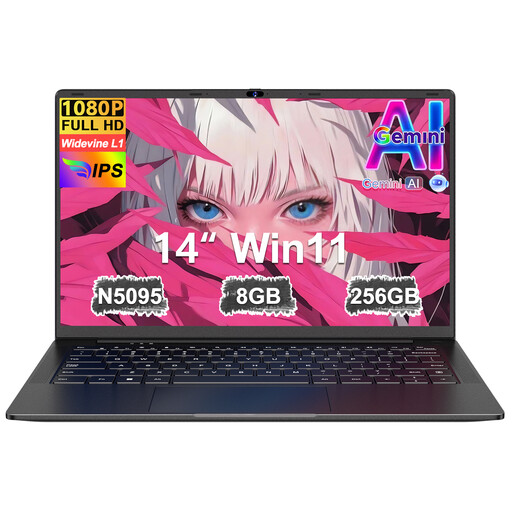
Ruzava 14-inch laptop, N5095, 8 GB RAM/256 GB SSD
Described as a laptop for travel and locally stored research PDFs; the product name doesn’t specify touch or stylus input.
14-inch FHD display; N5095 processor up to 2.9 GHz; 8 GB RAM; 256 GB SSD, expandable to 1 TB.
View at Joybuy
Frequently asked questions
Do I need a stylus to annotate PDFs on my laptop?
Only if you want to write by hand on PDF pages. You don’t need a stylus for typed notes. If you do want one, check the explicitly stated compatibility and what’s included with the specific configuration.
How should I set up my reference library before travelling by train?
Open the PDFs you need locally before setting off and test that an annotation is saved. Zotero distinguishes between library data and attached files; check file syncing if you need your PDFs on multiple devices.
Are train Wi-Fi and the stated battery life enough?
Plan to work on your PDFs without a continuous connection: Deutsche Bahn notes that reception can be unreliable. Compare battery figures only alongside the manufacturer’s test method, and try your own PDF workflow. This won’t give you a guaranteed battery life for your journey.
What accessory costs and consumer rights should I consider when buying?
Check whether the stylus, keyboard and any charging accessories you need are included with the specific offer. According to information from the European Union, goods bought from a trader come with a legal minimum guarantee of two years from receipt. This is separate from a voluntary manufacturer’s warranty. Online purchases generally come with a 14-day right to cancel, although exceptions apply.


