Which approach is right for you?

Website developers

If you write code and gardening content, use an editor and browser side by side, and check layouts at different widths, look at software compatibility, screen space and the specification of the exact configuration. Microsoft publishes its own requirements for Visual Studio Code, while Google describes device mode in Chrome DevTools as an approximation.

Mobile website editors

If you edit content in different locations, weigh screen size and ports against portability and charging options. Apple specifies a minimum charging power of 30 W for the MacBook Air M5 described here; Notebookcheck lists compact laptop configurations as examples of this device category.

Layout and image editors

If you review images and mainly assess page layouts at a desk, compare the built-in screen area with your preferred window arrangement and check whether you can connect an external monitor. The Apple and HP configurations documented here differ in several ways, including screen size.

What should you look for when buying?

Compact macOS laptop

A good fit if: You want to use macOS and often work on your website in different locations.

The trade-off: A smaller built-in display leaves less room for tools side by side, so check how your peripherals will connect.

Windows business laptop

A good fit if: You prefer Windows, or place more importance on the screen, keyboard and ports for a permanent workstation.

The trade-off: Specifications and what’s included vary by configuration. Check the operating system, power adapter and ports for the specific offer.

Buying priority What to check Who is it important to?
Development workflow Check the operating system and development tools, as well as the RAM and SSD in the exact configuration. If I use an editor, project and browser at the same time, I want the specification to suit the way I actually work. Around 36% of consumers prioritise their development workflow.
Responsive layouts Compare screen size and resolution, and check the ports for connecting an existing external monitor. Test important pages on a real mobile device too. If I want to see code and a preview side by side, available screen space is key. Around 29% of consumers put checking responsive layouts first.
Portability and power Check the dimensions, required charging power and whether a suitable power adapter is included. If I look after gardening content in different locations, I want to plan for the laptop and charging options. Around 21% of consumers prioritise portability and power.
Total cost and service Check the operating system, power adapter and service terms for the specific offer; distinguish between personal and business purchases. If I want to know what set-up and accessories I’ll need before buying, I check everything included in the box. Around 14% of consumers put total cost and service terms first.

Avoiding buying pitfalls

  • Assuming a browser preview is a full device test

    Google says that device mode in Chrome DevTools does not reproduce every feature of a real mobile device.

    After checking the desktop preview, test important pages on a real mobile device too.

  • Assuming the model name tells you the operating system and what’s included

    The documented HP A23HLEA#ABD configuration is listed with FreeDOS; the documented Dell PC14250 offer does not include a charger. These details apply to the specific configurations.

    Before buying, check the operating system and what’s included with the specific offer.

    Depending on the offer, installing an operating system or buying a suitable power adapter may mean extra set-up work.

  • Confusing the manufacturer’s service with your statutory rights

    A manufacturer’s voluntary service does not replace your statutory rights against the seller when you make a consumer purchase.

    Check whether you’re buying as a private individual or a business, and read the service terms separately from your statutory rights.

Key brands at a glance

Apple

The documented 13-inch MacBook Air M5 is a compact macOS option.

  • For the base configuration described, Apple specifies 16 GB of unified memory, a 512 GB SSD and two Thunderbolt 4 ports.
  • Check that the ports suit your peripherals and that the display offers enough space for your workflow.

Lenovo

The ThinkPad E14 Gen 7, in the documented 21SXCTO1WWDE5 configuration, is a 14-inch Windows business laptop.

  • For this configuration, Lenovo specifies 16 GB RAM, a 512 GB SSD and a matt IPS display.
  • The listed depot or send-in service should be distinguished from statutory consumer protection.

Dell

The Dell Pro 14 PC14250 is a configurable Windows business laptop range.

  • The documented configuration lists 16 GB RAM, a 512 GB SSD and an IPS display with a resolution of 1,920 × 1,200 pixels.
  • No charger is listed for the specific offer described, so check what’s included with the configuration you choose.

HP

The ProBook 460 G11 is an example of a 16-inch configuration for layout work mainly done at a desk.

  • For the A23HLEA#ABD configuration, HP specifies 16 GB RAM and a 1 TB SSD.
  • This configuration is listed with FreeDOS; don’t assume the same applies to other configurations.

ASUS

The Zenbook S14 is an example of a compact Windows laptop.

  • For the UX5406SA-PV530W configuration, Notebookcheck describes a 14-inch OLED display, 32 GB RAM and a 1 TB SSD.
  • Battery life quoted in a review may not reflect what to expect when developing websites.

Joybuy products for website work

The following 16-inch Windows laptops are options for code and layout work mainly done at a desk. Compare the specification and what’s included with each configuration.
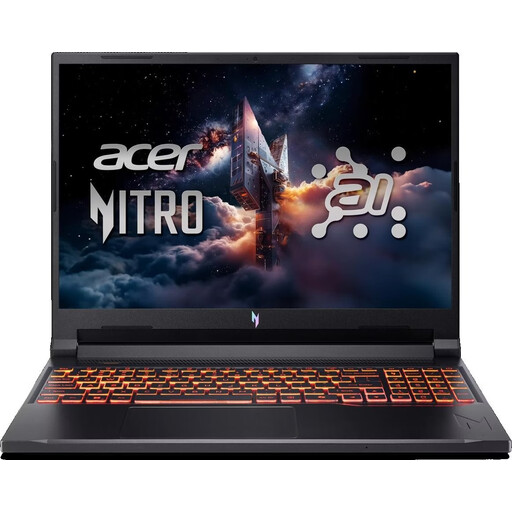
Acer Nitro V 16 AI ANV16-42-R1PE

Acer Nitro V 16 AI (ANV16-42-R1PE)

The 16-inch display gives you built-in screen space for desk-based layout work.

16-inch WUXGA IPS display, AMD Ryzen 5 240, NVIDIA GeForce RTX 5050 8GB, 16GB DDR5, 512GB SSD, Windows 11 Home, USB-C 4 and HDMI.

View at Joybuy

Lenovo ThinkPad E16 Gen 3 21ST

Lenovo ThinkPad E16 Gen 3 21ST

The 16-inch display is an option if you want more built-in screen space for editing layouts at a permanent workstation.

16-inch WUXGA IPS display, AMD Ryzen 7 250, Radeon 780M, 32 GB RAM, 1 TB SSD, Windows 11 Pro, HDMI 2.1, USB4-C and 65 W USB-C power adapter.

View at Joybuy

Lenovo ThinkBook 16 Gen 9

Lenovo ThinkBook 16 Gen 9

The 16-inch display and listed ports are worth considering if you’re weighing up screen space and monitor connections for your desk.

16-inch WUXGA IPS display, Intel Core Ultra 5 325, 32 GB DDR5, 512 GB PCIe SSD, Windows 11 Pro, HDMI 2.1, Thunderbolt 4 and USB 4.0.

View at Joybuy

MSI Prestige N16 Flip AI+ C1XMT-027Y

MSI Prestige N16 Flip AI+ C1XMT-027Y

The 16-inch 2-in-1 design is an option if you’re looking for a larger display and a versatile form factor.

16-inch, 2-in-1, Windows 11 Pro, 128 GB DDR5, 2 TB SSD and QWERTZ keyboard.

View at Joybuy

16-inch laptop with FHD display

16-inch laptop with FHD display

The 16-inch display is useful if you want more built-in screen space for working on code and layout previews.

16-inch FHD display, Intel Core i5-8210Y, 16 GB RAM, 512 GB SSD, Windows 11 Pro and RJ45 port.

View at Joybuy

Frequently asked questions

Is browser device mode enough to test a responsive layout?

No, not on its own. Chrome DevTools simulates factors such as viewport widths, CPU performance and network conditions. Google describes device mode as an approximation, so test important pages on a real mobile device too.

Which software should I check before working on a website?

If you want to work locally with Visual Studio Code, first check that your version of Windows, macOS or Linux is supported. Microsoft’s recommendations for the editor are not minimum requirements for your entire website workflow.

Can I use any USB-C power adapter with a laptop?

Check the required charging power and what’s included with the specific device. Apple specifies a minimum of 30 W for charging the 13-inch MacBook Air M5 described here; having a USB-C port alone doesn’t mean an existing adapter will be suitable.

What are the rules on returns and faults when buying online in Germany?

For eligible consumer purchases, online orders can generally be cancelled within 14 days of receipt; you must notify the seller that you wish to cancel. You also have statutory rights against the seller for faulty goods, with a minimum period of two years. These consumer rights do not necessarily apply to business purchases.

Do the EU’s common charger requirements also apply to laptops?

Yes. The European Commission gives 28 April 2026 as the date the common charging requirements start applying to laptops. This does not mean older devices have been retrofitted or that every offer includes a power adapter, so check the details for the specific product.