For lengthy contract pages or comparing several documents, a larger display may be worth considering: ASUS lists an anti-glare 16-inch display with a resolution of 1920 × 1200 pixels for certain Vivobook 16 variants. If space on your kitchen table is limited, a more compact device may fit your workspace better. Before buying, check that your particular PDF, commenting or signing software runs on the operating system. For confidential files, the Federal Office for Information Security recommends encryption, updates and backups.
Who is a laptop for reviewing contracts suitable for?
Readers dealing with lengthy contracts
If you read long PDFs or keep a contract and your notes open side by side, the usable screen space and distracting reflections at your chosen table spot are important factors to consider. ASUS Germany and Lenovo PSREF document display options for specific laptop models.
Users of existing contract software
If you want to keep using a particular programme to comment on, compare or sign documents, check its operating system and file compatibility before choosing a laptop. Apple lists the technical specifications for MacBook Air models with M5; what matters is whether your application supports the workflow you need.
Reviewers handling confidential documents
If you store sensitive contract files or use a computer that others can access, you should plan for encryption, regular updates and backups. The Federal Office for Information Security explains these measures for protecting digital data.
What should you consider when choosing one?
Consider the display, software compatibility and protection for stored files together, so your laptop suits both your workspace and the way you work with contracts.
| Consideration |
What to check before buying |
Who is this particularly relevant to? |
| Reading and comparing contracts |
Screen size, native resolution and screen finish for the specific variant; consider reflections where you plan to sit. |
If I read lengthy pages or need a contract and notes side by side, usable screen space matters to me. Around 31% of consumers put reading space first. |
| Continuing to use software and files |
Check the system requirements for your programmes, supported file formats and the ports you need. |
If I comment on, compare or sign documents using a particular application, I want to keep my existing workflow. Around 25% of consumers prioritise compatibility with the software they already use. |
| Protecting confidential contract files |
Plan for encryption, regular system and software updates, and backups that you can restore. |
If my contract files are sensitive, I want to protect them and be able to recover them if my device is lost or damaged. Around 19% of consumers put data protection and backups first. |
| Desk space and moving your laptop |
Compare the dimensions, weight and ports you actually need for the complete model variant. |
If the kitchen table is used for other things too, I want to be able to set up and put away my laptop easily. Around 13% of consumers prioritise desk space and portability. |
| Total cost of your workflow |
Factor in any software and adapters you may need; distinguish statutory consumer rights from a voluntary guarantee. |
If I’m looking for a complete setup that’s ready to use, I only want to pay for equipment and accessories I actually need. Around 12% of consumers focus primarily on the total cost. |
Which buying decisions could come back to bite you?
-
Choosing a glossy display based on its image quality alone
Reflections can make it harder to read at the kitchen table. PC-WELT noted this during a test of the Acer Swift 16 AI SF16-71T; the finding doesn’t automatically apply to other models.
Check the screen finish and lighting where you plan to sit, rather than applying the test results for one device to an entire product range.
-
Assuming a product range name tells you what’s included
Keyboard layouts and other features can vary within a product range. According to Lenovo PSREF, the documented ThinkPad E14 Gen 7 configuration 21T00050MB has a Belgian keyboard.
Compare the full model number, as well as the keyboard, display, operating system and ports of the specific variant on offer.
-
Confusing a voluntary guarantee with your statutory rights
The Verbraucherzentrale distinguishes between your statutory rights against the seller and a voluntary guarantee.
If something is faulty, check your statutory rights first and read the specific terms of any additional guarantee offers.
Additional guarantee offers may come with their own costs and conditions.
Which brands are worth considering?
Lenovo
ThinkPad E14 configurations offer a point of reference for compact Windows laptops with a choice of display and port options.
- For one specific ThinkPad E14 Gen 7 variant, Lenovo PSREF lists a 14-inch WUXGA display with an anti-glare finish.
- Keyboard layout and specifications vary by full model number; the documented 21T00050MB variant has a Belgian keyboard.
ASUS
The Vivobook 16 is worth considering if you’d like to compare a larger display with that of a compact device for use at the table.
- For both the M1605NAQ-MB077W and M1605NAQ-MB216W variants, ASUS Germany lists an anti-glare 16-inch WUXGA display with a resolution of 1920 × 1200 pixels.
- These specifications apply to these variants and don’t support general claims about other Vivobook models.
Apple
The MacBook Air with M5 is available with macOS and a 13- or 15-inch display, provided it runs the programmes you need.
- Apple lists two Thunderbolt 4 ports for the 13-inch model.
- Check that your specific software is compatible and whether your existing devices need an adapter. Apple’s battery life figures apply to particular types of use.
HP
The HP Laptop 15-fd0058ng is an example of a specific Windows configuration with a 15.6-inch display.
- For this model, HP lists an FHD display with a resolution of 1920 × 1080 pixels and a webcam privacy shutter.
- These specifications apply to model 15-fd0058ng and shouldn’t be assumed to apply to other HP laptops.
Acer
The Swift 16 AI SF16-71T is worth considering if you’re weighing up image quality and potential reflections on a larger display.
- In its review of this model, PC-WELT highlighted the OLED display and battery life.
- PC-WELT noted reflections on the glossy display; this review finding applies to this model, not other Acer laptops.
Laptops for reviewing contracts at Joybuy
The Joybuy options below include compact and larger Windows laptops for reading contract pages at the table.
 No image available
HP OmniBook Ultra 14-kd0072ngx
This 14-inch variant may suit you if you’re looking for a more compact display for the kitchen table and use Windows.
14 inches, 3K, Intel Core Ultra 7 356H, 16 GB RAM, 1 TB SSD and Windows 11 Home.
View at Joybuy
 No image available
Dell Pro 14 Essential PV14255 Copilot+ PC
This 14-inch variant is a compact Windows option. Check beforehand that your contract software runs on the operating system.
AMD Ryzen AI 7 350, 16 GB RAM, 1 TB SSD, Full HD+ and Windows 11 Pro; Wi-Fi 6E is listed.
View at Joybuy
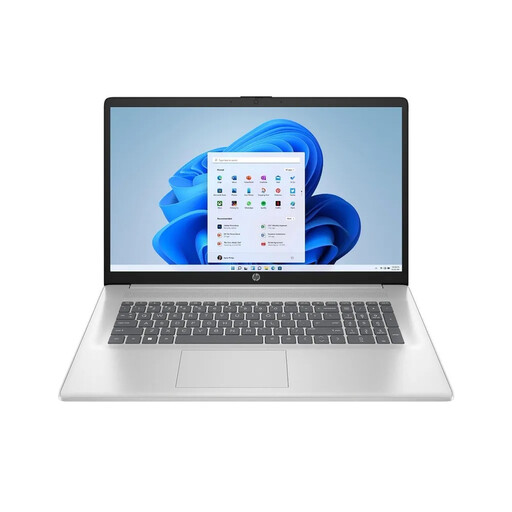 No image available
HP Laptop 17-cp3770ng
The larger display may be useful for reading lengthy contract pages, provided you have enough space on your kitchen table.
17.3 inches, Full HD IPS, AMD Ryzen 7 7730U, 16 GB RAM, 512 GB SSD and Windows 11 Home.
View at Joybuy
 No image available
Ninkear A15 Pro, 15.6 inches, 16 GB RAM, 512 GB SSD
This 15.6-inch configuration is a larger Windows option for reading contract pages at the table.
Full HD IPS, 16 GB DDR4, 512 GB SSD, Windows 11 and a 55.4 Wh battery.
View at Joybuy
 No image available
Ninkear A15 Pro, 16 inches, 16 GB RAM, 1 TB SSD
The 16-inch variant has a larger screen than the 15.6-inch configuration also listed, so it needs more desk space.
FHD display, 16 GB DDR4, 1 TB SSD, Windows 11 and 65 W charging are listed.
View at Joybuy
Frequently asked questions
Do I need an electronic signature feature to review a contract?
Simply reading or reviewing a contract doesn’t, in itself, mean you need a signature feature. If a statutory written form requirement is to be replaced by an electronic form, Section 126a of the German Civil Code (BGB) specifies a qualified electronic signature; whether that is possible or required for a particular contract depends on the type of contract. A laptop alone can’t determine which form is required.
How can I protect stored contract files?
Enable automatic updates where available, check that confidential files are encrypted and set up backups that you know how to restore. The Federal Office for Information Security recommends these measures; they aren’t a general legal requirement for laptop equipment.
Are a manufacturer’s guarantee and statutory consumer rights the same thing?
No. The Verbraucherzentrale distinguishes between your statutory rights against the seller and a voluntary guarantee. If something is faulty, you should first ask for it to be put right; assess any additional guarantee offers according to their own terms.
Can I return a laptop bought online after trying it out?
When you buy online as a consumer, you generally have a right to cancel, usually within 14 days of receiving the goods. You must notify the retailer that you wish to cancel; any exceptions or consequences of using the item should be checked separately in each case. This overview from the Verbraucherzentrale concerns the right to cancel and doesn’t replace checking what rights you may have if the goods are faulty.


