Choose a laptop to suit your graphics software and the file formats you use for designs and patterns. Then check the memory, display and whether it can print patterns to scale. A standard notebook may be all you need for vector designs, while large raster files or sketching directly on screen call for different features. A wide display colour gamut alone does not guarantee that colours will match the printed fabric.
Which laptop is right for you?
Designers working with lots of layers
Working on names, appliqués and illustrations separately makes it easier to edit individual elements. With large raster files, the memory available to the software you use becomes particularly important. Krita explains how to work with layers and masks.
DIY enthusiasts using patterns
If you need to transfer pattern pieces onto paper, the file format and printing at the specified scale are key. Snaply Magazin and Pattydoo show examples of patterns where you need to check the print format and scale.
Colour planners and fans of digital sketching
If you’re matching design colours to fabric, consider the entire colour workflow. If you want to sketch directly on screen, touch and pen support on the specific laptop model are essential.
What should you look for when buying?
Start by checking your software and file formats, then look for the right features for working with layers, printing, colour management or direct input on the display.
| What you need |
What to check before buying |
Who is it important to? |
| Working with layered designs |
The software you use and file sizes, plus the memory and available SSD storage in the specific configuration. For Photoshop 27.x, Adobe lists 8 GB as the minimum and recommends 16 GB or more. |
If I want to work on names, appliqués and illustrations separately, I need enough headroom for my software and files. Around 36% of consumers put working with layers first. |
| Printing pattern pieces to scale |
The dimensions and blank used for the template, as well as the paper size and scaling specified in the individual pattern file. |
If I want to transfer pattern pieces onto fabric at the right size, I need a printout whose scale I can check. For around 29% of consumers, printing to scale is their main concern. |
| Matching colours for fabric and printing |
The colour gamut of the specific display model; for colour-critical work, also check the monitor profile and the output provider’s requirements. |
If I want to match design colours to the finished fabric print, the output process matters just as much as the display. Around 21% of consumers prioritise colour matching. |
| Sketching on the go or directly on screen |
Display size and weight; if you want to use a pen, check confirmed compatibility with the specific pen and laptop model. |
If I want to work on the go or sketch on screen, I look for a suitable design and input method. Around 14% of consumers prioritise mobile sketching or direct interaction with the display. |
Common buying mistakes
-
A wide colour gamut guarantees accurate fabric colours
What you see on screen and the final print are affected by different colour conditions. A P3 display alone does not prove that the fabric print will look just like your design.
For colour-critical designs, check the printing or fabric workflow and available profiles rather than choosing a display based only on OLED or P3.
Depending on the variant, you may need to buy a compatible pen separately.
-
Laptop variants with similar names are the same device
Even the model number and display size can differ. So you can’t assume that specifications for one version also apply to a similarly named model.
Before buying, compare the full model number, as well as the memory, storage and display of the specific configuration.
Key brands at a glance
Apple
The MacBook Air is a macOS option if your software and files are compatible with the operating system. For the 13-inch range, Apple lists features including P3 and a configuration with 16 GB of memory and a 512 GB SSD.
- The P3 and storage specifications make it easier to compare specific variants.
- A wide colour gamut doesn’t guarantee a match with the fabric print. Check the ports, output process and exact storage configuration.
HP
The OmniBook X Flip is an example of a Windows convertible. HP lists a 16-inch OLED touchscreen, 32 GB of RAM and a 1 TB SSD for variant 16-cb0796ngx.
- A touchscreen may be useful if you want to sketch directly on screen.
- The touchscreen specification doesn’t confirm compatibility with a particular pen, and other variants may have different specifications.
Dell
The XPS 14 DA14260 is a more compact Windows notebook. Dell lists a 14-inch non-touch display, 16 GB of RAM and a 512 GB SSD for the configuration described.
- This design suits a way of working that uses a mouse or external input device.
- Configurable variants may differ, so don’t assume that specifications for one version apply to other configurations.
Lenovo
The ThinkPad X9-15 Gen 1 Aura Edition 21Q6006AGE is an example of a device with a 15.3-inch OLED display, 32 GB of RAM and a 1 TB SSD, according to Lenovo’s specifications for this configuration.
- The display size and storage can be checked against the full model number.
- Specifications for the X9-14 don’t automatically apply to the X9-15. Lenovo marked the X9-15 configuration mentioned as currently unavailable on its German product page.
ASUS
The ProArt P16 is a creator range offering OLED touchscreens and dedicated graphics on selected configurations. ASUS lists one variant with 32 GB of RAM and a 1 TB SSD.
- The range includes configurations for people who also do more demanding graphics work alongside their school cone project.
- There’s no evidence that a dedicated GPU is essential for simple pattern pieces and vector designs. Specifications depend on the full variant number.
Joybuy products for design and patterns
This selection includes Windows convertibles, a MacBook Air and traditional Windows notebooks to suit different ways of designing and sketching.
 No image available
HP OmniBook Ultra Flip 14-fh0670ng, 14-inch
As a 2-in-1 with a touchscreen, this variant is an option if you want to work directly on the display.
Intel Core Ultra 7 258V, 32 GB RAM, 1 TB SSD and 2.8K OLED display.
Check compatibility with your chosen pen before buying.
View at Joybuy
 No image available
Microsoft Surface Pro 11 for Business, EP2-20248
The 2-in-1 design is an option if you want to switch between working on a laptop and a tablet.
13-inch OLED touchscreen, Intel Core Ultra 7 266V, 16 GB RAM, 512 GB SSD and Windows 11 Pro.
If you want to use a pen, check compatibility and what’s included with this variant.
View at Joybuy
 No image available
Apple MacBook Air 13-inch (M5, 2026), 16 GB, 1 TB SSD
A macOS option if your software and files are compatible with the operating system.
10-core CPU, 10-core GPU and German QWERTZ keyboard; Midnight colour.
The product details state that a power adapter isn’t included; check whether you need one.
View at Joybuy
 No image available
Acer Aspire 5, 15.6-inch, 32 GB RAM, 1 TB SSD
A traditional Windows notebook if you mainly work with a mouse or external input device.
Matt Full HD IPS display, Intel Core i5-13420H, RTX 2050 and Windows 11 Pro.
The product details specify a German QWERTZ keyboard.
View at Joybuy
 No image available
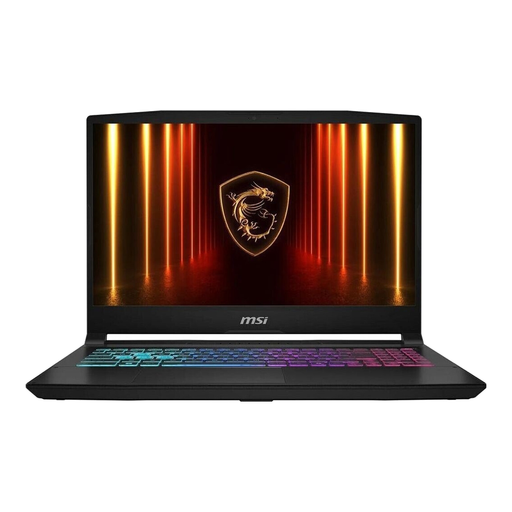
MSI Katana 15 HX B14WFK-487, 16 GB RAM, 512 GB SSD
A traditional Windows notebook design for working with a mouse or external input device.
15.6-inch Full HD IPS display, Intel Core i7, RTX 5060 and Windows 11.
Dedicated graphics are part of this configuration, but they aren’t automatically essential for school cone patterns.
View at Joybuy
Frequently asked questions
Do I need a dedicated graphics card for school cone designs?
No, the task described doesn’t in itself mean you need one. First check the requirements of the specific software you use. ASUS does offer ProArt configurations with dedicated GeForce RTX graphics, but that doesn’t mean they’re generally needed for simple pattern pieces or vector designs.
How can I stop a digital pattern piece from printing at the wrong size?
Set the paper size and scaling according to the instructions for the pattern, and check the dimensions before cutting the fabric. The Pattydoo example is a DIN A4 PDF for a 70 cm-high school cone; these specifications don’t automatically apply to other patterns.
Is a P3 or OLED display enough to make fabric colours look the same in the finished print?
No. For colour-critical printing, Adobe also recommends a calibrated monitor and suitable profiles for the specific output. Check the requirements of your fabric printing service too, or order a sample print.
What extra costs should I consider besides the laptop?
Check separately whether you need graphics software, a compatible pen, prints or colour samples. Inkscape is available as free vector graphics software, but that doesn’t mean it can replace every file format or raster workflow.
What are my rights if a laptop I bought online in Germany is faulty?
For a consumer purchase from a retailer, statutory rights for faulty goods generally apply, with at least two years’ protection. The retailer is responsible, and an additional manufacturer’s warranty doesn’t replace these rights. Online purchases also generally come with a 14-day right to cancel, starting when you receive the goods. Exceptions and the specific circumstances of the contract should be taken into account; the Verbraucherzentrale explains the cancellation rules for online orders.


