What should you look for when buying?
When choosing a laptop for creating a school yearbook at home, your main buying priority depends on which part of the process matters most to you.
Everyday laptop for text and layouts
A good fit if: You mainly coordinate contributions, review photos and edit templates.
The trade-off: For demanding colour decisions, you should also consider a suitable monitor or a printed proof.
Laptop with a display suited to photo work
A good fit if: You regularly review or edit lots of photos and want to compare the display specifications of the exact variant.
The trade-off: A larger or higher-resolution display is no substitute for a calibrated print proof. Also check the screen finish and memory card format.
Creative laptop for other demanding projects
A good fit if: You also regularly work on demanding creative projects alongside the yearbook.
The trade-off: The ASUS ProArt P16 variant H7606WX-SE090X comes with 64 GB RAM and an RTX 5090. The software requirements for a yearbook alone don’t mean you need this level of specification.
Portable MacBook for a compatible macOS workflow
A good fit if: Your software, fonts and peripherals work with macOS, and you often take your laptop with you.
The trade-off: Check the storage, import adapters and printer compatibility for the specific offer. Range details don’t automatically confirm the specifications of an individual device.
| What matters when buying |
What should you check? |
Who is it important to? |
| Space and ease of use for layouts |
Compare the display size and resolution, keyboard, and—if needed—the right port for an external monitor. |
If I’m laying out lots of contributions and checking pages, I need enough screen space for the layout and tools. Around 40 % of consumers put page layout first when choosing a yearbook laptop. |
| Reviewing and editing photos |
Check the requirements of your image-editing software, display specifications and how you’ll import files from your specific camera card. Adobe recommends at least 16 GB RAM for Photoshop 27.x. |
If I’m selecting or editing lots of photos, I want the software requirements and image display to suit the project. Around 30 % of consumers put photo editing first. |
| Storage, importing and backups |
Check the available SSD space, SD or microSD format, ports for external storage and a backup location agreed with the school. |
If I need to keep original photos and multiple file versions organised, importing and restoring files are essential. Around 20 % of consumers prioritise file management. |
| Preparing files for print |
Check the printer’s PDF and bleed specifications, along with linked images and, if needed, fonts before submission. |
If I’m preparing the final print files, I want to confirm the submission requirements early. Around 10 % of consumers put print submission first. |
Joybuy products for yearbook work
This selection from Joybuy includes laptops for writing, page layout, reviewing images and storing project files. If you edit photos regularly, check the display specifications and card format for the specific variant.
 No image available
Auusda T156A, 16 GB RAM, 512 GB SSD
For writing, page layout and storing project files locally. The product details list a 15.6-inch FHD IPS display, 16 GB DDR4 RAM and a 512 GB SSD.
Also listed are USB-C, USB-A, an HDTV output, Wi-Fi 5, a backlit keyboard and a separate number pad.
View at Joybuy
 No image available
Ninkear A15 Pro, 16 GB RAM, 1 TB SSD
For layout work and storing project files locally, the product title lists 16 GB DDR4 RAM and a 1 TB SSD.
The specifications also list a 16-inch FHD display, Windows 11, Wi-Fi 6 and Bluetooth 5.0. The stated weight is 1.8 kg.
View at Joybuy
 No image available
Lenovo IdeaPad Slim 5 16IPH11, Core Ultra 5 322, 16 GB RAM, 1 TB SSD
For reviewing images and storing large project files, the product title lists 16 GB RAM and a 1 TB SSD.
The product description lists a 16-inch OLED WUXGA display, a microSD card reader, a backlit German keyboard and a weight of 1.69 kg.
View at Joybuy
 No image available
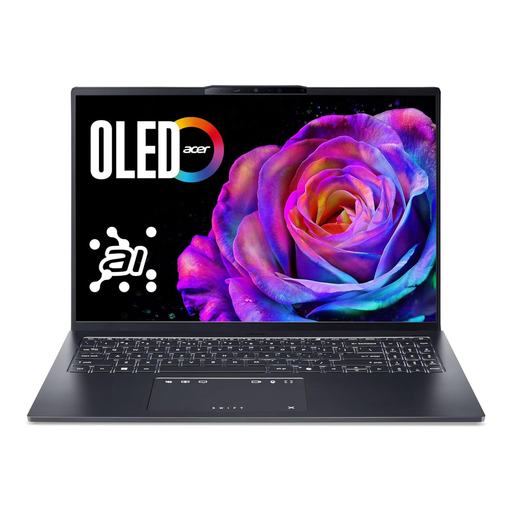
Acer Swift Go 16 OLED SFG16-73-7943, 16 GB RAM, 1 TB SSD
For working with photos and project files, the product title lists a 16-inch WUXGA+ OLED display, 16 GB RAM and a 1 TB SSD.
The product description also lists a microSD reader, HDMI 2.1, Thunderbolt 4 and a German QWERTZ keyboard. The stated weight is approximately 1.6 kg.
View at Joybuy
 No image available
MSI Cyborg 15 A13VE-1005, 16 GB RAM, 512 GB SSD
It may be worth considering for yearbook work alongside other multimedia applications. The product title lists a 15.6-inch FHD display, 16 GB DDR5 RAM, a 512 GB SSD and an NVIDIA GeForce RTX 4050.
According to the product description, the device is sold without an operating system, which you’ll need to install before use.
View at Joybuy
Frequently asked questions
Do I definitely need a dedicated graphics card for InDesign or Photoshop?
Not just because you use these programmes. For InDesign 21.3 on Windows, Adobe lists a minimum of 8 GB RAM and recommends 16 GB; for Photoshop 27.x, Adobe recommends at least 16 GB. Also check the full requirements for your version, particularly if you use specific GPU features or a high-resolution monitor.
How do I prepare the yearbook file for the printer?
Ask the printer for its PDF, colour and bleed specifications. InDesign can package files with linked graphics and fonts for handover. The Canva Help Center explains bleed and crop marks, and notes that these settings aren’t available in Canva Docs.
How can I protect the yearbook file from accidental changes or loss?
In Windows, File History can back up copies to an external drive or network storage and restore earlier versions. If the files contain pupil data, check with the school’s responsible staff about the approved storage location and access arrangements.
Can pupil photos be included in the printed yearbook or shared online without further checks?
There isn’t a single answer that applies to every school and type of publication. The Lower Saxony Data Protection Commissioner explains the requirements for voluntary consent for public bodies and distinguishes their legal position from that of other data controllers. Check responsibilities, the legal basis and the specific print or online purpose with the school; the guidance for Lower Saxony doesn’t replace a review of the rules in your own state.
What should I check about compliance and warranty when buying in Germany?
For devices it oversees, the Federal Network Agency checks matters including CE marking, traceability and manufacturer details. Consumer purchases in the EU are generally covered by a minimum two-year legal guarantee from the seller; Your Europe explains this right. Check the information provided for the specific offer.


