You don’t automatically need a particularly powerful laptop to build a score tracker with an editor and run local tests. Microsoft’s guidance for Visual Studio Code covers the editor itself, not additional services running alongside it, and pytest recommends using a virtual environment for Python. Start by choosing your operating system, language and testing tools. Then compare specific configurations by RAM, screen, ports and portability.
Who benefits from which specifications?
Developers running local tests
If you’re writing rules for a score tracker and running tests on the same laptop, your programming language and testing tool should be compatible with your operating system. For Python, pytest recommends installing in a virtual environment.
Developers working at a desk
If you often read code, rules and test results side by side, a larger built-in screen can be useful. You could also consider an external monitor for a permanent workstation. Acer lists a 15.6-inch display for the Aspire Go 15 NX.J7WEG.007, while HP lists a 14-inch display for the ProBook 4 G1i AD2N3ET#ABD.
Developers who work on the move
If you regularly change work locations, weigh compact dimensions and suitable ports against your screen requirements. The documented examples range from the 13.6-inch display on the MacBook Air with M5 to 14-inch configurations from HP and Lenovo.
What should you look for when buying?
Larger Windows laptop
A good fit if: you often read code, rules and test results side by side directly on your laptop. Acer lists a 15.6-inch display for the Aspire Go 15 NX.J7WEG.007.
Consider: A larger built-in screen is less compact, and the specifications need to match the specific version on offer.
Compact Windows laptop
A good fit if: you move between workspaces or want to use Windows software, and the ports on the specific configuration suit your needs.
Consider: Lenovo lists a Belgian keyboard for the ThinkPad E14 Gen 7 AMD 21T00050MB, so don’t assume this model number comes with a German layout.
Compact macOS laptop
A good fit if: your development tools and projects work with macOS, and you prefer a smaller screen.
Consider: Check the ports, keyboard layout and whether you’ll need an adapter for the exact version. Apple’s claim of up to 18 hours of battery life is a manufacturer estimate, not a measurement based on your testing workflow.
| Buying criterion |
What to check before buying |
Who should pay particular attention? |
| Development environment |
Choose your language, testing tool and any additional local services. Check that your operating system and processor architecture are compatible with your tools. For Python, pytest recommends using a virtual environment. |
If I’m running tests locally, my language, testing tool and operating system need to work together. Around 36 % of consumers say a suitable development and testing environment is their top buying priority. |
| Space for code and test results |
Compare screen size, resolution and the monitor ports you need. Acer lists a 15.6-inch screen with 1920 × 1080 pixels for the Aspire Go 15 NX.J7WEG.007; HP lists a 14-inch screen with 1920 × 1200 pixels for the ProBook 4 G1i AD2N3ET#ABD. |
If I want to read rules, code and test results at the same time, screen space matters to me. Around 28 % of consumers put space for code and test results first. |
| Working in different locations |
Check the weight, ports, charging accessories and keyboard layout for the exact model. Lenovo lists a Belgian keyboard layout for the ThinkPad E14 Gen 7 AMD 21T00050MB. |
If I regularly work in different places, I want a suitable size and the ports I need, without any surprises with the keyboard layout. Around 18 % of consumers prioritise portability. |
| Total cost and specifications |
Choose a configuration to suit your actual workflow, rather than using editor requirements as a benchmark for every service running alongside it. Also check whether the required power adapter is included; HP lists one in the box with the ProBook 4 G1i AD2N3ET#ABD. |
If I want to keep the specifications focused on my project and factor in any accessories I need, the overall cost matters to me. Around 18 % of consumers put total cost first. |
Common laptop-buying misconceptions
-
Using editor requirements as a guide to the whole laptop
Microsoft’s recommended requirements for Visual Studio Code apply to the editor. They don’t automatically tell you what resources tests or other development services running at the same time will need.
Work out how you’ll actually use the laptop before comparing RAM and processors.
-
Assuming the keyboard and ports from the product range name
Lenovo lists a Belgian keyboard for the ThinkPad E14 Gen 7 AMD with model number 21T00050MB. Other versions in the range may differ.
Check the full model number, keyboard layout and ports you need in the specific listing.
If the layout isn’t suitable, you may need an external keyboard.
-
Assuming USB-C charging means a charger is included
The EU rule for laptops in scope covers the charging port; it doesn’t mean that a power adapter comes with every offer. The European Commission says the rules start to apply to laptops in scope on 28 April 2026.
Check what’s included and the charging power required for your chosen configuration.
If a suitable power adapter isn’t included, you may need to buy a compatible one separately.
Relevant brands and specific product ranges
Acer
The Aspire Go 15 NX.J7WEG.007 is a specific Windows configuration with a larger screen than the documented 14-inch examples.
- Acer lists a 15.6-inch screen, 16 GB RAM and a 512 GB SSD for this version.
- Compare the exact model number and specifications; details for a product range don’t confirm the features of every version.
HP
The ProBook 4 G1i AD2N3ET#ABD is a specific example of a 14-inch Windows Pro configuration.
- HP lists 16 GB RAM, a 512 GB SSD and an included power adapter for this version.
- Check the exact configuration and stated box contents before buying.
Lenovo
The ThinkPad E14 Gen 7 AMD 21T00050MB is a specific 14-inch example with documented ports and upgrade options.
- Lenovo lists 16 GB RAM, a 512 GB SSD and two RAM slots for this version.
- This model is documented with a Belgian keyboard. Don’t assume other versions have the same layout or specifications.
Apple
The 13-inch MacBook Air with M5 is a compact macOS option, provided the tools you need work with the system.
- Apple lists 16 GB of unified memory and a 512 GB SSD for the base configuration.
- The claim of up to 18 hours of battery life comes from the manufacturer and doesn’t describe battery life with your development and testing workflow.
ASUS
According to ASUS, the Vivobook range includes models with different screen sizes and specifications.
- The manufacturer’s overview includes 14- and 16-inch models, as well as different memory options.
- The overview doesn’t confirm that every specification is available in every configuration; check the details for the specific model.
Joybuy laptop options for everyday development
The following Joybuy offers include compact and larger laptop configurations for Windows or macOS workflows. Check that the specific version and its ports suit your development environment.
 No image available
HP ZBook 8 G1i 14 Ultra 9 285H, 64GB, 1TB
A compact Windows option if you tailor your development tools and local tests to the specific configuration.
View at Joybuy
 No image available
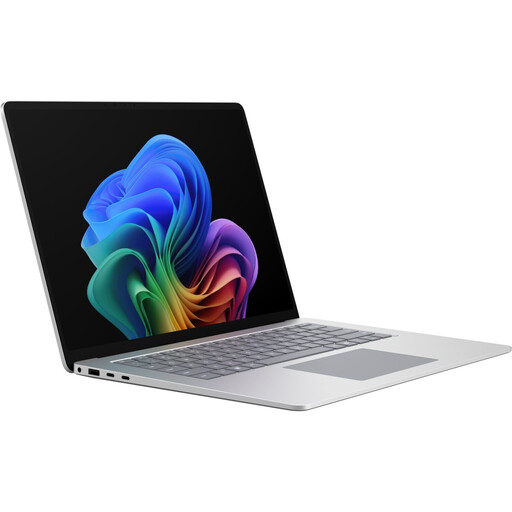
Microsoft Surface Laptop 8 for Business, 15-inch, Core Ultra X7, 16GB, 512GB, 65W, W11P, Platinum
A larger Windows laptop option if you prefer to read code and test results on the built-in screen.
View at Joybuy
 No image available
Dell Pro 14 Essential PV14255 Copilot+ PC, AMD Ryzen AI 7 350, Full HD+, 16GB, 1TB, Wi-Fi 6E, Windows 11 Pro, Black
A compact Windows configuration if you want to use existing Windows software and the ports suit your workspace.
View at Joybuy
 No image available
HONOR Magicbook X16 AMD 2025, AMD R5 6600H, 16GB+512GB, Cloud Gray, German Keyboard
A larger laptop option if you want to read code and test results on a bigger built-in screen.
View at Joybuy
 No image available
Apple 13-Inch MacBook Air M5, 10-Core CPU, 8-Core GPU, 16GB, 512GB SSD, Sky Blue, German QWERTZ Keyboard
A compact macOS option if your development tools work with macOS.
The product details state that no power adapter is included; check whether you’ll need a suitable one.
View at Joybuy
Frequently asked questions
Will a laptop that runs VS Code automatically be powerful enough for all my tests too?
No. Microsoft’s recommended requirements apply to Visual Studio Code, not additional tests or services running at the same time. Your programming language and specific testing environment also matter.
How do I set up Python tests for a score tracker?
If you’re using Python and pytest, the pytest documentation recommends a virtual environment for your application and test dependencies. This doesn’t mean Python or pytest is the only suitable option.
Do I need Docker for this score tracker?
Not just for the project described here. If your specific testing environment needs Docker Desktop on Windows, check its installation and backend requirements separately from those of the editor.
What rights do I have when buying a laptop online as a consumer?
For a distance purchase that is eligible for cancellation, the EU consumer portal explains that you have a 14-day right to cancel; exceptions and the circumstances of the contract should be taken into account. If goods are faulty, you generally have a statutory guarantee of at least two years from receipt, which is separate from any voluntary manufacturer’s warranty.
Does the EU rule on USB-C charging already apply to laptops?
Yes. For laptops in scope, the European Commission gives 28 April 2026 as the date the rules start to apply. The rule doesn’t remove the need to check the required charging power, and it doesn’t mean that a power adapter comes with every offer.


