First, choose spreadsheet or catalogue software that lets you check for duplicates using the fields you need; a more powerful laptop won’t solve a data problem. For a permanent workstation, screen space and typing comfort matter most, while for working in different places, consider the device’s size and the connections you need. Also plan to keep a separate backup, as recommended by the German Federal Office for Information Security.
Which laptop is right for you?
Collectors with lots of duplicate entries
If you’re combining lists or checking seed entries with similar names, what matters is which fields your software uses to compare them, and whether you can review matches before deleting anything. Microsoft Support and LibreOffice Help explain different ways to filter, remove or compare duplicates using selected fields.
Collectors with a photo archive
If you compare seed photos with catalogue details, look for a screen size that suits the way you work and enough storage for your files. It’s still important to keep a separate backup, independently of your laptop; the German Federal Office for Information Security recommends backing up data regularly.
People entering records in different places
If you don’t always record your stock at the same desk, compare the size of the device, keyboard layout and connections on the exact configuration with what you want to carry or connect. The German Federal Institute for Occupational Safety and Health describes external input devices as a way to set up the screen and input devices separately at a permanent workstation.
What should you look for when buying?
First, check how your software identifies duplicates and whether you can review matches before removing them. Then weigh up screen size, portability and accessories to suit the way you work.
| What you need |
What to check before buying |
Who is this important for? |
| Check for duplicates |
Make sure you can choose comparison fields and review matches before deleting them. |
If I want to compare similar seed entries before removing them, I need to be able to see which fields are being compared. Around 36% of consumers are likely to have checking for duplicates as their main priority. |
| View the catalogue and photos together |
Compare the display size and surface finish of the exact model variant. |
If you want to view catalogue columns and seed photos at the same time, consider how much screen space is available. Around 29% of consumers are likely to have this as their main priority. |
| Record entries in different places |
Check the dimensions and required connections against your accessories. |
If I record entries between my storage area and desk, I need a suitable size and the right connections for my accessories. Around 21% of consumers are likely to have recording entries in different places as their main priority. |
| Overall cost and data backup |
Check what’s included and whether there’s a connection for a separate backup drive. |
For consumers budgeting for accessories and ways to preserve their catalogue files as well as a laptop, the complete package is key. They are likely to account for around 14%. |
Common buying and usage mistakes
-
Automatically deleting similar seed names without checking them
Entries may differ in fields that matter to your collection. Microsoft Support distinguishes between filtering and permanently removing duplicate values in Excel, while LibreOffice Calc lets you choose which fields to compare.
Decide which fields distinguish one seed entry from another, review matches first and work from a backed-up copy.
-
Assuming every model in a range has the same specifications
The display, keyboard, storage and connections can vary depending on the exact product number. Details for an Aspire Go, ThinkPad or ProBook model don’t automatically apply to every variant in the range.
Before buying, check the full model code, the connections you need and exactly what’s included.
-
Confusing laptop storage with data backup
An SSD stores your files, but on its own it can’t protect them from a fault or accidental deletion. The German Federal Office for Information Security recommends backing up data regularly.
Plan to use a separate backup drive or another suitable backup method, and check that you can restore your files.
-
Overlooking your existing software and accessories when switching systems
Whether a particular catalogue app is suitable depends on more than the laptop brand or operating system. The power adapter and connections can also vary by configuration.
Check that the software works with your chosen operating system, and compare what’s included with the exact variant against the accessories you already own.
Brands to consider
Acer
The Aspire Go 15 NX.J7WEG.007 is a specific example of a larger Windows display for working on your catalogue directly on the laptop.
- Acer lists a matt 15.6-inch Full HD IPS display, 16 GB RAM, a 512 GB SSD, three USB-A ports and HDMI for this variant.
- These specifications apply to NX.J7WEG.007; other variants may have different specifications.
Lenovo
The ThinkPad E14 Gen 7 21SX000RGE is a specific 14-inch Windows option for working in different places.
- Lenovo lists a matt WUXGA display, backlit German keyboard, 16 GB RAM and a 512 GB SSD for this configuration.
- The keyboard specification describes the layout, not how comfortable it is for you to type on; these specifications apply to model code 21SX000RGE.
HP
The ProBook 4 G1i 14 AD2N3ET#ABD is a specific 14-inch configuration to compare with your existing accessories.
- HP lists WUXGA, 16 GB RAM, a 512 GB SSD, HDMI, USB-A, two USB-C ports and an included power adapter for this variant.
- Check the model number and what’s included carefully; details for this configuration can’t be applied across the board to other product numbers.
Apple
A 13-inch MacBook Air with M5 may be worth considering if your catalogue software and files fit into your existing macOS workflow.
- Apple offers configurations with 16 GB unified memory and a 512 GB SSD.
- Check that your specialist software is compatible; according to Apple, the configuration reviewed here doesn’t include a power adapter.
Laptops for your seed catalogue
This selection includes larger laptops for working on the built-in screen, a compact 14-inch option and a MacBook for a compatible macOS workflow.
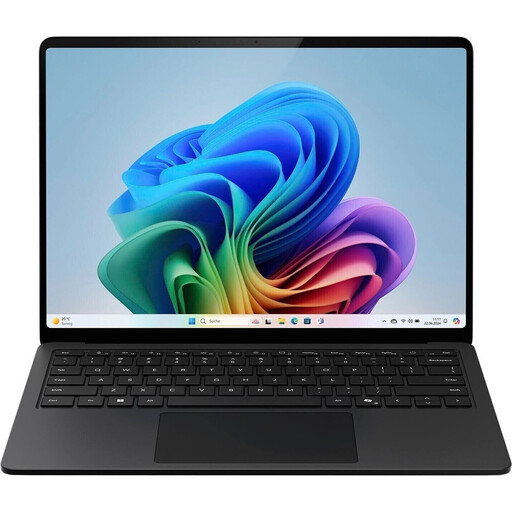 Image unavailable
Microsoft Surface Laptop for Business, 7th Edition, 15-inch
The 15-inch version is an option if you want to work on your catalogue using the built-in screen.
Intel Core Ultra 7 266V, 16 GB RAM, 512 GB SSD, Windows 11 Pro.
View at Joybuy
 Image unavailable
Microsoft Surface for Business, 8th Edition, 15-inch
The 15-inch format is an option for working on the device itself; check that Windows works with your catalogue software.
Intel Core Ultra 5 335, 16 GB RAM, 512 GB SSD, Windows 11 Pro, touchscreen with 3270 × 2180 pixels and 120 Hz.
View at Joybuy
 Image unavailable
Laptop with 16-inch FHD display and Intel Core i5-8210Y
The 16-inch display is an option if you want to view catalogue details on the device itself.
Intel Core i5-8210Y, 16 GB RAM, 512 GB SSD, Windows 11 Pro, RJ45 port.
View at Joybuy
 Image unavailable
Apple 15-inch MacBook Air with M5, 16 GB and 1 TB SSD
This MacBook configuration is worth considering if your catalogue software and files are compatible with your macOS workflow.
M5, 10-core CPU, 10-core GPU, 16 GB unified memory, 1 TB SSD, German QWERTZ keyboard. According to the product description, a power adapter isn’t included.
View at Joybuy
 Image unavailable
Lenovo Yoga Slim 7i Aura Edition, 14-inch
The more compact 14-inch format is an option if you want to take your laptop between work locations.
2.8K OLED display, Intel Core Ultra 7 355, 16 GB RAM, 1 TB SSD, Windows 11, German keyboard layout.
View at Joybuy
Frequently asked questions
Do I need a particularly powerful laptop to check for duplicate seed entries?
No. The spreadsheet app’s features are what matter most. Microsoft Support explains how to filter and permanently remove duplicate values in Excel, while LibreOffice Calc lets you choose which fields to compare. Decide which fields distinguish one seed entry from another, and check matches using a copy.
How can I set up a workstation for longer periods of catalogue work?
Check that you have enough desk space and suitable connections for an external keyboard and, if needed, a monitor. The German Federal Institute for Occupational Safety and Health explains that a separate keyboard allows you to raise the laptop; whether that works for you depends on your set-up.
How do I back up my seed catalogue?
Back up your spreadsheets and photos regularly, separately from your laptop, and check that you can restore them. The German Federal Office for Information Security lists USB sticks and external hard drives as possible backup media. How often you back up depends on how much work you’d have to redo if your files were lost.
What rights do I have when buying a laptop in Germany?
For a consumer purchase, the usual statutory claims for defects generally become time-barred two years after delivery, as set out in § 438 BGB; this is separate from a voluntary manufacturer’s warranty. Distance contracts generally come with a right to cancel under § 312g BGB. The Verbraucherzentrale says that for ordered goods, the period is usually 14 days from receipt; exceptions and the specific terms of the contract should be taken into account.


