Which laptop setup is right for you?

Regular worksheet creators

If you spend a lot of time writing and editing reading exercises at your desk at home, make sure you can arrange the text and source so they’re easy to read while you work. For longer sessions, the DGUV recommends using an external keyboard and mouse and, where possible, an external screen.

Creators who print their work

If you print your exercises or use existing devices and programmes, make sure they’ll work together and check the installation process before choosing a laptop. Microsoft notes that there may be difficulties installing certain printers on Windows Arm PCs.

Occasional mobile workers

If you mainly work at home but sometimes take your laptop with you, weigh up screen size and desk comfort against the total weight of your equipment. The Federal Institute for Occupational Safety and Health highlights total weight as a relevant factor when you move between locations frequently.

What should you look for when buying?

Laptop with a larger screen

A good fit if: You work at a permanent desk and want to edit your draft alongside the reading text on the built-in screen.

The trade-off: A larger device needs desk space, and for longer sessions it doesn’t automatically replace a separate keyboard and mouse, as recommended by the DGUV.

A more compact notebook with an external monitor

A good fit if: You sometimes take your notebook with you and can set up a monitor and input devices separately at your permanent workstation.

The trade-off: A monitor and additional input devices take up space. If you move between locations frequently, the total weight of your equipment also becomes more important.

What matters when buying What to look for Who is it important to?
Readability and screen space Check the screen size and resolution, as well as the connection for a monitor you already own. If I often read a draft and a source at the same time, I need enough screen space. Consumers with this as their main priority are likely to make up around 33%.
Comfort while writing Consider whether you’d like to use a separate keyboard and mouse for longer writing sessions, and whether you have room for them. If I write at my desk for long periods, the positioning of the screen and input devices matters to me. Around 27% of consumers are likely to prioritise this.
Printer and software compatibility Check the specific application, printer or scanner model, and installation process for the operating system and processor architecture. If I want to keep using my existing programmes and printer, I need to check that they’ll work with the new device. Consumers who prioritise this are likely to make up around 20%.
Total cost and device condition Factor in any accessories you’ll need. For a used device, check its documented condition, what’s included and the terms of sale. If I’m weighing up the cost of the laptop, workstation accessories and possibly a used device, the total outlay is what matters. Around 20% of consumers are likely to prioritise this.

Common buying mistakes

  • Assuming a large screen means you have a fully set-up workstation

    A large laptop screen doesn’t automatically mean that the screen and input devices are set up separately in an ergonomic way. For longer sessions, the DGUV recommends using an external keyboard and mouse and, where possible, an external screen.

    Think about your desk and decide whether you’ll work with the built-in screen alone or set up a separate workstation.

  • Assuming printer compatibility from the word ‘Windows’ alone

    According to Microsoft, you may run into difficulties on Windows Arm PCs when setting up a printer using installation software provided by the manufacturer. This doesn’t tell you whether your particular printer model will work.

    Before you buy, check the exact printer model and the installation process for the device you’re considering.

  • Judging a refurbished notebook by its model range alone

    The condition and included accessories of a used device may differ from what you expect from the model. The German consumer advice centre recommends checking the accessories, warranty and returns policy carefully too.

    Compare the condition described and the exact contents of the offer instead of relying on the model name alone.

    A used device may also require additional accessories.

Brands to consider

Lenovo

IdeaPad Slim 5 and ThinkPad models offer different starting points if you’re looking for a larger built-in screen or a device designed for office work.

  • Lenovo Germany lists different memory and display configurations for the IdeaPad Slim 5 Gen 10.
  • Details for one configuration don’t necessarily apply to another version in the same model range.

HP

According to HP, the OmniBook 5 range includes more compact options and 16-inch versions for different workspaces.

  • HP Germany lists HDMI and USB-C, as well as a choice of displays and processors, for the range.
  • Information about a product range doesn’t necessarily describe the ports, features or battery life of every individual offer.

Dell

The Dell 16 is a configurable option if you’d like a larger built-in screen for working with text.

  • Dell Germany lists a 16-inch configuration with an FHD+ display, 16 GB of memory and a 512 GB SSD.
  • Whether it’s right for you depends on the specific configuration you choose, as other options may change the specifications.

Apple

A MacBook Air could suit a compact workspace or use with an external display, provided the programmes and devices you need are compatible with macOS.

  • Apple Germany lists USB-C or Thunderbolt ports and support for external displays.
  • This information doesn’t confirm compatibility with a particular printer you already own or a specific teaching application.

Joybuy laptops with a large integrated screen

This Joybuy selection includes 16- and 17-inch notebooks with large integrated screens, suited to working at a permanent desk.

HP ProBook 4 16 G1i AI notebook

HP ProBook 4 16 G1i Notebook AI

An option if you’d like to work on your draft and reading text on a large integrated display.

Intel Core Ultra 7 255U; 32 GB RAM; 1 TB SSD; 16-inch IPS display with 1,920 × 1,200 pixels; Windows 11 Pro.

View at Joybuy

Lenovo ThinkBook 16 Gen 9

Lenovo ThinkBook 16 Gen 9

A good fit if you’re looking for a large integrated display for reading and editing text side by side.

Intel Core Ultra 5 325; 32 GB DDR5 RAM; 512 GB PCIe SSD; 16-inch display; Windows 11 Pro.

View at Joybuy

Lenovo IdeaPad Slim 5 16IPH11

Lenovo IdeaPad Slim 5 16IPH11

An option if you’d like to work on a reading source and draft on the built-in screen.

Core Ultra 5 322; 16 GB RAM; 1 TB SSD; 16-inch WUXGA display with 1,920 × 1,200 pixels; Windows 11.

View at Joybuy
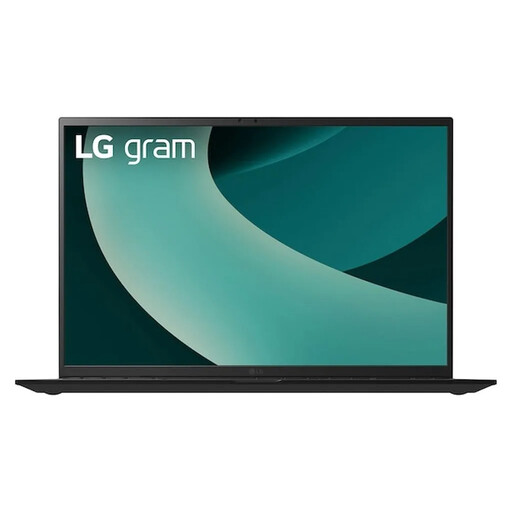
LG Gram 17Z90TL-G.AU78G

LG Gram 17Z90TL-G.AU78G

An option if you’d like a large integrated display for longer texts and occasionally need to take your notebook with you.

17-inch WQXGA IPS display; Intel Core Ultra 7 256V; 16 GB RAM; 1 TB SSD; Windows 11 Home.

View at Joybuy
MSI VenturePro A16 AI+ A3HWEG-003

MSI VenturePro A16 AI+ A3HWEG-003

An option if you’re looking for a large integrated display for writing and keeping reading materials open.

Ryzen AI 7 350; 16 GB RAM; 1 TB SSD; GeForce RTX 5050.

View at Joybuy

Frequently asked questions

Do I definitely need a large laptop for working at home for long periods?

No, a large laptop screen isn’t essential. For longer sessions, the DGUV recommends using a separate keyboard and mouse and, where possible, an external screen. If you’d rather work without an additional monitor, check that the built-in display is clear enough for the kind of text you usually work with.

How can I check my existing printer before buying a laptop?

Check the exact printer model and the intended driver and installation process for the laptop’s operating system. Microsoft notes that some Windows Arm devices may have difficulties with printer manufacturers’ installation software. This doesn’t mean your printer will work, nor does it mean it’s automatically incompatible.

Which programmes should I check for compatibility before buying?

Check the specific programmes you need to create and edit your reading exercises, particularly if you’re considering a device with an Arm processor. Microsoft says most Windows apps can be installed and run on Windows 11 Arm PCs as they can on other Windows 11 PCs; however, this doesn’t confirm that every individual application will be compatible.

What happens if an item is faulty or you change your mind after buying online in Germany?

Your statutory rights against the seller are separate from any voluntary guarantee. According to the German consumer advice centre, consumers who buy online generally have 14 days from receiving the goods to cancel their purchase. The legal requirements and exceptions apply to the specific contract.

Which product markings should I look for when buying a laptop?

For electrical and electronic devices offered for sale, the German Federal Network Agency lists requirements including correct CE marking, product identification and manufacturer details. These requirements apply to the economic operators involved; a simple statement in a product listing isn’t proof that a specific device is correctly marked.