What should you look for when buying?
For this task, it’s worth deciding what matters most to you before comparing individual specifications in isolation.
| Priority |
What to look for |
Who is it most important to? |
| Long documents and structure |
Check the keyboard layout of the specific configuration; make sure the word processor supports heading levels and navigation. |
If I write a lot and often rearrange chapters, I need a suitable keyboard and proper heading levels. Around 36% of consumers prioritise extended writing and structuring. |
| Checking text and images at the same time |
Check the screen size and resolution of the specific device; if needed, check for a port to connect an external monitor you already own. |
If I compare photos or sketches with the text, I want to be able to see both clearly at a readable size. Around 29% of consumers prioritise reviewing images and text side by side. |
| Software and licence |
Check that the software you need is compatible with the operating system version; find out which Office licence you already have or still need. |
If my documents or planned pattern-making software require a particular environment, I want to check compatibility and licensing in advance. Around 21% of consumers prioritise software compatibility and ongoing costs. |
| Working in different places |
Check the dimensions and weight of the specific configuration; assess battery-life claims only in light of the stated usage scenarios. |
If I take my laptop with me regularly, it needs to suit my commute, even if a smaller screen gives me less room to view multiple items at once. Around 14% of consumers prioritise portability. |
Joybuy product selection
The models below include compact devices, larger screen sizes and a MacBook. If you also want to create digital sewing patterns, check that your chosen software is compatible with the specific operating system version.
 No product image available
HP OmniBook Ultra Flip 14-fh0670ng, 14-inch 2-in-1
A 14-inch laptop can suit a compact workspace if you move between different places to work.
Listed in the product title: touchscreen, Intel Core Ultra 7 258V, 32 GB RAM, 1 TB SSD, 2.8K OLED and Windows 11 Home.
Joybuy
 No product image available
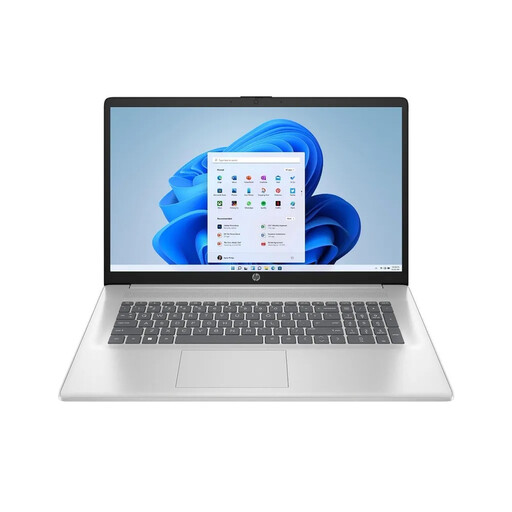
HP Laptop 17-cp3770ng, 17.3-inch
The large screen is a good option if you want plenty of built-in space to check your instructions and images.
Listed in the product title: AMD Ryzen 7 7730U, 16 GB RAM, 512 GB SSD, Full HD IPS and Windows 11 Home.
Joybuy
 No product image available
HONOR Magicbook X16 AMD 2025, 16-inch, German keyboard
The 16-inch format can be useful if you prefer a larger screen when writing.
Listed in the product title: AMD R5 6600H, 16 GB RAM, 512 GB SSD and German keyboard.
Joybuy
 No product image available
Apple MacBook Neo, 13-inch, 8 GB/256 GB, German QWERTZ keyboard, without Touch ID
This compact MacBook configuration may suit you if you’re looking for a smaller format and a German keyboard.
Listed in the product title: A18 Pro chip, 8 GB memory and 256 GB SSD. According to the product information, no power adapter is included, so you’ll need to buy one separately.
Joybuy
 No product image available
HP ENVY x360 16-ac0473ng, 16-inch convertible
This larger convertible is an option if you want a bigger screen for editing text and images.
Listed in the product title: WUXGA IPS display, Intel Core Ultra 7 155U, 16 GB RAM, 512 GB SSD and Windows 11. The description also specifies a German QWERTZ keyboard layout.
Joybuy
Frequently asked questions
Do I need particularly powerful hardware for nested chapters?
No. The heading features described don’t require a particularly powerful graphics card. The first thing to check is whether your word processor supports heading levels, navigation and a table of contents for the way you work.
How do I create a table of contents with subheadings?
In LibreOffice Writer, the built-in ‘Heading 1–10’ styles assign outline levels to paragraphs. Word for Windows displays chapters with heading styles in the navigation pane; set up the levels in whichever software you use.
Does my laptop also need to be able to create digital sewing patterns?
No, not if you’re only writing sewing instructions. If you also want to use Seamly2D, the project lists Windows, macOS and Linux as supported platforms; check your operating system version and how your files will work across your devices.
Does a laptop automatically come with Word?
You can’t tell from the type of device alone. Microsoft offers Microsoft 365 as a subscription and Office suites as a one-off purchase; check the specific offer and whether you already have a suitable licence.
What rights apply when buying online as a consumer from a business seller?
For a distance sale from a business seller in Germany, you generally have a 14-day right to cancel, starting from delivery. If the goods are faulty, you generally have statutory rights against the seller for at least two years. These are separate from any voluntary warranty. Your Europe, the European Union’s consumer portal, explains these rights; also check the seller’s status and the terms of your specific purchase.


