Website builder with a local project
You regularly work with an editor and browser, and want to work out which programmes and, where relevant, local services will need to run at the same time.


When choosing a laptop for building a small website, start with the programmes you actually use at the same time. Then decide whether a larger built-in display or a more compact device is a better fit for your workspace. You don’t automatically need a particularly powerful model; if local containers or specific extensions are part of your setup, check their requirements for the exact operating system and processor architecture.
You regularly work with an editor and browser, and want to work out which programmes and, where relevant, local services will need to run at the same time.
When designing, you often compare code with the preview and consider whether a larger built-in display or an external monitor would suit your workspace better.
You need particular development tools or containers, so you check that the operating system and processor architecture are compatible before choosing a laptop.
A good fit if: you need Windows programmes or are looking for a Windows model with the right screen size and specifications.
Bear in mind: Windows alone doesn’t tell you anything about processor architecture or whether your specific development tools are supported.
A good fit if: your chosen tools support macOS and a compact device matters more to you than a large built-in display.
Bear in mind: Check the ports and what’s included with the exact configuration; Apple notes that the 13-inch MacBook Air with M5 on offer does not come with a power adapter.
First, make a note of the programmes you’ll need to run at the same time. Then you can compare compatibility, screen space and everything included in the box more effectively.
| Buying priority | What to check before buying | Who is this especially important for? |
|---|---|---|
| Development environment | Check which programmes you’ll need to use at the same time, along with the operating system, RAM and storage of the specific configuration. Check the requirements for any planned containers separately. | If you’ll be running an editor, browser and local services in parallel, your whole workflow matters—not just the editor’s requirements. Around 36% of consumers make the development environment their top priority. |
| Room for code and preview | Compare screen size and display specifications. If you plan to use an external monitor, check the ports on both devices. | If you want to view code and a browser preview side by side at your desk, screen space is especially important. Around 29% of consumers make screen space their top priority. |
| Tool compatibility | Check that the programmes, extensions and containers you need are compatible with the operating system, processor architecture and, where relevant, Windows backend. | If particular tools or containers are essential, make sure they’re supported before choosing a model. Around 21% of consumers put tool compatibility first. |
| Cost and what’s included | Compare the complete configurations and check whether a power adapter or any monitor adapters you need are included. | If you’re considering the cost of the laptop and the accessories you need together, check what comes with the exact model, too. Around 14% of consumers prioritise the total cost and what’s included. |
Visual Studio Code’s published hardware recommendations apply to the editor; they don’t automatically cover a browser and local services running at the same time.
Choose a laptop based on the programmes you use in parallel, and check their requirements individually.
Support can also depend on processor architecture and installation requirements. Docker documents different installation routes for Windows, depending on the architecture and backend.
Check the architecture of the specific model and compare it with the requirements of the programmes you rely on.
Apple explicitly notes that the 13-inch MacBook Air with M5 on offer does not come with a power adapter.
Check what accessories are included with the exact version you’re buying, and whether you already have a suitable power adapter or monitor adapter.
Depending on what you already have, you may also need a suitable power adapter or an adapter that works with your monitor.
The ThinkPad E series is a Windows option if you’re looking for a compact laptop with a clearly specified configuration.
The MacBook Air with macOS is worth considering if your tools are compatible and you’d like to choose between 13- and 15-inch versions.
The Vivobook 16 series is worth considering if you’re looking for a larger built-in display and suitable ports.
The OmniBook 5 is available as a specified 16-inch Windows model, where you should also take processor architecture into account.
The following Windows laptops are worth considering for website work from a home office, including models with larger displays and 2-in-1 devices.
 No image available
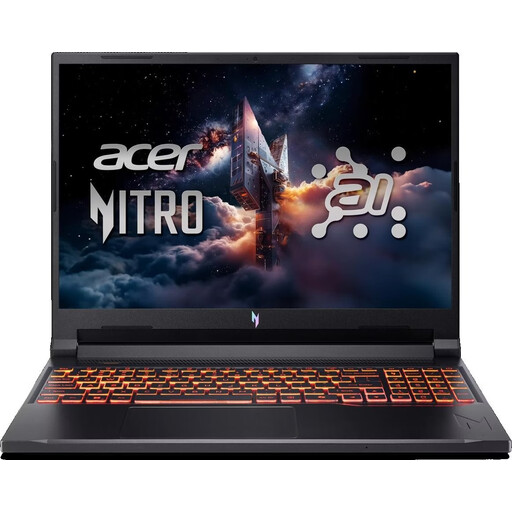
An option for a Windows setup where you need room for code and a preview on a larger display.
16-inch WUXGA display with 180 Hz, AMD Ryzen 5 240, NVIDIA GeForce RTX 5050 with 8 GB, 16 GB DDR5, 512 GB SSD and Windows 11 Home.
The keyboard is listed as a US keyboard; check that the layout suits your needs.
 No image available
A Windows option for a desk setup where you want a 16-inch display and a German keyboard.
AMD Ryzen 7 250, Windows 11 Pro, 32 GB RAM, 1 TB SSD and a 16-inch WUXGA display.
The specifications listed apply to this configuration.
 No image available
A 2-in-1 model for anyone who wants to consider this form factor as well as screen size when choosing a device.
16-inch version, Windows 11 Pro, 128 GB DDR5 and a 2 TB SSD.
 No image available
A compact Windows 2-in-1 option if an adjustable kickstand suits your planned workspace.
13-inch OLED display, Intel Core Ultra 7 266V, Windows 11 Pro, 16 GB RAM and a 512 GB SSD. The description also lists two Thunderbolt 4 ports.
 No image available
A Windows option for your desk if a 16-inch display and German keyboard suit your workspace.
AMD Ryzen 5 6600H, 16 GB RAM and a 512 GB SSD.
Not just because of the editor: Visual Studio Code describes itself as lightweight and publishes its own hardware recommendations. What also matters is which browsers, extensions and local services you plan to use at the same time. The editor’s recommendations alone don’t give you a general minimum specification for your whole workflow.
Check the Docker Desktop installation requirements for your operating system. On Windows, also check the intended backend and processor architecture. Containers are one possible way to work, but they aren’t essential for every small website.
That depends on the laptop and monitor. Check the ports on both devices for the exact model you’re considering. For example, ASUS lists HDMI 1.4 and USB-C ports for the Vivobook 16 M1605; you’ll need to check the ports on your monitor to see whether they’re compatible.
If you buy goods online from a business as a consumer, you generally have a 14-day right to cancel, starting from delivery; exceptions and possible return costs should be taken into account. Faulty goods are also covered by a statutory guarantee of at least two years. If you buy the laptop for use in your self-employed professional work, don’t assume these consumer rights apply without checking. (Your Europe, European Union)
No. Your statutory rights are against the seller; any additional commercial or manufacturer’s warranty is separate. So compare any warranty offer with the legal protection you already have. (Your Europe, European Union)