What should you look for when buying?
First, check that your chosen operating system supports the software you need. Then compare the ports, note-taking options and specifications with the way you work day to day.
| Buying priority |
What to look for |
Who is this especially important for? |
| Quick set-up |
Check the ports on the exact version against your monitor and input devices. An external keyboard and mouse can be useful for longer sessions. |
If I need to clear the desk after studying, I want to connect the devices already there without the hassle of swapping cables around. Around 28% of consumers prioritise a quick set-up at a shared desk. |
| Finding and sharing notes |
Check that your study apps and file formats are compatible. With OneDrive, you can choose specific recipients and sharing permissions, as explained by Microsoft Support. |
If I want to find my notes and shared documents again quickly, I need a clear filing system and carefully managed sharing. Around 22% of consumers prioritise organising and sharing their notes. |
| Keeping your work secure at a shared desk |
Set up a screen lock and check who can view or edit shared files. Microsoft Support explains how to lock your device manually, while Microsoft OneDrive lets you share individual files and folders. |
If other people are working nearby, I want to protect my open session and study materials from prying eyes. Around 22% of consumers put protecting their files and screen first. |
| Portability |
Compare the weight of the exact configuration with the screen size you need. Manufacturers’ battery-life figures are based on specific test conditions and may not reflect how you use your laptop. |
If I carry my laptop between study locations, I want to find the right balance between weight and screen size for my everyday needs. Around 17% of consumers prioritise portability between different study locations. |
| Handwritten notes |
Check the touchscreen, stylus compatibility and what’s included in the box separately for the same model number. |
If I want to annotate slides or notes directly on the screen, I need a compatible way to write and need to know exactly what’s included. Around 11% of consumers prioritise handwritten notes on screen. |
Joybuy products for taking study notes at your desk
This selection at Joybuy includes laptops and convertibles for typed study notes, working on the go and, on compatible versions, writing directly on the screen.
 No image available
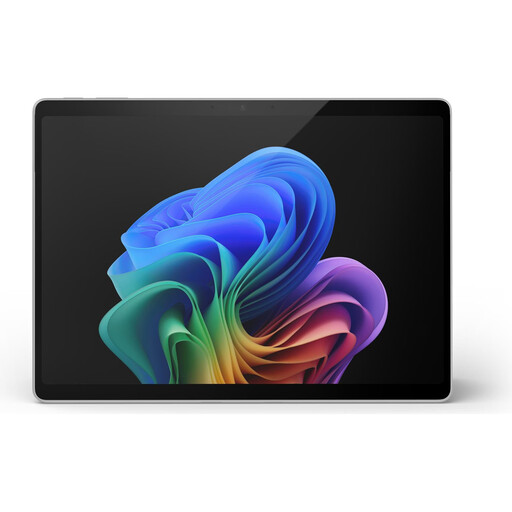
Microsoft Surface Pro 11, 13-inch, Snapdragon X Plus, 16 GB RAM, 512 GB
The touchscreen and 2-in-1 design described make this a good fit if you want to work on your notes directly on screen.
13-inch touchscreen; Windows 11 Pro; 16 GB RAM; 512 GB SSD; two USB-C 4 ports; 0.90 kg.
View at Joybuy
 No image available
HP OmniBook Ultra Flip 14-fh0670ng, 32 GB RAM, 1 TB SSD, 2.8K OLED
The convertible modes and the stylus listed in the product description make this a good fit if you want to take notes directly on the screen.
14-inch OLED touchscreen; Intel Core Ultra 7 258V; 32 GB RAM; 1 TB SSD; Windows 11 Home; 1.34 kg. The description also lists Thunderbolt 4 and a USB-C to HDMI adapter as included.
View at Joybuy
 No image available
Ruzava 14-inch laptop, N5095, 8 GB RAM, 256 GB SSD
The 14-inch display and listed SSD make this a suitable option for typed notes and files stored locally.
FHD display; 8 GB RAM; 256 GB SSD, expandable up to 1 TB according to the product name; N5095 processor; USB 3.0 and Type-C; 1.39 kg. The hinge is listed as opening to 180 degrees.
View at Joybuy
 No image available
HONOR MagicBook X16 AMD 2025, Ryzen 5 6600H, 16 GB RAM, 512 GB, German keyboard
The 16-inch display and German keyboard are a good fit if you type lengthy notes or want to view several documents side by side.
AMD Ryzen 5 6600H; 16 GB RAM; 512 GB SSD; 16-inch display; German keyboard.
View at Joybuy
 No image available
Apple 13-inch MacBook Air with M5, 16 GB, 512 GB SSD, Midnight, German QWERTZ keyboard
This compact version is ideal for working on the go, provided the software you need is compatible with macOS.
13.6-inch display; 1.23 kg; macOS; 16 GB unified memory; 512 GB SSD; two Thunderbolt 4/USB-C ports. According to the product description, a power adapter isn’t included.
View at Joybuy
Frequently asked questions
How should I set up my laptop for longer sessions at a shared desk?
If you have the space and the right equipment, use a separate keyboard and mouse, and an external monitor if needed. The DGUV gives this as an ergonomic recommendation for longer work sessions, not a legal requirement for students.
Can other people automatically see my notes saved in OneDrive?
According to Microsoft, OneDrive files are private by default until you share them. For shared folders, check who has access and whether they can edit the files.
Can I work on notes offline on a Chromebook?
You can make certain Google Drive files available offline in advance and sync them later, but some apps won’t work offline. Also check the end-of-update date for the specific Chromebook model.
What happens if a product bought from a retailer in Germany develops a fault?
Your statutory rights against the seller are separate from any voluntary guarantee. If a product is faulty, you may first be entitled to have it repaired or replaced, as explained by the Verbraucherzentrale.
What labelling is relevant for a laptop with Wi-Fi in Germany?
Devices with radio equipment must meet the relevant EU requirements; the manufacturer is responsible for compliance and CE marking. The European Commission clarifies that CE marking is a manufacturer’s declaration, not an independent quality mark. The Bundesnetzagentur lists labelling, manufacturer details and documentation as points to check.


