What should you look for when buying a laptop?
First, work out what matters most to you: limited space, taking notes without an internet connection, long writing sessions or the overall cost. Then compare the specific features and charging options.
| Priority |
What to check before buying |
Who is this important to? |
| Space and portability |
Check the dimensions and weight of the exact configuration, as well as the keyboard and screen size. The screen size in inches alone doesn’t tell you how easy the laptop will be to use in your seat. |
If I often set up my laptop for a short time in a cramped train seat, I want it to fit comfortably while still being easy to type on. Around 31% of consumers would put space and portability first. |
| Taking notes offline |
Check whether your particular app works offline, and make the files you need available offline before you set off. Google says that Docs needs to be set up for offline access and that you’ll need enough storage on your device. |
If I want to keep working on my study notes when my connection drops, I need the right files on my device in advance. Around 31% of consumers would prioritise offline access above all other buying considerations. |
| Battery life and charging |
Compare battery life only when it’s measured under the stated test conditions. For the exact model, check the charging port, the power adapter wattage required and what’s included in the box. Deutsche Bahn says there is usually one socket per pair of seats in second class on ICE trains. |
On a longer journey without a planned charging stop, I want to keep working on my notes without relying on having a socket to myself. Around 23% of consumers would prioritise battery life and charging. |
| Total cost and features |
Check the price of the exact configuration, the software you need, the operating system and whether a power adapter is included. A product series name alone doesn’t tell you what features a particular version has. |
If I’m mainly working on study notes, I want to pay for the features I need and avoid overlooking any extra purchases. Around 15% of consumers would put the total cost first. |
Joybuy products for taking notes on the go
These Joybuy products are suited to writing on the go. For each model, check that the screen size, keyboard, operating system and charging options work for your train journeys.
 No image available
Lenovo Yoga Slim 7i Aura Edition, 14-inch, Core Ultra 7 355, 16 GB/1 TB SSD
The 14-inch format and backlit German keyboard may come in handy during longer writing sessions; the listed weight is 1.14 kg.
Features listed include a 14-inch OLED display, 16 GB RAM, a 1 TB SSD and Windows 11.
Joybuy
 No image available
Ruzava 14-inch laptop, N5095, 8 GB RAM/256 GB SSD
The listed 14-inch FHD display gives you a specific screen size to work with when writing; check that the stated features meet the needs of your study apps.
Listed specifications include 8 GB RAM, a 256 GB SSD and a weight of 1.39 kg. The product description claims up to 7 hours of battery life, but doesn’t specify how long it lasts when editing notes.
Joybuy
 No image available
Apple 13-inch MacBook Air (M5, 2026), 16 GB/512 GB SSD, German QWERTZ layout
This compact configuration with a German keyboard may suit writing on the go, provided the study software you need is compatible with macOS.
Listed specifications include a 13.6-inch display, 16 GB memory, a 512 GB SSD and a weight of 1.23 kg. A power adapter isn’t included; the stated minimum charging power is 30 W.
Joybuy
 No image available
Apple 13-inch MacBook Neo (A18 Pro), 8 GB/256 GB SSD, German QWERTZ layout
The 13-inch format and German keyboard are useful for writing on the go; check that your study software runs on macOS before buying.
Listed specifications include 8 GB RAM, a 256 GB SSD and a weight of 1.23 kg. A power adapter isn’t included; the product information specifies a USB-C power source of at least 20 W.
Joybuy
 No image available
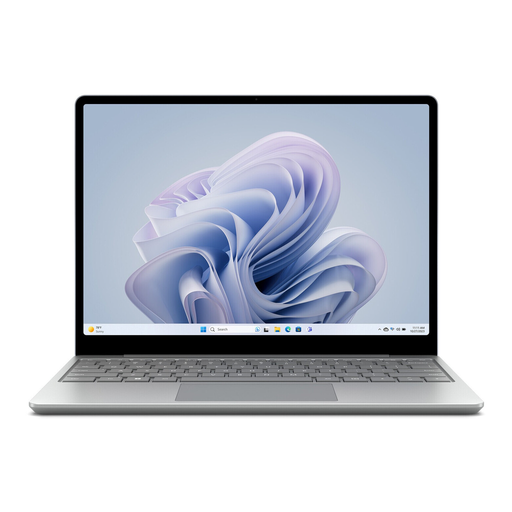
Microsoft Surface Laptop Go 3, 12.45-inch, Core i5, 8 GB/256 GB SSD
The compact size and listed weight of 1.13 kg may suit cramped spaces and frequent carrying. The smaller screen may also be a factor when reading notes and reference materials.
Listed specifications include a 12.45-inch touchscreen, 8 GB RAM, a 256 GB SSD and Windows 11 Home.
Joybuy
Frequently asked questions
Can I edit my Google Docs study notes on the train without internet access?
Yes, as long as you set up offline access in advance while you’re connected to the internet and make the files you need available offline. Google lists Chrome or Edge, the offline extension being enabled and enough storage on your device among the requirements. Your changes will sync once you’re connected again.
Can I rely on Wi-Fi and having my own power socket on the train?
Not always. Deutsche Bahn says Wi-Fi is available across its ICE fleet, but only on parts of its Intercity fleet and selected regional trains; speeds can vary. In second class on ICE trains, there is usually one socket per pair of seats.
Does a new laptop sold in Germany have to come with a power adapter?
The EU rules on common charging ports don’t give you a general right to a power adapter in the box. They explicitly allow products to be sold without a new charger and require information about charging features. So check what’s included with the exact configuration and how much power it needs. One MacBook Air M5 configuration on Joybuy is explicitly listed without a power adapter.
Which charging-port rule applies to laptops?
The European Commission says that the EU requirements for a common USB-C charging port have applied to laptops since 28 April 2026. That alone doesn’t tell you whether a particular older or second-hand listing is covered; check the charging information for the specific device.
Is a short manufacturer’s warranty the same as your statutory guarantee?
No. According to EU consumer information, if you buy from a business seller, you have a statutory guarantee of at least two years from the date you receive the goods. A commercial guarantee may offer extra benefits, but it can’t reduce these rights. This rule doesn’t apply to purchases from private individuals.


