Which option suits you?

Students who do a lot of writing

If you revise longer passages and often switch between your text and study materials, a good keyboard and plenty of usable document space should be priorities. Lenovo Germany lists a matte display for the ThinkPad E14 Gen 7, while the BILD buying guide features the ASUS Vivobook 16 (M1605) in a dated test list.

Travellers packing light

If you often take your laptop between your accommodation and places to study, weigh up a compact size against the screen space available. Apple Germany lists a 13.6-inch display for the MacBook Air, while Lenovo Germany offers a 14-inch configuration of the ThinkPad E14 Gen 7.

Students who work offline

If you need your notes to be available without the hotel Wi-Fi, plan to keep files locally and think about how you’ll handle sensitive content. Germany’s Federal Office for Information Security explains the risks of public Wi-Fi, while Microsoft Support describes how to access files stored locally when offline.

What to look for when buying

Compact traditional laptop

A good fit if: you mainly type and take your laptop with you often. Check the keyboard, ports and specifications of the exact version.

The trade-off: A smaller display gives you less room to open two documents side by side.

Larger traditional laptop

A good fit if: you usually work at a desk in your hotel and want to keep your sources open alongside your notes.

The trade-off: A larger device takes up more room when you’re travelling and on your desk.

Touchscreen convertible

A good fit if: you regularly mark up PDFs directly on screen or switch between typing and touch input.

The trade-off: A touchscreen doesn’t remove the need to check typing comfort. Also check whether the pen you want is included with the exact configuration.

Priority What to check before buying Who it matters most to
Writing and document space Try the keyboard for yourself; check the display size, resolution, aspect ratio and finish of the exact version. When I revise longer passages, I want to type comfortably and read both my text and the source material clearly. Around 36% of consumers put writing and document space first.
Portability and charging Check the device dimensions, what’s included in the box and the power output required by the exact configuration; consider the test conditions behind any published battery life. If you often carry your laptop between your accommodation and places to study, you’ll want a portable design and a clear charging plan. Around 29% of consumers prioritise portability and charging.
Offline access to notes Make the files you need available locally before your trip and check that you can open them without Wi-Fi; check the offline features of the app you use. If the hotel connection drops, I want to access my notes and protect sensitive files with care. Around 21% of consumers put offline access first.
Essential accessories Check whether a power adapter and, if needed, a pen are included with the exact configuration, and whether your required software will work. If you want to have everything you need before you travel, check whether the version you’ve chosen includes a power adapter or pen. Around 14% of consumers prioritise essential accessories.

Common buying pitfalls

  • Assuming advertised battery life equals time spent writing

    Apple quotes up to 18 hours of video streaming and up to 15 hours of wireless web browsing for the MacBook Air M5. These figures are based on different test conditions and don’t guarantee the same battery life when you’re writing.

    Compare the stated test conditions and make sure you have a charger that’s suitable for your device.

  • Assuming cloud files are available offline

    OneDrive files that are only available online can’t be opened without an internet connection. Microsoft Support highlights this distinction.

    Save the notes you need locally before you leave and test that you can access them without Wi-Fi.

  • Assuming every version in a product range comes with the same accessories

    What’s included can vary from one listing to another. And a USB-C port alone doesn’t tell you whether your existing power adapter can provide the required charging power.

    Check what’s included and the charging requirements for the configuration you’ve selected.

Brands and ranges to consider

Apple

The 13-inch MacBook Air M5 is a compact option for writing, provided the apps you need are available for macOS.

  • Apple lists a 13.6-inch display for the range reviewed.
  • Battery life depends on how you use the laptop. According to the product page, the specific German Joybuy listing doesn’t include a power adapter; this won’t necessarily apply to every configuration.

Lenovo

The ThinkPad E14 Gen 7 is a traditional 14-inch Windows laptop. Check the specifications of the exact version before you buy.

  • Lenovo Germany lists the 21SXCTO1WWDE5 configuration with a matte display, 16 GB RAM, 512 GB SSD and a 65 W USB-C power adapter.
  • These details apply to the configuration named; other versions may differ, and they don’t represent independently measured keyboard or battery performance.

ASUS

The Zenbook 14 OLED UX3405 is a compact OLED option, while the Vivobook 16 M1605 is a larger model to assess based on its exact configuration.

  • The BILD buying guide notes good everyday performance from the Vivobook 16 M1605 in one test.
  • The same test notes a limitation in colour reproduction; this can’t be assumed to apply to all ASUS devices. Display specifications for the Zenbook may also vary between configuration pages.

Dell

The Dell 14 Plus 2-in-1 DB04250 is a touchscreen convertible to consider if you really want to work directly on screen while revising.

  • Dell lists German 14-inch touchscreen configurations with 16 GB RAM and 512 GB SSD.
  • No charger is listed for the versions viewed. Also check whether the pen you want is included with the exact configuration.

HP

The OmniBook 3 16-bz0752ng is a larger Windows option if document space matters more to you than a compact design.

  • For this German version, HP lists a 16-inch display in a 16:10 aspect ratio, 16 GB RAM and 512 GB SSD.
  • According to HP, the power adapter is sold separately. Also check that the exact version supports the software you need; advertised peak figures for the range don’t necessarily apply to this model.

Joybuy products

This Joybuy selection includes laptops for revising study notes in a hotel room, from compact devices to models with more screen space.

HP ProBook 4 16 G1i laptop with 16-inch display

HP ProBook 4 16 G1i

The 16-inch display gives you plenty of room to view study materials and notes side by side; the stated weight is 1.74 kg.

This Joybuy listing specifies a 16-inch WUXGA IPS display in a 16:10 aspect ratio, 32 GB RAM, 1 TB SSD, Intel Core Ultra 7 255U, Intel Graphics, Wi-Fi 7 and Windows 11 Pro.

Joybuy

Lenovo ThinkBook 16 Gen 9 with 16-inch display

Lenovo ThinkBook 16 Gen 9

The 16-inch display is designed to give you plenty of document space; the stated weight is 1.7 kg.

This Joybuy listing specifies a WUXGA display in a 16:10 aspect ratio, 32 GB DDR5 RAM, 512 GB PCIe SSD, Intel Core Ultra 5 325 and Windows 11 Pro. A 65 W power adapter is listed as included in the box.

Joybuy

MSI Crosshair 16 Max HX E2WGXK-023 with OLED display

MSI Crosshair 16 Max HX E2WGXK-023

The 16-inch display gives you plenty of room for documents; bear in mind the stated weight of 2.20 kg if you’ll be carrying it often.

This Joybuy listing specifies a QHD+ OLED display with 165 Hz, Intel Core Ultra 9 275HX, 16 GB DDR5 RAM, 1 TB SSD, NVIDIA GeForce RTX 5070 with 12 GB and Windows 11 Home.

Joybuy

HONOR MagicBook X16 AMD 2025 with German keyboard

HONOR MagicBook X16 AMD 2025

The 16-inch display gives you plenty of room to revise notes; the product name specifies a German keyboard.

This Joybuy listing specifies AMD Ryzen 5 6600H, 16 GB RAM and 512 GB SSD.

Joybuy
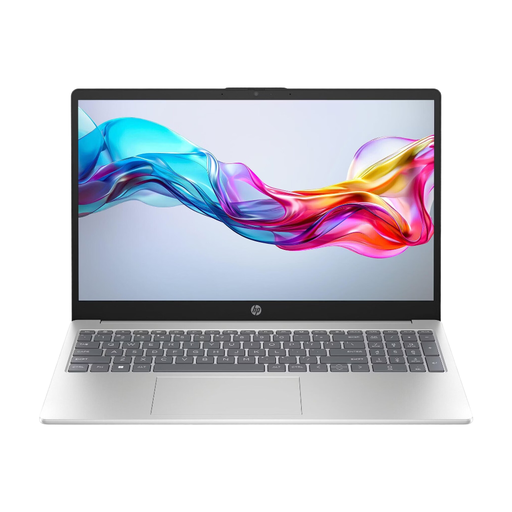
HP 11.6-inch laptop, model 15-fd1054ng

HP 11.6-inch laptop (15-fd1054ng)

Its compact size could suit you if you have limited room for your device while travelling; there’s less screen space for viewing sources side by side.

This Joybuy listing specifies an 11.6-inch Full HD IPS display, Intel Core i5 120U, 8 GB RAM, 512 GB SSD and Windows 11.

Joybuy

Frequently asked questions

How can I prepare my notes for a poor hotel internet connection?

Save the files you need locally before travelling and try opening them without an internet connection. Microsoft Support explains that OneDrive files available online only can’t be opened offline; also check the offline features of the specific app you use for editing.

Is it safe to transfer sensitive documents over hotel Wi-Fi?

Not simply because the hotel provides the Wi-Fi. Germany’s Federal Office for Information Security warns about the risks of public networks. For confidential data, check whether you can work on it locally or use an approved VPN connection.

Should I budget for a separate power adapter?

It depends on the exact configuration. According to the product page, the German Joybuy listing for the 13-inch MacBook Air M5 doesn’t include a power adapter; Apple specifies a minimum charging power of 30 W for the model. A power adapter is also sold separately or not included with the HP and Dell configurations viewed.

What are my rights in Germany if a laptop I bought online is faulty?

When you buy from a business seller, you generally have a statutory guarantee of at least two years from the date you receive the goods; the seller is your point of contact. Your Europe, the European Union’s information portal, distinguishes this statutory guarantee from a voluntary warranty. For distance sales, the right to cancel generally lasts 14 days and is subject to its own conditions and exceptions, as explained by the consumer advice centre.