For occasional cropping, a laptop that suits your studies and budget will usually do the job; there’s no need to invest in a high-performance creative laptop for that alone. If you regularly edit RAW files or photos in Photoshop, the software requirements, a comfortable display and plenty of storage become more important. Always check the exact configuration and how you’ll transfer files from your camera or memory card.
Which laptop is right for you?
Students who occasionally edit pet photos
If you mainly work on your studies and occasionally crop a pet photo, look for a well-balanced all-rounder rather than unnecessary creative power. GIMP explains how to crop an image to a fixed aspect ratio, while Notebookcheck highlights portability and a display that’s comfortable to work on as important features in a student laptop.
Students who regularly work with photos
If you often browse and edit photos, the laptop’s specs should suit your software, and its storage and usable screen space should work for both your images and tools. Adobe lists specific requirements for Photoshop, while Notebookcheck covers photo and video editing as a separate use case.
Students moving between home and campus
If you regularly take your laptop with you, you’ll need to balance screen size, weight and ports. Apple, Acer and Notebookcheck discuss these factors for portable devices and student life.
What should you look for when buying?
For occasional cropping, start by checking whether you can comfortably view your photo and tools on the display. Then compare the software, storage and portability against the way you actually study and work with photos.
| What you need |
What to check before buying |
Who should pay particular attention |
| Review the image and crop it |
Check the screen size and resolution of the exact model, as well as the space available for your photo and toolbars. GIMP explains how to use fixed aspect ratios when cropping. |
If I want to see the subject and edges of the image clearly and set the crop precisely, usable screen space is key. Around 40% of consumers put image viewing first. |
| Stay within budget |
Match the specs to the software you actually use and check what’s included with the exact model. The manufacturer states that the ASUS UX3405CA-QD1709W does not include a power adapter. |
If I mainly study and only crop photos occasionally, I don’t want to pay for performance I don’t need. Around 30% of consumers prioritise their budget. |
| Edit photos regularly |
Compare the software requirements with the RAM and SSD in the exact configuration. For Photoshop 27.x, Adobe recommends at least 16 GB RAM for optimal performance and lists 8 GB as the minimum. |
If I regularly browse or edit photos, the software and specs need to suit my workflow. Around 20% of consumers prioritise regular photo editing. |
| Travel between home and campus |
Compare the weight, screen size and ports you need; check how you’ll transfer files from your camera or memory card. Manufacturer battery-life figures aren’t based on photo-editing use. |
If I want to take my laptop with me often, the screen space I need for work must still be practical alongside the weight and ports. Around 10% of consumers put portability first. |
Common buying mistakes
-
Automatically choosing a creator laptop for a single crop
A cropping tool can do the job without requiring extensive creative performance. Photoshop’s requirements only matter if you actually plan to use the software.
First decide which programme you’ll use and how often you’ll edit photos. Then check the configuration that suits your needs.
Specs you don’t need can make your purchase more expensive.
-
Assuming OLED or wide colour gamut coverage means accurate colours
A manufacturer’s claim about colour gamut coverage doesn’t automatically prove that the specific display has been measured for colour accuracy.
If colour-accurate editing matters to you, look for measurements of the exact display configuration you’re buying. For occasional cropping, first check that you can comfortably see the subject and the edges of the image.
-
Overlooking the power adapter and photo imports when comparing models
The manufacturer explicitly states that the ASUS UX3405CA-QD1709W does not include a power adapter. Ports and card readers also vary between models.
Check what’s included, the charging power required and how you’ll connect your camera or memory card to the exact model.
You may need to buy a compatible power adapter separately for the ASUS UX3405CA-QD1709W. If your camera’s connection isn’t compatible, you may also need a suitable card reader.
Brands to consider
Acer
The Swift Go 14 OLED SFG14-71 is a compact Windows option for studying and editing photos on the go.
- For the NX.KMZEG.006 configuration, Acer Store Germany lists a 14-inch display with a resolution of 2880 × 1800 pixels, 16 GB RAM, a 512 GB SSD, a weight of 1,25 kg and a microSD reader.
- These details apply to this exact configuration and may not be the same for other Swift Go models.
Apple
The 13-inch MacBook Air with M5 could suit studying and mobile photo editing, provided the software you need runs on macOS.
- Apple lists 16 GB of unified memory, a 512 GB SSD and a 13,6-inch P3 display for the base configuration described.
- Check how you’ll transfer files from your camera or memory card. Battery-life figures are based on manufacturer estimates.
ASUS
The Zenbook 14 OLED UX3405CA-QD1709W is a Windows option for a regular workspace and occasional travel.
- ASUS lists 32 GB RAM, a 512 GB SSD, USB-A, HDMI and a weight of 1,22 kg for this configuration.
- The product page states that no power adapter is included. A stated DCI-P3 coverage figure isn’t an independent measurement of colour accuracy.
HP
The OmniBook 5 Flip 14-fp0750ng is a 14-inch Windows convertible with a touchscreen.
- HP lists 16 GB RAM, a 512 GB SSD and a 1920 × 1200-pixel touchscreen for this configuration.
- A touchscreen and 360-degree hinge aren’t essential just for cropping photos. Check whether these features would genuinely be useful for your studies.
Joybuy models with more screen space
The Joybuy models below have 16-inch displays and are particularly suited to students who want more room for photos and tools when working with images regularly. If you’ll be carrying one around, bear in mind the weight of the specific configuration.
 No image available
ASUS Zenbook S16 UM5606GA-SS335W
The larger screen could be useful for regular photo editing and comparing your image with the tools.
16 inches, WQXGA OLED, 32 GB RAM and a 1 TB SSD; an SD card reader is listed. The product title states that no power adapter is included.
View at Joybuy
 No image available
Acer TravelMate TMP216-41-TCO
This 16-inch model is a better fit if you value extra screen space more than keeping the weight down when travelling.
WUXGA IPS display, 16 GB RAM, a 512 GB SSD and Windows 11 Pro Education; the configuration described weighs 1,80 kg.
View at Joybuy
 No image available
Lenovo ThinkBook 16 G9 AHP 21UT
This 16-inch configuration is an option if you’d like more screen space for studying and regular photo work.
WUXGA IPS display, 32 GB RAM, a 1 TB SSD and a weight of 1,7 kg. USB4-C, USB-A and HDMI ports are listed.
View at Joybuy
 No image available
Lenovo ThinkBook 16 Gen 9, Intel Core Ultra 5 325
The 16-inch display gives you more room for photos and tools; consider the weight if you’ll be carrying the laptop around often.
WUXGA IPS display, 32 GB RAM, a 512 GB SSD and Windows 11 Pro; the configuration described weighs 1,7 kg. An integrated SD card reader is listed.
View at Joybuy
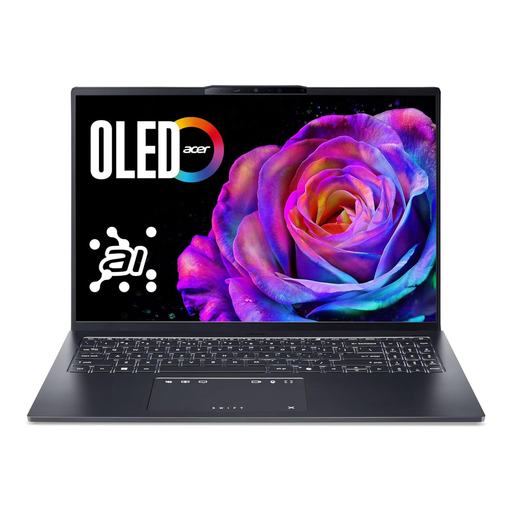 No image available
Acer Swift Go 16 OLED SFG16-73-7943
This model could be a good fit if you’d like a large display for photo work and a microSD card reader for importing images.
16-inch WUXGA+ OLED display with 120 Hz, Intel Core Ultra 7 255H, 16 GB RAM and a 1 TB SSD. A microSD card reader is listed; the product description gives the weight as around 1,6 kg.
View at Joybuy
Frequently asked questions
Do I need Photoshop just to crop a pet photo?
No. GIMP’s documentation describes a cropping tool with a fixed aspect ratio. If you also want to use Photoshop, check the requirements for the version you’ll be using and make sure it’s compatible with your operating system.
How do I set a specific aspect ratio when cropping?
GIMP’s documented cropping tool lets you set a fixed aspect ratio, then move or adjust the crop. Before exporting, check the dimensions of the remaining image.
Who should I contact in Germany if my laptop is faulty?
For your statutory consumer rights, contact the seller; responsibility doesn’t automatically lie with the manufacturer. The Verbraucherzentrale explains that there is generally a two-year legal guarantee for defects that existed when the goods were handed over. This is separate from any voluntary manufacturer’s warranty.
Can I return a laptop ordered online in Germany?
According to the Verbraucherzentrale, online consumer contracts generally come with a 14-day right to cancel, starting from the day you receive the goods. Exceptions and the terms of your specific purchase may apply; you must notify the retailer that you wish to cancel.
How should I dispose of an old laptop in Germany?
The German Environment Agency recommends returning old electrical equipment separately, for example to a recycling centre or an appropriate take-back point, rather than putting it in household waste. Remove your personal data before handing it in. Only remove the battery separately if it can be taken out.


