What should you consider when choosing one?
First, check that your software works and that the files you need are available offline. Then you can choose a screen size, level of portability and power setup to suit your usual seat.
Deutsche Bahn notes that Wi-Fi conditions can vary, while Microsoft says that OneDrive files available online only cannot be opened without an internet connection. The Hessian data protection authority points out that data protection requirements also apply when working on a train.
| Consideration |
What to check |
Who is this important to? |
| Reading spreadsheets |
Open one of your own spreadsheets at your preferred zoom level and compare the laptop’s dimensions with the space available at your usual seat. |
When I review wide spreadsheets from my seat, I want to be able to make out the columns and text clearly. That’s why around 25 % of consumers put a readable spreadsheet view first. |
| Offline access |
Save your results files locally before you leave and check that they open without an internet connection. |
When I rely on prepared results during a journey, I want to be able to open them without train Wi-Fi. Around 25 % of consumers prioritise offline access. |
| Portability and power |
Consider the weight of the laptop and charger, its size, and how long the battery lasts when you use your usual software. |
When I travel frequently, I don’t want to carry more than I need, and I want to work without relying on an available power socket. Around 20 % of consumers focus on portability and power. |
| Software compatibility |
Check that the software, add-ins, file features and, where applicable, drivers you need are compatible with the specific operating system and processor architecture. |
When my analysis depends on particular software or add-ins, I need to confirm they work on the specific device before I buy it. Around 20 % of consumers prioritise software compatibility. |
| Confidentiality |
Check the type of data, permissions, your organisation’s protection requirements and where the data is intended to be stored. |
When my results include sensitive information, I want to know before travelling whether and how I’m allowed to work on them on the train. Around 10 % of consumers put confidentiality ahead of convenience features. |
Relevant brands and product ranges
The information below applies to the specific product ranges and configurations mentioned, not necessarily to every device from each brand.
Lenovo
The ThinkPad X1 Carbon range includes compact business laptops. For the German configuration 21NS0019GE, Lenovo specifies a 14-inch display, 32 GB RAM and Windows 11 Pro.
- Lenovo lists the weight of this specific configuration as under one kilogram.
- This is a manufacturer figure and doesn’t indicate how long the battery will last while you work on spreadsheets. Check the display and specification before buying.
Apple
The MacBook Air with M5 is available in Germany in 13-inch and 15-inch versions, offering different amounts of screen space.
- For the 13-inch version, Apple specifies a 13.6-inch display and up to 15 hours of wireless web browsing.
- Apple’s battery-life figure isn’t based on testing with your spreadsheets and software. Check that the analysis software you need will work before switching platforms.
HP
The German EliteBook 8 G1i in configuration D84XYET#ABD is a Windows business laptop with a 14-inch WUXGA display, 16 GB RAM and a 512 GB SSD.
- The 16:10 aspect ratio may suit spreadsheets with lots of rows; HP explains how it compares with 16:9 from the manufacturer’s perspective.
- Other EliteBook versions may have different specifications. Check the full model number.
Samsung
The Galaxy Book6 Pro NP940XJG-KG1DE is a 14-inch Windows laptop for working on the move.
- Samsung specifies 16 GB RAM and 512 GB storage for this version.
- Manufacturer battery-life figures are no substitute for testing with your own files and settings.
ASUS
The Zenbook 14 OLED UX3405 is a 14-inch option for anyone looking for a compact laptop with an OLED display.
- ASUS lists Intel Core Ultra processors for this range.
- Model numbers vary by configuration. Check the exact specification before buying.
Joybuy laptops for analysing results on the train
This selection includes compact laptops for spreadsheets and files prepared for offline use, as well as a convertible if touch input is part of your workflow.
 No image available
Lenovo Yoga Slim 7i Aura Edition, 14-inch, 2.8K OLED, Core Ultra 7 355, 16 GB/1 TB SSD, Windows 11 Evo
The 14-inch size gives you a useful starting point for checking how your spreadsheets look at your usual seat.
The product name lists 2.8K OLED, Core Ultra 7 355, 16 GB RAM, 1 TB SSD and Windows 11 Evo.
View at Joybuy
 No image available
Microsoft Surface Laptop 8 Core Ultra 5, 24 GB, 1 TB, Platinum
If you’re looking for a compact laptop, check how your own spreadsheets look on the screen before you buy.
The product name lists Core Ultra 5, 24 GB RAM, 1 TB storage and the colour Platinum.
View at Joybuy
 No image available
HP OmniBook Ultra Flip 14-fh0670ng, 14-inch, 2-in-1, touchscreen, Core Ultra 7 258V, 32 GB RAM, 1 TB SSD, 2.8K OLED, Windows 11 Home
If touch input suits the way you work, see whether the convertible mode supports how you review results.
The product name lists a 14-inch touchscreen, 2-in-1 design, Core Ultra 7 258V, 32 GB RAM, 1 TB SSD, 2.8K OLED and Windows 11 Home.
View at Joybuy
 No image available
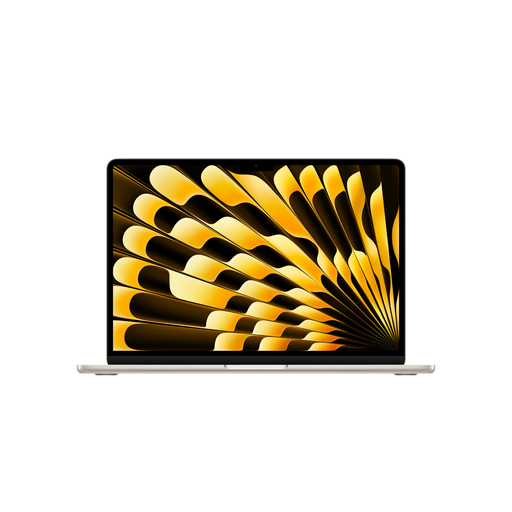
Apple MacBook Air 13-Inch (M5, 2026), 10-Core CPU/10-Core GPU, 24 GB, 1 TB SSD, Starlight, German QWERTZ Keyboard
If you’re considering a compact laptop, check that the screen size and keyboard suit your spreadsheets and the way you work.
The product name lists M5, 10-Core CPU, 10-Core GPU, 24 GB, 1 TB SSD, Starlight and a German QWERTZ keyboard. The product description says that a power adapter isn’t included, so check whether you already have a compatible one.
View at Joybuy
 No image available
ASUS Zenbook 14 UX3405CA-QD1303W, 14-inch, WUXGA OLED, Core U7 255H, Intel ARC, 16 GB/1 TB, Windows 11
The 14-inch size and OLED display are specific features you can compare with how your own spreadsheets look.
The product name lists WUXGA OLED, Core U7 255H, Intel ARC, 16 GB RAM, 1 TB and Windows 11.
View at Joybuy
Frequently asked questions
Can I rely on train Wi-Fi to access my results files?
Don’t rely on train Wi-Fi alone. Deutsche Bahn says Wi-Fi is available across the ICE fleet, but only on some IC trains and selected regional services; speeds can vary. Save the files you need locally before you travel and test that you can access them offline.
How can I make sure my synced results are available during the journey?
Save the OneDrive files you need locally on your device before you travel, then check that they open without an internet connection. Microsoft notes that files available online only can’t be opened offline.
Do I need a special laptop charger for an ICE train?
First, check the charging port and make sure you have a charger that’s compatible with your specific device. Don’t assume you’ll have your own power socket: Deutsche Bahn says that in second class on ICE trains, one socket is normally shared between two seats. The amount of usable table space also depends on your seat.
What are my rights if a laptop is delivered faulty?
For consumer purchases in the EU, you generally have a minimum of two years’ statutory protection against faulty goods from the date you receive them. This is separate from any additional manufacturer’s warranty. For online orders, the consumer advice centre also describes a general 14-day right to cancel, starting from the date you receive the goods. The relevant legal conditions and exceptions apply.
Can I review personal survey responses on the train?
There’s no blanket yes or no. The Hessian data protection authority notes that data protection requirements also apply when working on a train. Whether you can process specific data there, and what measures you need to take, depends on factors including the type of data and your organisation’s requirements.


