Who benefits from each design?

Those who draw directly on the screen

If you want to sketch card designs directly on your laptop and then continue working in laptop mode, check that the specific convertible configuration supports a pen and includes one. Lenovo lists a Yoga Pen Gen 2 for configuration 83TD008TGEEB; this doesn’t automatically apply to other variants.

Those who work with lots of open templates

If you switch between an image file and several references while creating your cards, compare the RAM and available storage with the needs of your apps and files. Adobe recommends 16 GB of RAM or more for Photoshop; this isn’t a general minimum requirement for every drawing app.

Teachers who prepare materials on the move

If you create or edit cards in different places, check that the screen, your preferred input method and the accessories you need suit the way you work. A laptop on its own doesn’t confirm that a required pen or external drawing device is included.

What should you look for when buying?

Convertible with touchscreen and pen

A good fit if: you want to draw card designs directly on the laptop screen and then carry on working in laptop mode.

Keep in mind: a touchscreen alone doesn’t confirm pen support or what’s included in the box; the documented Lenovo display has a glossy finish.

Traditional laptop

A good fit if: you don’t need to draw directly on the built-in screen and use a mouse or separate drawing device instead.

Keep in mind: if you use an external input device, you’ll need to check its compatibility and make room for it in your setup.

What you need What to check when buying Who this matters to
Using apps and references at the same time Check the requirements of your drawing app and the RAM in the specific configuration. Adobe recommends 16 GB or more for Photoshop and lists 8 GB as the minimum for this application. When I have my working file and several templates open at once, I want to choose enough RAM for the apps I use. Around 36% of consumers prioritise working across multiple items at once.
Drawing directly with a pen Check the model number, pen support and actual box contents. When I want to draw designs directly on my laptop, I need a suitable input method and want to know whether the pen is included with the configuration I’ve chosen. Around 29% of consumers prioritise drawing directly on the screen.
Viewing cards and templates clearly Compare the screen size and resolution of the exact variant with how you plan to arrange your card, tools and references. When I want to keep my card and templates in view as I work, I look at the screen area and resolution. Around 21% of consumers put workspace first.
Portability and accessories Check the weight and box contents of the configuration, and whether you’ll need a charger, pen or external input device. When I work in different places, I want to take only the accessories I need and know in advance what comes with the laptop. Around 14% of consumers prioritise a portable setup with accessories.

Common buying misconceptions

  • A touchscreen doesn’t automatically mean a pen is included

    The documented pen bundle applies to one specific Lenovo configuration and can’t be assumed to come with every convertible variant.

    Check the model number, supported pen and box contents together. If a compatible pen isn’t included, you may need to buy one separately.

  • A RAM recommendation for one app isn’t a general minimum for laptops

    Adobe’s recommendation of 16 GB or more applies to Photoshop. It doesn’t tell you what another drawing app or your specific working files require.

    First, identify the software you use, then compare its current requirements with the exact laptop configuration.

  • Accessories and statutory rights aren’t the same as a voluntary warranty

    Check what’s included in the box separately from any additional warranty cover. Your statutory rights against the seller are separate from any voluntary warranty offered.

    Check whether a charger and your preferred input device are included, and review any optional extras separately.

    You may need to buy a charger, pen or external input device separately, which can add to the cost and mean carrying extra equipment.

Brands to consider

Lenovo

The specific Yoga 7a 2-in-1 configuration 83TD008TGEEB is a documented option for drawing directly on the screen.

  • Lenovo lists a 14-inch OLED touchscreen, 16 GB of soldered RAM, a 512 GB SSD and a Yoga Pen Gen 2 for this configuration.
  • Lenovo describes the display as glossy. Pen and bundle details don’t automatically apply to other Yoga configurations.

HP

The documented OmniBook X Flip configuration 14-kb0774ngx is a convertible model with an OLED touchscreen.

  • HP lists 24 GB of RAM, a 1 TB SSD and a 14-inch OLED touchscreen for this configuration.
  • The details for this configuration don’t confirm that a pen is included or that it’s better suited to creating teaching cards. Check pen support and app compatibility separately.

Apple

The documented 13-inch MacBook Air M5 is a traditional laptop option if you don’t need to draw directly on the built-in screen.

  • Apple lists 16 GB of unified memory, a 512 GB SSD and a 13.6-inch display with a resolution of 2560 × 1664 pixels for the base configuration.
  • The technical specifications don’t confirm direct pen input on the built-in screen. Check whether you need external input devices and whether your apps are compatible.

Laptops available at Joybuy

The laptop configurations below include traditional laptops and convertibles for illustrating teaching cards while working with several references open.

HP ZBook 8 G1i 14 Ultra 9 285H with 64 GB RAM and 1 TB SSD

HP ZBook 8 G1i 14 Ultra 9 285H, 64 GB, 1 TB

If you prefer a traditional laptop setup with several references open, the listed memory specifications make this configuration worth considering.

14-inch display with a resolution of 2560 × 1600 pixels and a matte finish; 64 GB RAM; 1 TB SSD.

View at Joybuy

HP OmniBook Ultra Flip 14-fh0670ng, 14-inch convertible with stylus

HP OmniBook Ultra Flip 14-fh0670ng, 2-in-1

This 2-in-1 configuration could be a good fit if you want to draw directly on the screen; the product details list a stylus as included.

14-inch OLED touchscreen with a resolution of 2880 × 1800 pixels and a 120 Hz refresh rate; 32 GB RAM; 1 TB SSD.

View at Joybuy

Ninkear A15 Pro with 16-inch FHD display, 16 GB RAM and 1 TB SSD

Ninkear A15 Pro, 16 inch, 16 GB, 1 TB

If you’d prefer a larger screen for your cards and references, compare this laptop configuration with the space you need.

16-inch FHD display; 16 GB DDR4 RAM; 1 TB SSD; listed at 1.8 kg in the product name.

View at Joybuy
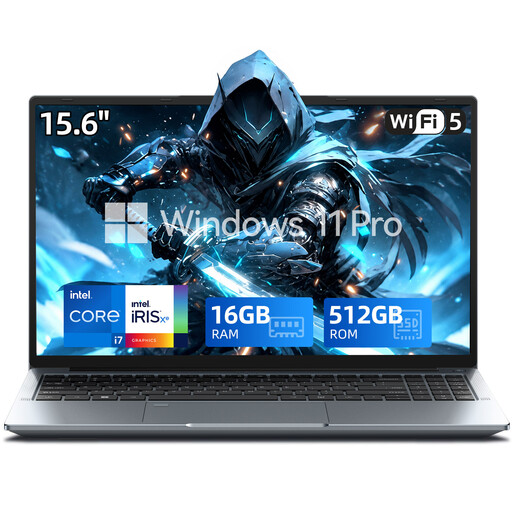
15.6-inch FHD laptop with Intel Core i7-1255U, 16 GB RAM and 512 GB SSD

15.6-inch FHD laptop with Intel Core i7-1255U

Compare this configuration’s listed display and memory with the requirements of your drawing app and reference files.

15.6-inch FHD display; 16 GB RAM; 512 GB SSD; USB Type-C port and Windows 11 Pro.

View at Joybuy
MSI Cyborg 15 A13VE-1005 with 15.6-inch FHD display, 16 GB RAM and 512 GB SSD

MSI Cyborg 15 A13VE-1005

If you work in different places, factor the listed weight into your decision about a portable setup.

15.6-inch FHD display; 16 GB DDR5 RAM; 512 GB SSD; listed product weight: 4.55 kg.

View at Joybuy

Frequently asked questions

Is 16 GB of RAM required for every teaching-card app?

No. Adobe lists 8 GB as the minimum for Photoshop and recommends 16 GB or more. For another drawing app, check its current requirements, as well as the number and size of the files you’ll have open at once.

Does a touchscreen convertible automatically come with a pen?

No, you’ll need to check what’s included with the exact configuration. Lenovo lists a Yoga Pen Gen 2 for configuration 83TD008TGEEB; this doesn’t mean other variants come with the same accessories.

What should I check before setting up a drawing workspace?

Compare your drawing app’s requirements with the specific laptop and check that your preferred pen or external input device is compatible. For Photoshop, you should also check the operating system, graphics and storage requirements.

Is the manufacturer’s warranty the same as your statutory rights?

No. Under EU rules, when you buy from a trader as a consumer, you have a legal guarantee of at least two years from the date you receive the goods, which applies against the seller. A commercial guarantee is an additional benefit, so check its terms separately.

Can I return a laptop bought online in Germany without giving a reason?

For eligible consumer purchases made at a distance, you generally have a 14-day right to withdraw from the contract from the date you receive the goods. Your Europe points out that there are exceptions; this statutory right to withdraw is not the same as a longer return period offered voluntarily.