When preparing teaching handouts at a shared desk, the key things to look for are a comfortable keyboard, a display that gives you enough room to work on documents and a format that’s easy to put away when needed. Then check that the specific configuration works with your school’s software, printers and monitors. If you handle personal data relating to pupils, you’ll also need to follow your institution’s policies.
Who is this laptop for?
Anyone creating teaching handouts
If you write longer texts and design pages, assess the keyboard and how much of your document you can see before focusing on extra processing power. Bitkom’s laptop guide and the Education and Science Workers’ Union recommend choosing a device to suit your actual needs.
People who regularly change workspaces
If you regularly clear a shared desk, a practical size and easy reconnection are important things to consider. Lenovo and Apple list different display sizes for specific laptop configurations.
Teachers working with school IT policies
If you use specified software, printers or work-related data, check that the specific configuration meets your institution’s requirements. The German Federal Office for Information Security recommends locking your screen when you leave your workspace. Policies for personal devices can vary between federal states and institutions.
What should you look for when buying?
First, work out how much room your handouts need on screen and how easy it is to write and lay them out. Then compare portability, the connections you need and compatibility with your institution’s software.
| What you need |
What to check before buying |
Who will find this especially important? |
| Writing and page layout |
Keyboard layout, the display size and resolution of the specific configuration, and whether you can connect an existing monitor. |
If I write longer texts and check page layouts directly on the laptop, I pay particular attention to the keyboard and the space available for documents. Around 31% of consumers prioritise writing and layout when buying. |
| Desk space and moving between locations |
The dimensions and weight of the chosen configuration, its charging port and the connections available at your actual workspace. |
If I often need to clear the shared desk, I want to be able to put the laptop away and reconnect it quickly. About 25% of consumers put a changing workspace and desk space first. |
| Software and connections |
The requirements of the software you use, the connections for your printer, dock and monitor, and what’s included with the specific configuration. |
If I have to create handouts using specified software and print them using the equipment available, compatibility is essential. Around 25% of consumers prioritise software, peripherals and suitable connections. |
| Privacy at work |
If you handle personal data relating to pupils, check your institution’s and federal state’s policies on devices and software, and lock the screen when leaving your desk. |
If I handle personal data relating to pupils, I need to check the applicable requirements before using a personal device and lock the screen whenever I step away. About 19% of consumers prioritise protecting this type of data. |
Avoid common buying mistakes
-
Choosing a laptop based only on processor performance
More processing power doesn’t tell you whether the keyboard, display and your existing workspace are right for preparing handouts.
Start by checking the documents and software you actually use, then weigh up the technical requirements. Bitkom’s guide recommends choosing a device to suit your own needs.
-
Assuming the connections or accessories are included
A slim laptop may need a suitable adapter to connect to existing printers, monitors or other peripherals. In its listing for the Dell Pro 14, Dell explicitly states that a power adapter is not included.
Before deciding, check the full configuration against the connections you need and what’s included in the box.
-
Confusing the manufacturer’s guarantee with your statutory rights
An additional guarantee and your statutory rights are separate forms of protection.
Check who is buying the laptop and who the seller is, then look separately into your statutory rights and any optional service plans. Your Europe explains statutory rights for consumer purchases from traders in the EU.
-
Planning to use a personal device for pupil data without checking first
Whether you can process work-related data on a personal device may depend on your institution’s and federal state’s policies. At a shared desk, other people may be able to see your open screen.
Check the applicable policies before processing this type of data on a personal device, and lock your screen whenever you leave your desk. The German Federal Office for Information Security recommends locking your screen even if you’ll only be away briefly.
Brands to consider
Lenovo
The ThinkPad E14 Gen 7 (Intel), configuration 21SX000RGE, is a 14-inch Windows laptop to consider for writing and working in different locations.
- Lenovo lists a German backlit keyboard, a matte WUXGA display, 16 GB RAM and a 512-GB SSD for this configuration.
- This doesn’t amount to an independent assessment of the keyboard feel or real-world battery life; the specifications apply to the configuration listed.
HP
The ProBook is worth considering if you’re looking for Windows and want to check specific USB and HDMI connections.
- For the ProBook 4 G1i 14, AD2N3ET#ABD, HP lists a 14-inch WUXGA display, HDMI, USB-A and two USB-C ports.
- These connections apply to this configuration and shouldn’t be assumed to be available on every ProBook.
Apple
The 13-inch MacBook Air with M5 is a compact macOS option if it’s compatible with the software and workflows you need.
- Apple lists a 13.6-inch display, MagSafe 3 and two Thunderbolt 4/USB-C ports.
- This configuration isn’t listed with built-in HDMI or USB-A ports. Apple’s battery life figures are based on the manufacturer’s test conditions, not on preparing handouts.
Dell
The Dell Pro 14 PC14250 is another 14-inch Windows laptop to consider for office work.
- The listed configuration includes Windows 11 Pro, 16 GB DDR5 RAM, a 512-GB SSD and a 14-inch IPS display with 1,920 × 1,200 pixels.
- Dell notes that this offer doesn’t include a power adapter. Specifications may vary between configurations.
Joybuy products for a shared workspace
The Joybuy products below include compact 13- and 14-inch laptops for working in different locations. Before buying, check the operating system, connections you need and what’s included against your working environment.
 No image available
HP OmniBook Ultra 14-kd0072ngx
The 14-inch size is an option for a workspace you need to clear regularly.
Listed in the product title: 3K display, Intel Core Ultra 7 356H, 16 GB RAM, 1 TB SSD and Windows 11 Home.
Joybuy
 No image available
Dell Pro 14 Essential PV14255 Copilot+ PC
This compact 14-inch Windows laptop is an option for working at a shared desk.
Listed in the product title: AMD Ryzen AI 7 350, Full HD+, 16 GB RAM, 1 TB SSD and Windows 11 Pro.
Joybuy
 No image available
Ruzava 14-inch laptop, N5095, 8 GB RAM, 256 GB SSD, Red
This 14-inch laptop could suit a workspace you need to clear after preparing your handouts.
Listed in the product title: FHD display, N5095 processor up to 2.9 GHz, 8 GB RAM and a 256-GB SSD, expandable to 1 TB; USB 3.0 and Type-C are also listed.
Joybuy
 No image available
Apple 13-inch MacBook Air (M5, 2026), 16 GB, 1 TB SSD, Silver
This compact laptop could be a good fit if the school software and workflows you need are compatible with macOS.
Listed in the product title: 10-core CPU, 10-core GPU, 16 GB, 1 TB SSD and a German QWERTZ keyboard layout. The product description states that the power adapter isn’t included, so check whether you’ll need to provide one.
Joybuy
 No image available
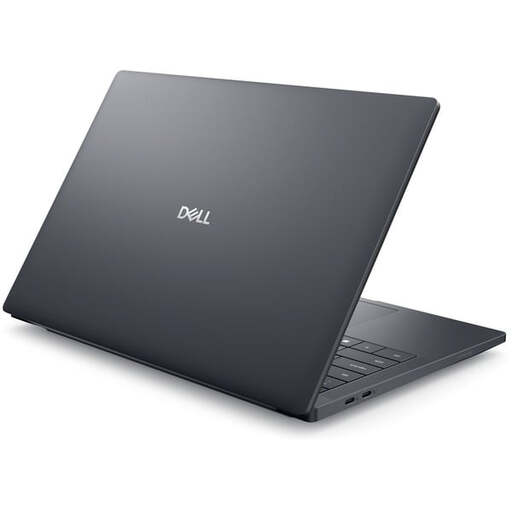
Dell Pro Max 14 Premium MA14250
This 14-inch laptop is another Windows option to consider for preparing handouts at a shared workspace.
Listed in the product title: Intel Core Ultra 7 265H, 32 GB RAM, 1 TB SSD, RTX PRO 2000 and Windows 11 Pro. The product description lists a German keyboard layout and a 14-inch FHD+ display with 1,920 × 1,200 pixels.
Joybuy
Frequently asked questions
Do I need a particularly powerful laptop to prepare teaching handouts?
Not simply for that task. Start by considering the writing, layout and software you actually use. Bitkom’s guide recommends choosing technical specifications to suit your needs; it doesn’t set a minimum processor or RAM requirement.
How do I set up a laptop at a shared desk?
Check that the connections on the specific laptop configuration work with your monitor, printer and dock, and lock the screen whenever you leave your desk. The German Federal Office for Information Security recommends locking your screen even if you’ll only be away briefly.
Can I use a personal laptop to handle personal data relating to pupils?
There’s no general yes or no without knowing the policies of your federal state and institution. An official document from the Ministry of Schools and Education of North Rhine-Westphalia sets out a declaration of commitment and authorisation from the headteacher for its own area of application; this doesn’t amount to approval across Germany.
What are my rights if my laptop is faulty?
For consumer purchases from a trader in the EU, you’re generally entitled to a minimum two-year legal guarantee from the date you receive the goods. An additional manufacturer’s guarantee doesn’t replace these rights. If a business or school authority is buying the laptop, check the contract separately. Your Europe explains EU rules on guarantees and legal rights.
What should I check about the power adapter and other adapters before buying?
Check what’s included and the connections on the specific configuration against what you have at your workspace. According to the product description, the MacBook Air configuration featured here doesn’t include a power adapter. You may also need a suitable connection for your printer, monitor or dock.


