Which laptop is right for you?

Designers creating print-critical covers

If you’re assessing the colours and typography of a printed programme, consider the display specifications, colour profiles and printer requirements together. Adobe explains colour management and suitable output profiles in InDesign.

Designers working with large scans

If you’re working on high-resolution drawings, layers and layout files at the same time, check how much memory your projects need and how much SSD storage is available. Adobe recommends 16 GB of RAM for both Photoshop and InDesign.

Mobile theatre teams

If you work in different locations, weigh up screen size, portability and compatibility with your existing scanner. Adobe notes that scanner manufacturers are responsible for their scanning software and drivers.

What should you look for when buying?

What you need What to check when buying Who is it important to?
Assessing colour and approving print files Check the display specifications for the exact model, as well as the printer’s colour profile and PDF requirements. Adobe explains colour conversion and bleed in InDesign’s export options. If I’m assessing colours on my laptop for print, I need the display specifications and printer requirements to work together. Around 36% of consumers put colour accuracy first.
Large scans and working on layouts at the same time Compare the size of your typical files with the RAM and free SSD storage available. Adobe recommends 16 GB of RAM for both Photoshop and InDesign. When I’m working with large drawings and several project files open, the available memory and file storage matter. Around 29% of consumers prioritise large scan and layout files.
Keeping your existing scanner Check for drivers compatible with your chosen operating system, as well as the connection used by your specific scanner model. Adobe also explains how to import TIFF files from a standalone scanning application. If I want to keep using my existing scanner, it needs to work with my laptop, operating system and software. Around 21% of consumers put scanner compatibility at the top of their buying list.
Working in different locations Match the screen size and weight to where you’ll be working. If you plan to use an external monitor, check the connections on the exact model. If I move between the rehearsal venue and my workspace, I want a portable laptop that still gives me room to work comfortably on layouts. Around 14% of consumers prioritise having a mobile design setup.

Which buying misconceptions should you avoid?

  • A wide colour gamut guarantees accurate print results

    Display specifications and the output profile used for printing or proofing describe different parts of the colour workflow.

    Compare the display specifications for the exact model and ask the printer about colour profiles, proofs and PDF requirements.

    Checking colours and making any necessary changes to print files can mean extra steps.

  • Every existing scanner will work straight away with a new laptop

    Whether scanning software and drivers work depends on the specific scanner and operating system you choose. Adobe advises contacting the scanner manufacturer about drivers and scanning software.

    Before buying, check support for your scanner model, its connection and any available ways to import scans.

  • The laptop specifications tell you everything about what’s included

    An accessory you need may be sold separately. HP lists the power adapter for the OmniBook Ultra 14-kd0771ngx configuration as sold separately.

    Check what’s included with the exact configuration and make sure it meets your needs.

Which brands are worth considering?

Apple

The 13- and 15-inch MacBook Air M5 offers a portable macOS workflow. Specifications and connections vary depending on the configuration you choose.

  • Apple lists P3 displays and two Thunderbolt 4 ports for the range.
  • Check that your scanner has macOS drivers and whether you’ll need an adapter to connect it. Display specifications are no substitute for a properly calibrated print workflow.

ASUS

The ProArt P16 is aimed at buyers who regularly take on other demanding creative work as well as designing covers.

  • For the H7606WP-RJ084X configuration, ASUS lists a 16-inch OLED display, 64 GB of RAM, RTX 5070, USB4, HDMI and a card reader.
  • These specifications apply to the configuration listed. A dedicated graphics card isn’t proven to be necessary for 2D covers alone.

Lenovo

The Yoga Pro 9i Gen 10 Aura Edition is a 16-inch Windows option for extra screen space and other demanding projects.

  • For the 83L0007XGE configuration, Lenovo specifies a Tandem OLED display, 64 GB of soldered RAM and an RTX 5070.
  • The display and memory specifications don’t apply to other Yoga configurations. Dedicated graphics aren’t essential for cover layouts in general.

HP

The OmniBook Ultra 14 is a more compact Windows alternative for working with scans and layouts.

  • For the 14-kd0771ngx configuration, HP lists 32 GB of RAM, a 1 TB SSD and a 14-inch touchscreen.
  • HP says the power adapter is sold separately for this configuration. Also check that any specifications listed for the range apply to the exact configuration you’re considering.

Joybuy products for scanning and cover design

This selection from Joybuy includes 16-inch laptops for scanning and layout work, as well as a Surface model for a portable design setup. Compare the exact specifications with your files, software and scanner connections.

Acer Nitro V 16 AI ANV16-42-R1HB laptop

Acer Nitro V 16 AI ANV16-42-R1HB, 16-inch, 16 GB, 1 TB SSD, RTX 5060

If you also take on demanding graphics work, you could consider a model with dedicated graphics. It isn’t automatically necessary for 2D covers alone.

The product name lists a 16-inch screen, 16 GB of RAM, a 1 TB SSD, RTX 5060 and Windows 11 Home.

Joybuy

Acer TravelMate TMP216-41-TCO laptop

Acer TravelMate TMP216-41-TCO, 16-inch WUXGA, 16 GB, 512 GB SSD

This 16-inch configuration is an option if you’d like more screen space for working on scans and cover layouts.

The product name lists WUXGA, AMD Ryzen 3 PRO 7335U, 16 GB DDR5, 512 GB SSD, AMD Radeon 660M and Windows 11 Pro Education.

Joybuy

Lenovo ThinkPad E16 Gen 3 21ST laptop

Lenovo ThinkPad E16 Gen 3 21ST, 32 GB RAM, 1 TB SSD

This 16-inch configuration is worth considering if you work on large scans and layout files at the same time.

The product name lists 32 GB of RAM, a 1 TB SSD, AMD Ryzen 7 250, Radeon 780M and Windows 11 Pro.

Joybuy

Microsoft Surface Laptop 8 Core Ultra 5

Microsoft Surface Laptop 8 Core Ultra 5, 24 GB, 1 TB SSD, Platinum

This Surface model is an option for a portable design setup. Before buying, check that the screen size and connections suit your workflow.

The product name lists 24 GB of RAM, a 1 TB SSD and the colour Platinum.

Joybuy
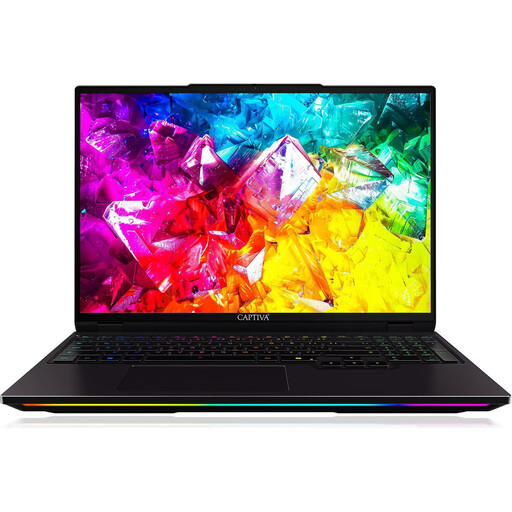
Captiva I92-069 Ultimate gaming laptop

Captiva I92-069 Ultimate, 16-inch WQXGA, 32 GB, 1 TB SSD

If you also have demanding graphics work to do, you could consider this model with dedicated graphics. This specification isn’t automatically necessary for 2D work alone.

The product name lists a 16-inch WQXGA IPS display, 32 GB DDR5, a 1 TB SSD and RTX 5080 with 16 GB GDDR7.

Joybuy

Frequently asked questions

Does a laptop for theatre programme covers need a dedicated graphics card?

Not just for editing scans and creating a 2D cover layout. First, check the requirements of the specific software you use, along with your file and display needs. Extra graphics power is more worth considering if you also take on other demanding graphics work.

How can I transfer drawings from my existing scanner into image-editing software?

One option is to scan using a standalone scanning application and then import the file as a TIFF. Adobe also describes importing via macOS Image Capture and Windows WIA. Whether these options work depends on your scanner model and the manufacturer drivers available for it.

What scan resolution do I need for a printed cover?

First, establish the original size, the intended print size and the printer’s requirements. Adobe recommends calculating the necessary scan resolution based on the scaling ratio and output resolution; there isn’t one dpi value that suits every original.

Is a display with a wide colour gamut enough to approve a print file?

No. Display specifications alone don’t determine the print result. Agree the colour profile and PDF export settings with the printer. In InDesign, Adobe explains colour conversion as well as marks and bleed.

Can I scan someone else’s original drawing and publish it in a theatre programme?

Not simply because you own the sheet or scan it yourself. Under § 16 UrhG, Germany’s Federal Ministry of Justice and Federal Office of Justice assign the right to reproduce a work to the rights holder. Under § 23 UrhG, permission may also be needed to publish or use an adaptation. Check who owns the rights, which usage rights have been granted and whether any exceptions apply to the specific drawing.