Choose your laptop based first on the environment in which you plan to run your tournament planner and its tests. Windows and macOS devices are both options for editing, working on your project and running straightforward local tests. If you use containers and run several services at once, the operating system, backend and specific memory and device configuration become more important. For working on the move, consider the display, keyboard and ports too. The specifications listed for a device don’t tell you how quickly your own project will run its tests.
Who this selection is for
Developers who run tests frequently
If you edit your tournament planner in an editor and regularly run local tests, check what your tools require and what the specific laptop configuration offers. The Visual Studio Code and pytest documentation provide different, tool-specific guidance.
Developers who use containers
If you need to run tests alongside containerised services or in a reproducible environment, the operating system, backend and available memory all need to be compatible. Docker documents the requirements for its different desktop and backend options.
People who code on the move
If you work in different places and want to view code or test results while you’re out and about, compare the display, keyboard layout and ports on each version. Lenovo Germany and Apple Germany list different device configurations and port specifications.
What to look for when buying
Windows business laptop
A good fit if: you need Windows and want to compare a specific configuration with documented specifications.
Things to consider: If you use containers, also check the requirements for your chosen Docker backend. Information about upgradeability or what’s included applies only to the specific version.
MacBook Air with macOS
A good fit if: your tools work with macOS and a compact device suits your working day.
Things to consider: Check that the ports and specific configuration meet your peripheral and container requirements. The manufacturer’s battery-life figures aren’t a measure of automated test performance.
Modular laptop
A good fit if: you want to choose the components and operating system yourself.
Things to consider: According to the manufacturer, the DIY version of the Framework Laptop 13 Pro needs to be assembled and is sold without an operating system.
| Requirement |
What to check before buying |
Who is this important to? |
| Editor and local tests |
Check that the tools you use support the operating system, and compare the CPU, RAM and SSD in the specific configuration. For Python projects, pytest recommends using a virtual environment. |
If I edit my tournament planner often and rerun tests locally, I want to consider the tool requirements and device specifications together. Around 36% of consumers put their testing workflow first. |
| Containers and parallel services |
Check the Docker backend and operating system. Docker specifies at least 4 GB of allocated memory for the Linux VM in its VMM backend; this isn’t a general minimum RAM requirement for every laptop. |
If I want to use containers or run other services alongside my editor, my chosen environment needs to support them. Around 29% of consumers prioritise containers and parallel services. |
| Working on the move |
Compare the display size and resolution, keyboard layout and ports you need on the specific version. Lenovo Germany lists a matt 14-inch WUXGA display and a German keyboard for the ThinkPad E14 Gen 7 AMD; Apple lists two Thunderbolt 4 ports for the 13-inch MacBook Air M5. |
If I code in different places, my setup needs to work for viewing code and test results and connecting the peripherals I need. Around 21% of consumers put working on the move first. |
| Customisation and what’s included |
Check the specific model, upgrade options, operating system and whether a power adapter is included. Lenovo describes the memory in the E14 range mentioned here as upgradeable; Dell lists the Pro 14 offer in question without a power adapter, while Framework’s DIY version is sold without an operating system. |
If I might customise my device later or need to budget for additional components, I check upgrade options and what’s included before ordering. Around 14% of consumers prioritise customisation and planning for extra purchases. |
Avoiding buying pitfalls
-
Applying the editor’s minimum requirements to all testing
Visual Studio Code’s hardware recommendation is for the editor. Containers and additional services may need more resources.
Before buying, note whether you’ll be running tests, databases or containers alongside the editor, then check the requirements for the tools you’ll use for them.
-
Assuming every model in a range has the same specifications
Specifications from Lenovo, Dell and Apple apply to specific configurations or versions, not automatically to every device in the same model family.
Check the full model name, RAM, SSD, keyboard, display and ports in the specific offer.
-
Assuming a power adapter or operating system is included
The Dell Pro 14 offer in question doesn’t list a power adapter; Framework describes the DIY version of the Laptop 13 Pro as a device without an operating system.
Check what’s included with the version you’ve chosen, and whether you already have suitable components and any operating system you need.
-
Confusing a warranty with your statutory rights
The Verbraucherzentrale distinguishes statutory consumer rights from a voluntary warranty. If there’s a fault, the seller is generally your point of contact for statutory claims.
Keep your proof of purchase and, if a fault occurs, first check what claims you can make against the seller.
Relevant brands at a glance
Lenovo
The ThinkPad E14 Gen 7 AMD is a documented Windows configuration. Its specifications apply only to the specific version listed.
- For article number 21T0CTO1WWDE5, Lenovo Germany lists 16 GB RAM, a 256 GB SSD, a matt 14-inch WUXGA display and a German keyboard.
- Lenovo describes the memory in this range as upgradeable. That doesn’t mean every E14 version has the same specifications or delivers a particular test performance.
Dell
The Pro 14 PC14250 is a Windows business option with specifications that vary by configuration.
- For the configuration in question, Dell lists Windows 11 Pro, 16 GB DDR5, a 512 GB SSD and a 14-inch IPS display with a resolution of 1,920 × 1,200 pixels.
- Dell lists the offer in question without a power adapter; check other configurations separately.
Apple
The 13-inch MacBook Air M5 is an option if your tools and peripherals are compatible with macOS.
- For one base configuration, Apple lists 16 GB of unified memory, a 512 GB SSD and two Thunderbolt 4 ports.
- The stated battery life isn’t a measure of how long automated tests take to run.
Framework
The Laptop 13 Pro DIY is aimed at people who want to choose their own components and operating system.
- Framework lists repairability and Linux support among the product’s features.
- According to Framework, the DIY version needs to be assembled and is sold without an operating system. Compatibility with your project dependencies should be checked separately.
Joybuy products for development and testing
This selection features Windows laptops for development and local testing. Pay particular attention to each configuration and whether it suits your tools.
 No image available
Acer TravelMate TMP216-41-TCO, 16-inch, WUXGA
For development and local testing in a Windows environment; the product title specifies Windows 11 Pro Education.
AMD Ryzen 3 PRO 7335U, 16 GB DDR5, 512 GB SSD and AMD Radeon 660M.
View at Joybuy
 No image available
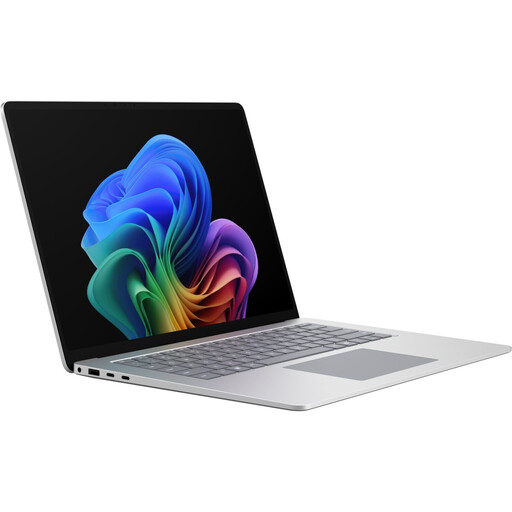
Microsoft Surface Laptop 8 for Business, 15-inch, Core Ultra X7
For development and testing in a Windows environment; the product title identifies this version as running Windows 11 Professional.
16 GB RAM, 512 GB SSD, 65 W and Platinum.
View at Joybuy
 No image available
HP OmniBook Ultra Flip 14-fh0670ng, 14-inch 2-in-1
For Windows development in different locations; the product details list several ways to use the device.
Intel Core Ultra 7 258V, 32 GB RAM, 1 TB SSD and 2.8K OLED display. According to the product details, the RAM is onboard memory and is limited to a maximum of 32 GB.
View at Joybuy
 No image available
16-inch laptop with FHD display, Core i5-8210Y
For development and local testing on Windows; the product title specifies Windows 11 Pro.
Intel Core i5-8210Y, 16 GB RAM, 512 GB SSD and RJ45 port.
View at Joybuy
 No image available
Ninkear A15 Pro, 16-inch, FHD
For development and local testing on Windows; the product title specifies Windows 11.
16 GB DDR4, 1 TB SSD and Wi-Fi 6.
View at Joybuy
Frequently asked questions
Do I need a specific amount of RAM for my tournament planner?
No. The project described doesn’t imply a general minimum. Visual Studio Code has its own hardware recommendation, which doesn’t account for the needs of additional tests and services. So check your specific laptop configuration against the tools you use.
How do I set up Python tests if my project uses Python?
The pytest documentation recommends installing pytest in a virtual project environment rather than in the operating system’s Python installation. This is a recommendation from the tool’s developers, not a requirement for every tournament planner.
What extra costs should I check before ordering?
First, check what’s included and what software you need: the Dell Pro 14 offer in question doesn’t list a power adapter, and Framework describes the DIY version of the Laptop 13 Pro as being sold without an operating system. Docker says that a paid subscription is required for certain types of professional use of Docker Desktop; whether this applies to you depends on how you use it.
Who should I contact in Germany if a laptop I bought as a private consumer is faulty?
For a consumer purchase, you generally make statutory claims against the seller; a voluntary manufacturer’s warranty doesn’t replace your statutory rights. European Union consumer information states that these rights last for at least two years from receipt of the goods. When you buy online as a consumer, you’ll generally also have a 14-day right to cancel; statutory rights and the right to cancel are separate rights.


