What to look for when buying
Compact traditional laptop
A good fit if: you mainly type longer passages and often move your device between your bag and your train seat.
The trade-off: A traditional laptop doesn’t offer a fold-back touchscreen mode. The keyboard, screen finish and weight vary by model.
Convertible with touchscreen
A good fit if: you want to mark up parts of your notes by touch or regularly use the screen in different positions.
The trade-off: Touch controls aren’t a substitute for a suitable keyboard. Also check whether a stylus you need is actually included.
macOS laptop
A good fit if: the programmes you need for recording, playback and transcription run on macOS.
The trade-off: Apple’s dictation feature converts speech to text; it isn’t automatically a tool for transcribing existing interview recordings.
Windows laptop for a set workflow
A good fit if: you need a specific Windows application or your organisation’s requirements determine your choice.
The trade-off: Feature availability also depends on the application and licence. Microsoft describes a Word workflow in which recordings are stored in OneDrive.
When buying a laptop for working on the train, people’s priorities vary according to what they want to secure first; each row lists one main concern.
| Priority |
What to check before buying |
Who it matters most to |
| Writing longer texts |
Compare the keyboard layout and typing feel, as well as the screen finish and usable workspace at your own seat. |
If I’m writing longer notes at my train seat, I need a keyboard that’s comfortable for typing and proofreading; around 28% of consumers put this first. |
| Working without a power socket |
Look for comparable battery tests and check the charging requirements and whether a power adapter is included for the specific configuration. |
If there isn’t a free socket at my seat, I still want to be able to carry on working; around 22% of consumers prioritise working without mains power. |
| Using files and software offline |
Test file access without an internet connection and check the operating system, licence, upload process and local storage options for the transcription software. |
If the Wi-Fi drops out, my recordings need to remain available and the software I need must still work; around 22% of consumers prioritise offline access and compatible software. |
| Carrying the device around often |
Compare the weight and dimensions of the exact configuration, including the power adapter you’ll carry; only consider touch or a stylus if they’ll help with your workflow. |
If I change trains often and work in a cramped space, I want a device that’s easy to carry and set up; around 17% of consumers prioritise portability and flexible use. |
| Protecting confidential content |
Check local storage, synchronisation, sharing settings and any cloud uploads made by the software you choose. |
If my notes contain personal or confidential information, I want to control how and where it’s stored and processed; around 11% of consumers put this first. |
Joybuy products for taking field notes on the train
The options below include compact devices for writing, as well as Windows and macOS models. The operating system, keyboard and your own workflow are key when choosing.
 No image available
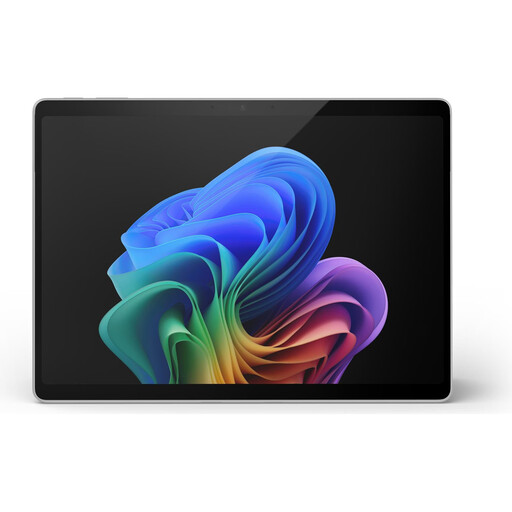
Microsoft Surface Pro 11, 13-inch, Snapdragon X Plus, 16 GB/512 GB
This touchscreen Windows option suits workflows where flexible screen positions matter. Check that the keyboard suits your typing style, particularly for longer texts.
The product name lists Snapdragon X Plus, 16 GB of memory and 512 GB of storage.
View at Joybuy
 No image available
Microsoft Surface Laptop 8, Core Ultra 5, 24 GB/1 TB, Platinum
This Windows option could suit you if the programmes you need require Windows and you want to store files locally on the device.
The product name lists Core Ultra 5, 24 GB of memory and 1 TB of storage.
View at Joybuy
 No image available
Microsoft Surface Pro 11 for Business, OLED, Core Ultra 7 266V, 16 GB/512 GB, EP2-20248
This convertible could work well if touch controls and different screen positions suit the way you take notes. Pay particular attention to the keyboard if you’ll be writing for long periods.
The product name lists an OLED display, Core Ultra 7 266V, 16 GB of memory and a 512 GB SSD.
View at Joybuy
 No image available
Ruzava 14-inch laptop, N5095, 8 GB/256 GB SSD, red
If you’ll be taking longer notes on the move, check that the keyboard and the space available at your seat suit the way you work.
The product name lists an N5095 processor, 8 GB of memory and a 256 GB SSD, expandable up to 1 TB.
View at Joybuy
 No image available
Apple MacBook Air 13-inch with M5, 16 GB/512 GB SSD, QWERTZ, silver
This macOS option is a good fit if the programmes you need run on macOS and you want to type on a German QWERTZ keyboard.
The product name lists a 10-core CPU, an 8-core GPU, 16 GB of memory and a 512 GB SSD.
View at Joybuy
Frequently asked questions about transcription on the train
Do I need a special transcription programme for the journey?
You don’t need a particular automatic transcription feature to listen to recordings and type them up yourself. If you want to use one, check the specific software and licence: Microsoft Support describes Word transcription for certain Microsoft 365 environments and a workflow in which recordings are stored in OneDrive.
How can I prepare files for a journey without internet access?
Open a test file before you travel, with your internet connection turned off. OneDrive files may only be available online; Microsoft describes the “Always keep on this device” option for making copies available offline. This doesn’t automatically mean that a separate transcription feature will work offline too.
Can I rely on Wi-Fi and a power socket on the train?
Don’t assume both will always be available. Deutsche Bahn says Wi-Fi is available on parts of its IC fleet and selected regional trains; speeds depend, among other things, on the mobile connection and the number of passengers. For second-class ICE seats, it lists one power socket per pair of seats. Set up your workflow so you can carry on working without a connection or a free socket.
What costs and rights should I consider after buying?
Check whether the listing includes the power adapter and software licence you need. When you buy from a trader as a consumer, faulty goods are covered by a statutory right to a remedy for at least two years from receipt; this is separate from any voluntary guarantee. Your Europe and the Verbraucherzentrale (German Consumer Advice Centre) explain these rights.
Can I simply record conversations to transcribe them later?
No, not in every case: Section 201 of the German Criminal Code (StGB) specifically covers recording another person’s private spoken words without authorisation. You’ll need to establish whether a particular recording is authorised and what data protection legal basis applies to any personal information. This isn’t the same as a general ban on typing up your own observations.


