What should you look for when buying?
First, check that your writing and photo apps work with the operating system of the configuration you’re considering. Then weigh up battery life, portability and screen space.
The percentages relate to consumers looking for a laptop to write a travel journal in a café; each figure reflects their main reason for buying.
| Priority |
What to check when buying |
Who is it particularly important to? |
| Writing without a plug socket |
Compare battery-life claims under similar conditions; check the charging port and whether a power adapter is included. |
If I write in a café for a long time, I don’t want to rely on finding a free plug socket. Around 29% of consumers say battery life is their top priority. |
| Portability and space |
Compare the dimensions and weight of the exact model, including any charging accessories you’ll be carrying. |
If I’m often packing and unpacking my laptop, I want it to take up as little space as possible. Around 22% of consumers name portability as their main priority. |
| Typing comfort and display |
Try the keyboard and screen in similar lighting conditions, if possible, and check which display variant is specified. |
For longer entries, I want to type comfortably and read the screen easily in a café. Around 21% of consumers prioritise typing comfort. |
| Working without Wi-Fi |
Before your trip, test whether you can open and edit your journal offline and sync it later. |
If the café’s connection drops out, I still want to be able to carry on writing. Around 14% of consumers name offline working as their top priority. |
| Photos and software |
Check the storage capacity and system requirements of the writing and photo apps you actually use. |
If I add photos to my journal or edit them while I’m away, I need enough storage and compatible apps. Around 14% of consumers prioritise adding photos. |
Joybuy laptops for writing on the go
The Joybuy models below include compact and 14-inch laptops for writing journal entries on the go. If you’re adding photos, also check that the storage and operating system suit your apps.
 No image available
Lenovo Yoga Slim 7i Aura Edition, 14-inch, OLED, Core Ultra 7 355, 16 GB, 1 TB SSD, Windows 11
This 14-inch model is worth considering if you want to view photos or other content on screen alongside your journal entries while you’re away.
Specifications listed in the product name: 2.8K OLED display, Core Ultra 7 355, 16 GB of memory, 1 TB SSD and Windows 11.
View at Joybuy
 No image available
HP OmniBook Ultra Flip 14-fh0670ng, 14-inch, 2-in-1, Core Ultra 7 258V, 32 GB, 1 TB SSD
The 2-in-1 design is worth considering if you’re looking for a convertible laptop to use in different places.
Specifications listed in the product name: 14-inch 2.8K OLED touchscreen, Intel Core Ultra 7 258V, 32 GB of memory, 1 TB SSD and Windows 11 Home.
View at Joybuy
 No image available
Apple MacBook Air 13-inch (M5, 2026), 10-core CPU, 8-core GPU, 16 GB, 512 GB SSD, Midnight, German QWERTZ keyboard layout
This compact macOS model is worth considering if your writing and photo apps work with macOS.
Specifications listed in the product name: 10-core CPU, 8-core GPU, 16 GB of memory, 512 GB SSD and German QWERTZ keyboard layout.
A power adapter isn’t included with this version; a separate USB-C power adapter is required.
View at Joybuy
No image available
Apple MacBook Air 13-inch (M5, 2026), 10-core CPU, 10-core GPU, 16 GB, 1 TB SSD, Midnight, German QWERTZ keyboard layout
This compact macOS model is an option if you want to store photos locally and your apps work with macOS.
Specifications listed in the product name: 10-core CPU, 10-core GPU, 16 GB of memory, 1 TB SSD and German QWERTZ keyboard layout.
A power adapter isn’t included with this version; a separate USB-C power adapter is required.
View at Joybuy
 No image available
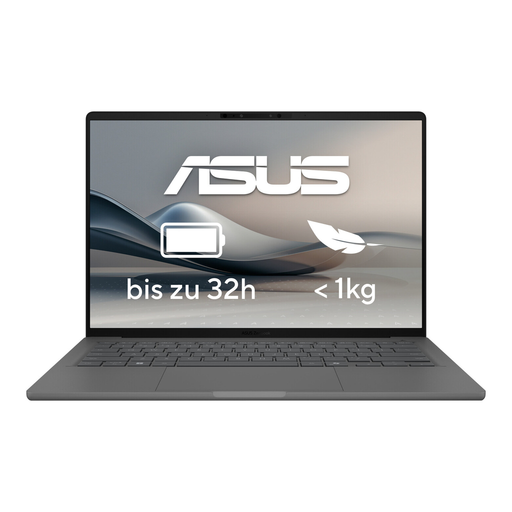
ASUS Zenbook A14 OLED UX3407RA-QD011W
This 14-inch model is an option if you’re looking for a laptop to use in different places. Check that the platform supports the apps you need.
Specifications listed in the product name: OLED display, 16 GB of memory and 512 GB SSD.
View at Joybuy
Frequently asked questions
Can I edit my travel journal without the café’s Wi-Fi?
Yes, as long as you’ve set up the app and files for offline use beforehand. Google Docs Help explains how to open, create and edit documents without an internet connection. With OneDrive, you can sync selected folders to your computer. Test the process without Wi-Fi before your trip.
How can I protect private entries when using public Wi-Fi?
The Federal Office for Information Security advises avoiding access to confidential data over other people’s Wi-Fi networks wherever possible. You can edit suitable entries offline and sync them later using a connection you trust.
Should I budget for a separate charger?
It depends on the configuration you choose. Dell doesn’t list a power adapter as included with the documented Dell 14 Plus DB14250, so check what comes with your specific model and the charging power it requires.
What are my rights when buying online in Germany?
For eligible distance contracts, you generally have a 14-day right to cancel. Your Europe also explains that goods purchased come with a legal guarantee of at least two years from receipt; this is separate from a voluntary manufacturer’s warranty.
Can I take my laptop battery on a flight?
Check the capacity of the specific battery and your airline’s requirements. EASA sets 100 Wh as the limit for devices that don’t need additional checks, and advises contacting the airline about batteries between 100 and 160 Wh and any required approvals.


