Learners with limited table space
If you revise vocabulary during short café breaks, you’ll need room for your laptop, input devices and drink. Compact models are especially worth considering for your study space.


For reviewing vocabulary lists in a café, a compact laptop is usually the better choice, provided your learning app runs on its operating system. Choose between Windows, macOS and Chromebook based on which apps and files you can use offline. Manufacturers’ battery-life claims don’t guarantee the same runtime when you’re studying.
If you revise vocabulary during short café breaks, you’ll need room for your laptop, input devices and drink. Compact models are especially worth considering for your study space.
If you study for longer or often move between locations, check the battery life and charging options of the exact configuration for the way you plan to use it.
If you already use a vocabulary service or particular files, make sure the app and the offline access you need are compatible with the laptop’s operating system.
A good fit if: Your vocabulary software or other essential programmes require Windows.
Worth noting: HP lists the OmniBook 7 Aero 13-bg1750ng as having a 13.3-inch display and weighing under 1 kg. Check the display, keyboard and battery details for the exact configuration.
A good fit if: Your learning programmes are compatible with macOS and you want to use the device for other tasks too.
Worth noting: Apple quotes up to 15 hours of wireless web browsing for the 13-inch MacBook Air with M5. This isn’t a guaranteed runtime for vocabulary apps.
A good fit if: Your lists are available through supported browser services or files you’ve prepared for offline use.
Worth noting: Google describes offline access for certain Drive files, including Google Docs, but some apps may not work offline.
| What to consider | What to look for | Who it matters most to |
|---|---|---|
| Space and portability | Dimensions, weight and display size of the exact configuration; room on the table for your laptop and other essentials. | If I study at a small café table, I need room for my laptop, input devices and drink. Around 23% of consumers put compact dimensions and low weight first. |
| Battery life | The manufacturer’s test conditions, included power adapter and supported charging method; factor in your screen brightness and app use. | If there’s no reliable socket available, I want to keep working during longer study sessions. Around 23% of consumers prioritise battery use without a socket. |
| Offline access and apps | Check the system requirements for your specific learning app, as well as the offline features and syncing options for the files you need. | If the café Wi-Fi goes down, I still want to use my vocabulary lists and the app I need. Around 18% of consumers prioritise offline access and app compatibility. |
| Screen readability | Display size, resolution, stated brightness and finish of the exact configuration; if possible, view it in similar lighting conditions. | If I’m reading lists for a long time, a clear display matters more to me than the lowest possible weight. Around 18% of consumers put readability first. |
| Features for studying | Check the exact configuration and whether the software or charging equipment you need suits the way you study. | If I mainly use my laptop for vocabulary lists, I want to choose features that also suit my other tasks. Around 18% of consumers prioritise features that meet their study needs. |
Manufacturers’ claims vary depending on how they test their devices. For example, Apple’s MacBook Air M5 figures are based on wireless web browsing or video streaming, not a vocabulary app.
Only compare battery life when the test conditions are clearly stated, and allow some leeway for your screen brightness and app use.
Google supports offline access to certain files prepared in advance, but not every app works without an internet connection.
Test your learning app and the files you need offline before you go.
Lenovo lists different configurations and display options for the IdeaPad models mentioned here.
Compare the full model number and the display, keyboard and battery details with those of the exact version on offer.
If a product is faulty, you should make a claim under your statutory rights to the seller; a voluntary guarantee has its own terms and conditions.
Keep your proof of purchase and the product description, and check your rights with the seller if a fault develops.
The OmniBook 7 Aero 13-bg1750ng is a specific example of a compact Windows laptop.
The 13-inch MacBook Air with M5 is a compact macOS option, provided your learning programmes are compatible.
The IdeaPad Slim 3 range shows why the exact model number and display option matter when choosing a compact device.
This selection includes compact laptops and a portable secondary display. Before buying, check that the operating system, keyboard and any charging equipment you need suit the way you study.
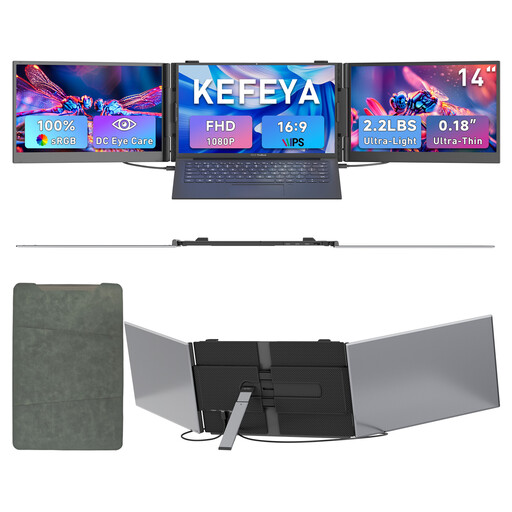 No image available
This could work as a secondary display if you already have a compatible laptop; it isn’t a standalone laptop for vocabulary lists.
The product description lists an FHD 1080P IPS display, compatibility with 13- to 17.3-inch laptops, and support for Windows and Mac.
 No image available
A compact macOS option if your vocabulary app works with macOS.
This configuration lists a 13.6-inch display, a weight of 1.23 kg, a 2560 × 1664-pixel display, 10-core CPU, 8-core GPU, 16 GB and a 512 GB SSD.
The claim of up to 18 hours refers to video streaming, not learning vocabulary. A power adapter is not included.
 No image available
This macOS model could suit your vocabulary lists if your learning software is compatible.
The specifications list a 13-inch display with a resolution of 2408 × 1506 pixels, a weight of 1.23 kg, a 6-core CPU, 5-core GPU, 8 GB and a 256 GB SSD, as well as a German QWERTZ keyboard.
Up to 11 hours of wireless web browsing is a usage estimate, not guaranteed study time. A power adapter is not included; charging requires a USB-C PD power source of at least 20 W.
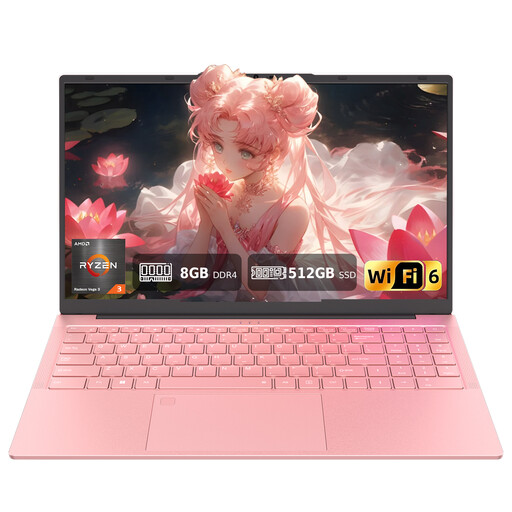 No image available
The larger display could suit you if more reading space matters more than an especially compact design.
The product details list a 15.6-inch FHD display, AMD 3250C, 8 GB DDR4, a 512 GB SSD and a wired mouse included in the box.
According to the product description, the keyboard has a US QWERTY layout.
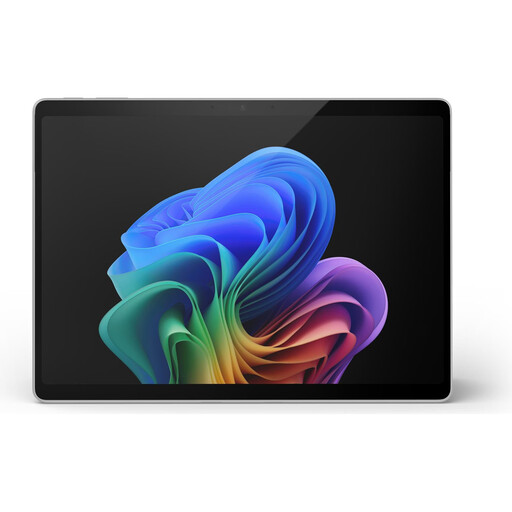 No image available
This compact Windows 2-in-1 could suit a small study space if you’d like to use the touchscreen.
The specifications list a 13-inch touchscreen with a resolution of 2880 × 1920 pixels and a device weight of 0.90 kg.
No keyboard layout is specified. Check which keyboard option is intended for longer typing sessions.
Yes. You can make certain files available offline in advance; Google lists Google Docs among them. Also check your specific vocabulary app and make sure the files you need have synced before you leave, as not every app works offline.
Check the ChromeOS update schedule for the specific model. Google notes that security and browser updates may stop after the final update, and some features or apps may no longer be supported later on.
You can’t directly apply a manufacturer’s battery-life claim to your learning app. Apple quotes up to 15 hours of wireless web browsing for the 13-inch MacBook Air with M5; one version on offer is listed as offering up to 18 hours of video streaming. These different uses don’t guarantee the same runtime when you’re studying.
The Verbraucherzentrale recommends steps for public hotspots including using encrypted websites, disabling file or directory sharing, and using a VPN. These steps don’t guarantee that a particular café network is secure.
For faulty goods bought new by a consumer in Germany, you may have statutory rights against the seller for up to two years from delivery, as explained by the Verbraucherzentrale. A voluntary guarantee is separate; the circumstances of your specific purchase will determine what applies.