What to look for when buying
Windows laptop
A good fit if: Your learning software needs a Windows desktop version, or you want to edit lists locally.
Consider: Specifications and ports can vary between configurations in the same range.
MacBook
A good fit if: Your learning programme runs on macOS and you’re looking for a compact device.
Consider: Apple’s stated battery life for web browsing and video streaming isn’t a guarantee of how long it will last while you’re learning vocabulary.
Chromebook
A good fit if: You use compatible browser services or files and set up offline access in advance.
Consider: Google says some apps won’t work offline, so check your whole study routine before you travel.
Start by considering your learning programme and whether you need offline access. Then compare the size, display and accessories required for the exact device configuration.
| Priority |
What to check before buying |
Who it matters most to |
| Portability and space |
The weight and dimensions of the exact configuration, including the power adapter you’ll need, as well as a screen size that suits you. |
If I carry my laptop around regularly and have limited space, I look for a compact design. Around 33% of consumers put easy portability first. |
| Learning software and offline access |
The app’s operating system requirements, supported file types and offline access, tested before you travel. |
If I need to access my specific programme or list at the hotel, I check the whole process without Wi-Fi. Around 27% of consumers prioritise compatible learning software and offline access. |
| Screen readability and typing |
The screen size, resolution and finish of the specific configuration, as well as the keyboard layout and typing feel. |
If I’m reading or adding to lists for longer periods, I need a clear screen and a comfortable keyboard. Around 20% of consumers put readability and typing first. |
| Power adapter and what’s included |
Whether a power adapter is included and whether an existing USB-C PD charger meets the required specifications. |
I want to know before travelling whether I can charge my device with the accessories I already have. Around 20% of consumers prioritise what’s included and charging requirements. |
Joybuy products for learning on the go
This selection includes compact macOS and Windows laptops for travel. For each model, check that the operating system, keyboard layout and accessories suit your study routine.
 No image available
Apple 13-inch MacBook Neo (A18 Pro, 2026), 8GB RAM, 256GB SSD – Indigo Blue, English QWERTY keyboard layout
A compact macOS option if you use Anki as a desktop application and want to take a 13-inch device with you.
13-inch display; 1.23 kg; 8GB RAM; 256GB SSD; Indigo Blue; English QWERTY keyboard layout.
View at Joybuy
 No image available
HP OmniBook Ultra Flip 14-fh0670ng, 14-inch 2-in-1 touchscreen laptop
A Windows option if your desktop learning software requires Windows and you’re looking for a 14-inch device.
Intel Core Ultra 7 258V; 32GB RAM; 1TB SSD; 2.8K OLED; Windows 11 Home; 1.34 kg; Eclipse Gray.
View at Joybuy
 No image available
Apple 13-inch MacBook Air (M5, 2026), 16GB RAM, 512GB SSD – Sky Blue, German QWERTZ keyboard layout
A compact macOS option if your learning programme runs on this platform and you want a device that’s easy to carry around regularly.
13.6-inch display; 1.23 kg; 10-Core CPU; 8-core GPU; 16GB RAM; 512GB SSD. The product description says a power adapter isn’t included.
View at Joybuy
 No image available
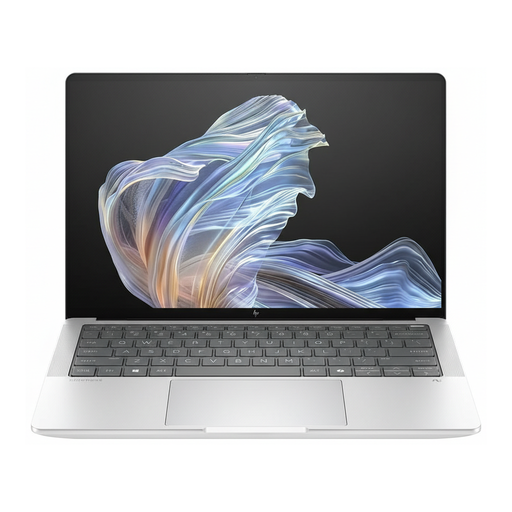
HP EliteBook Ultra G1a 14 business laptop (B66PTES)
A Windows option if you use a compatible Windows desktop application and are looking for a 14-inch laptop.
2.2K display; Snapdragon® X Elite; 16 GB RAM; 512 GB SSD; Windows 11 Pro; USB-C Power Delivery; Premium Silver design.
View at Joybuy
Frequently asked questions
Can I open vocabulary lists on a Chromebook without hotel Wi-Fi?
You can make certain Google Drive files, including Docs and Sheets, available offline in advance. Set this up while you’re connected and test the actual file before you travel; Google notes that some apps don’t work offline.
Will the Anki desktop application run on all these laptops?
No, you shouldn’t assume that. Anki lists Windows, macOS and Linux as platforms for its desktop application, but doesn’t offer a ChromeOS desktop version. If you use another vocabulary programme, check its own system requirements.
What should I bear in mind when studying over hotel Wi-Fi?
The Verbraucherzentrale points out that public Wi-Fi networks are generally not encrypted. Where possible, prepare your lists for offline use before you travel, and check that your connection is secure if you use the hotel Wi-Fi.
Which charger do I need for the ASUS Chromebook CM14 CM1405?
ASUS recommends a USB-C PD charger of at least 45 W for optimum performance. ASUS says the CM14 CM1405 doesn’t include a power adapter or power cable, so check that your charger meets the specifications for the exact configuration.
What is the cancellation period for an online purchase in Germany?
Online purchases from a business seller generally come with a 14-day right of withdrawal; the Council of the European Union notes that some exceptions may apply. Check the seller’s status and the terms of the specific purchase. The right of withdrawal is separate from claims relating to faulty goods and from a voluntary manufacturer’s warranty.


