Time-series analysts
If you regularly download and work with longer weather records or data at higher time resolutions, consider the data volume, memory and requirements of your analysis software.


Choose a laptop for weather records based first on the volume of data and the software you use to analyse it. Then consider your workspace: would a larger built-in screen or a more compact device connected to an external monitor suit you better? The German Weather Service provides datasets at different time resolutions, while Excel, Python with Matplotlib and Power BI support different workflows. So check the specific RAM and SSD configuration, software compatibility and the monitor ports you need.
If you regularly download and work with longer weather records or data at higher time resolutions, consider the data volume, memory and requirements of your analysis software.
If you compare charts and tables, consider whether the built-in screen gives you enough room or whether you’d prefer to connect an external monitor.
If you already use Excel, Python or Power BI Desktop, check the software requirements, operating system and size of your files before choosing a laptop.
First, decide which software and data you’ll use. Then you can work out whether you’d prefer a larger built-in screen or a more compact device paired with a suitable external monitor.
| Requirement | What to check before buying | Who is this particularly important to? |
|---|---|---|
| Large weather datasets | Compare the RAM and SSD against a typical file and the way you plan to analyse it. | If I work with longer records or data at higher time resolutions, I want enough headroom for my data and programmes. That’s why around 29% of consumers put data volume and processing first. |
| Viewing charts and tables at a glance | Consider screen size and resolution together. If you plan to use an additional monitor, check that it has the video port you actually need. | At my desk, I want to compare charts and raw values easily without constantly switching views. Around 29% of consumers therefore prioritise the built-in screen space for charts. |
| Compatible analysis software | Check that your software is supported and that it can handle the files you need to import. Microsoft Support lists a maximum of 1,048,576 rows per Excel worksheet. | If I’ve already chosen an analysis programme, I want my laptop to meet its requirements and support my file format. Around 21% of consumers put software compatibility first. |
| Ports for your workspace | Match your monitor connectors and peripherals to the video, USB and charging features of the specific configuration. USB-C alone doesn’t guarantee a particular video function. | If I already have a monitor and accessories, I want to connect everything easily. Around 14% of consumers focus first on the ports available at their desk. |
| Occasional use on the go | Compare the weight of the specific model and battery test results under conditions similar to how you’ll use it away from a socket. | If I work with weather data away from my usual desk, portability and battery life matter to me. Around 7% of consumers prioritise occasional use on the go. |
Laptops with similar names in the same range can have different specifications. The figures reported by Notebookcheck apply to the specific configuration tested, not automatically to every model in the range.
Before you buy, compare the full model number, processor, RAM, SSD, screen and what’s included in the box.
A compact device gives you less built-in workspace. With a larger screen, the diagonal measurement alone doesn’t tell you how many rows of data will be visible at once.
Choose a laptop that suits your desk, and check the ports on the specific model if you plan to use an external monitor.
A compact laptop may require an additional monitor or a suitable connection solution.
Dell explicitly states that a configured version of the Dell 16 DC16255 does not include a power adapter.
Check what’s included with the specific offer and whether the supplied charging accessories suit your needs.
If there’s no suitable power adapter in the box, you may need to buy a compatible one separately.
A voluntary warranty is not the same as your statutory rights against the seller. EU guidance describes a statutory guarantee of at least two years for consumers.
Keep your proof of purchase and details of any promised product features, and check any additional warranty separately from your statutory rights.
The ThinkPad L14 and E14, along with the IdeaPad Slim 5, offer different office and all-round configurations. These details refer to the specific models described, not the whole Lenovo range.
The ExpertBook PM3406 is one compact office laptop you could use for comparison.
The HP ProBook 4 G1a AD2M8ET#ABD gives you a specific 14-inch laptop to compare for working from home.
The Dell 16 DC16255 is an example of a larger laptop you could consider for a permanent workspace.
The Joybuy models below include larger screens for a permanent desk and more compact devices for a space-saving workspace. For each model, check that the ports and software are right for the way you work.
 No image available
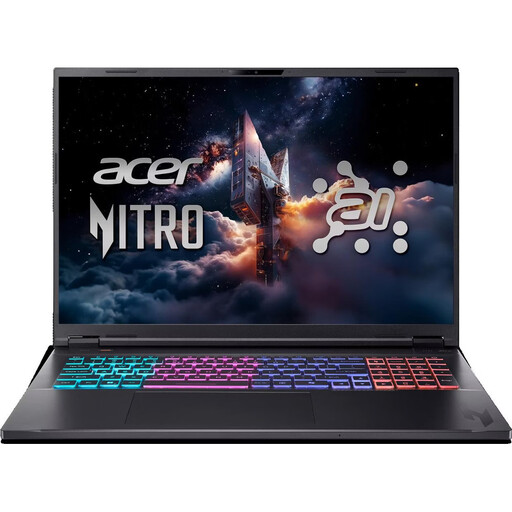
The 18-inch screen is worth considering if you prefer a large built-in display at a permanent desk.
The listed specification includes 16 GB RAM, a 1,000 GB SSD, RTX5070 and Windows 11 Home. Bear in mind that it has an English International keyboard layout.
 No image available
The 16-inch screen gives you a larger built-in display for working at your desk.
The product title lists QHD, 16 GB RAM, a 1 TB SSD, GeForce RTX 5060 and Windows 11 Home. Check that the software requirements and ports on this specific configuration suit the way you work.
 No image available
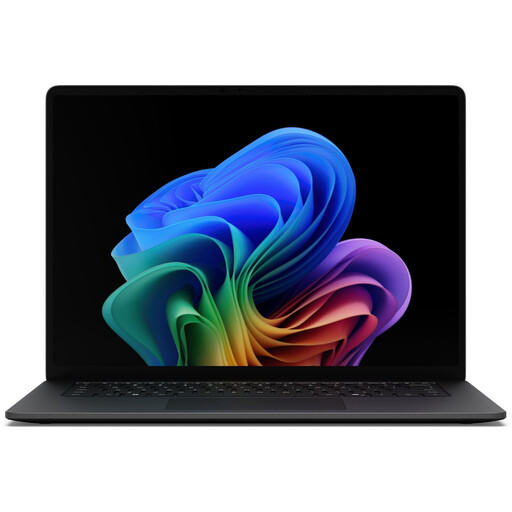
The 15-inch screen listed here could be a good fit if you want more built-in workspace at your desk.
The listed specification includes 16 GB RAM, a 512 GB SSD and Thunderbolt 4. Check that the ports on this specific model work with your monitor and accessories.
 No image available
The 13-inch format is a more compact option if you need less built-in space for charts or plan to use an external monitor.
The listed specification includes a touchscreen, 24 GB RAM, a 1 TB SSD, integrated Intel graphics and Windows 11 Pro.
 No image available
The 14-inch format is a more compact choice if you want to keep your workspace small.
The product details list a 2-in-1 2.8K OLED touchscreen, Intel Core Ultra 7 258V, 32 GB RAM, a 1 TB SSD, two Thunderbolt 4 ports and Windows 11 Home.
The DWD data formats described and Matplotlib’s features don’t indicate that a dedicated graphics card is generally needed for standard time-series charts. What matters is your specific software and workload; this doesn’t cover other tasks not discussed here.
First, choose the parameter, weather station and time resolution. The German Weather Service provides historical and current records at several resolutions for download. You can then choose a charting tool that suits the way you work.
Microsoft Support lists a maximum of 1,048,576 rows per worksheet for the Excel versions covered. Compare this limit with the number of rows you’re actually importing; it isn’t a limit on the DWD dataset itself.
No. Your statutory rights for faulty goods against the seller are separate from a voluntary warranty. EU guidance describes a statutory guarantee of at least two years for consumers; the terms and conditions of any additional warranty set out its cover and requirements.
According to the consumer advice centre, online consumer contracts generally come with a 14-day right of withdrawal. When the period starts and whether any exceptions apply depend on the specific contract. Check the terms and notify the other party to your contract that you wish to withdraw.