When building a small website by a bright window, the display should be easy to read in your actual workspace. A high brightness rating alone won’t rule out distracting reflections. The German Federal Institute for Occupational Safety and Health (BAuA) treats glare protection as a topic in its own right. Your workflow also depends on whether the laptop supports the software you need and has enough screen space for your editor, browser and developer tools. Then compare matte displays, larger screens and portable formats to suit where you work, and check the exact configuration.
Which approach is right for you?
Building a website by a window
If you regularly write and test your website beside a bright window, start by assessing the screen finish and reflections in your actual workspace. The BAuA treats glare protection as a separate topic, while Lenovo lists matte displays for certain ThinkPad T14 configurations.
Working between an editor and browser
When switching between source code, browser previews and developer tools, make sure your laptop supports the software you need and offers enough screen space for your workflow. MDN Web Docs lists a code editor, up-to-date browsers and developer tools among the essentials.
Getting started while working on the move
If you’re building your small website in different locations, weigh up portability, screen space and the features you need. Also check whether the specific configuration includes any accessories you’ll need.
What should you look for when buying?
First, check that you can work comfortably at the window where you plan to set up. Then consider support for your web tools, the right screen size and what’s actually included in the box.
| Consideration |
What to check before buying |
Who it matters most to |
| Screen readability by a window |
Check the screen finish and brightness rating for the exact version, and assess reflections where you’ll be working. Lenovo lists 500 cd/m² for the ThinkPad T14 Gen 6 AMD 21QJ002LGE and 400 cd/m² for the ThinkPad T14 Gen 6 Intel 21QC003JGE. These figures apply to different configurations; they don’t measure how easy the screen is to read by a window. |
If you regularly work beside a bright window, you’ll want to read text without distracting reflections. Around 36% of consumers put screen readability by a window first. |
| Web development workflow |
Check that the operating system and configuration are compatible with the development software you need. MDN Web Docs recommends a code editor and up-to-date browsers; depending on your website, you may also need a local test server. |
When switching between your editor, browser and developer tools, you’ll want your software to run smoothly and your windows to remain easy to navigate. Around 29% of consumers prioritise a smooth web development workflow. |
| Portability or screen space |
Compare the screen size, weight and ports on the specific version. Apple offers the MacBook Air with M5 in 13- and 15-inch sizes. |
If you often change where you work, you’ll need a portable laptop but still want enough room for your editor and preview. Around 21% of consumers put this balance first. |
| What’s included |
Check whether the power adapter is included with your chosen configuration. HP lists it as sold separately for the EliteBook offer reviewed. |
Before buying, you’ll want to know whether anything you need for your planned use is missing. Around 14% of consumers prioritise what’s included and the total cost. |
Common buying mistakes
-
Assuming a brightness rating guarantees a reflection-free screen
The stated display brightness alone doesn’t tell you whether the screen will be easy to read by your window. The finish, lighting and positioning all affect how it performs in use.
Compare the specific display version and check whether windows or bright surfaces are likely to cause distracting reflections in your planned workspace.
-
Assuming every model in a range has the same display specifications
According to Lenovo, the ThinkPad T14 Gen 6 21QJ002LGE and 21QC003JGE differ in brightness, memory and SSD capacity.
Check the full model or product number against the details for the specific version on offer.
-
Overlooking a power adapter sold separately
HP lists the power adapter as sold separately for the EliteBook 8 G2i offer reviewed.
Check what’s included and whether you’ll need a compatible power adapter for your chosen configuration.
If you need a power adapter, you may have to buy one separately.
Brands to consider
Lenovo
The ThinkPad T14 Gen 6 configurations include specific matte display options to compare for a bright workspace.
- Lenovo lists a matte 14-inch display with 500 cd/m², 32 GB RAM and a 1 TB SSD for the 21QJ002LGE.
- For the 21QC003JGE, Lenovo lists a matte 14-inch display with 400 cd/m², 16 GB RAM and a 512 GB SSD. These details apply only to the configurations listed; the brightness ratings don’t confirm how easy the screen will be to read by your window.
Apple
The MacBook Air with M5 offers a macOS option if you’re weighing up portability against a larger screen.
- Apple lists 500 nits for the range, with options featuring 16 or 24 GB of unified memory.
- The brightness rating doesn’t guarantee a reflection-free screen by a window. Check how it looks in your workspace, and choose the memory and ports you need.
HP
The EliteBook 8 G2i is a business laptop to consider if you’re looking for more screen space.
- For the EliteBook 8 G2i with product code DK4X0AT#ABD, HP lists a 16-inch WUXGA display, 32 GB RAM and a 512 GB SSD.
- HP lists the power adapter as sold separately for the offer reviewed. The display specifications don’t indicate that it’s particularly suited to a bright spot by a window.
Joybuy products
The Joybuy models below cover matte or anti-glare displays, a range of screen sizes and configurations for building a website.
 No image available
HP ZBook 8 G1i 14, Ultra 9 285H, 64 GB RAM, 1 TB SSD
A compact business laptop for working in different places with an anti-glare display.
14-inch WQXGA IPS anti-glare display, Windows 11 Pro, 64 GB RAM, 1 TB SSD and a stated weight of 1.43 kg.
View at Joybuy
 No image available
HP ZBook Power 16, Ryzen 7 8845HS, 32 GB RAM, 1 TB SSD
The matte, anti-glare finish is worth comparing if you often work beside a bright window.
16-inch WUXGA display with 400 cd/m², Windows 11 Pro, 32 GB RAM and 1 TB SSD. The product description advises against exposing the laptop to direct sunlight for extended periods.
View at Joybuy
 No image available
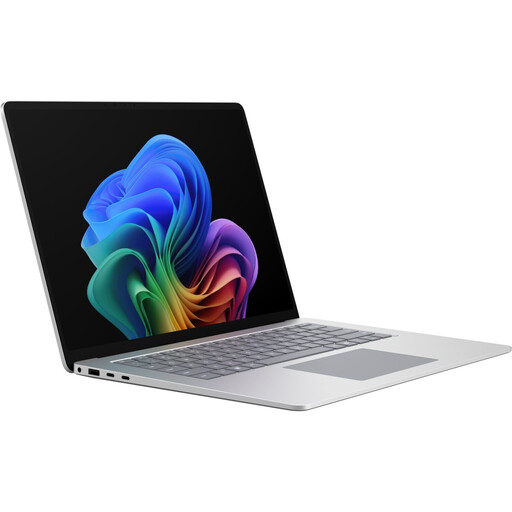
Microsoft Surface Laptop 8 for Business 15-inch, Core Ultra X7, 16 GB RAM, 512 GB SSD
The larger screen could be a good fit if you want room for your editor and browser preview on one display.
15-inch touchscreen with a resolution of 3,270 × 2,180 pixels and 600 cd/m², Windows 11 Pro, 16 GB RAM, 512 GB SSD and a stated weight of 1.67 kg. The product description advises against exposing the laptop to direct sunlight for extended periods.
View at Joybuy
 No image available
Apple MacBook Air 15-inch with M5 (2026), 16 GB, 512 GB SSD, Midnight, German QWERTZ keyboard
A macOS option with a larger built-in display if you want to work with your editor and preview side by side.
15.3-inch display, macOS, 16 GB unified memory and 512 GB SSD. Apple lists 500 nits for the MacBook Air M5 range; this doesn’t guarantee a reflection-free screen. According to the product description, a power adapter isn’t included.
View at Joybuy
 No image available
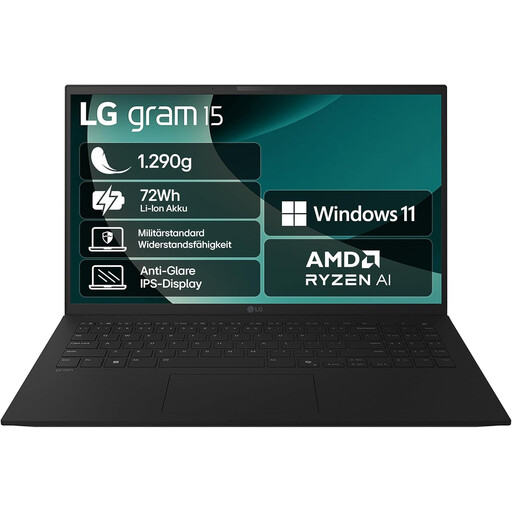
LG gram 15 (2025), Ryzen AI 7 350, 16 GB RAM, 1 TB SSD
The matte, anti-glare display is worth comparing if you often work by a window or in different locations.
15.6-inch IPS display, Windows 11 Home, 16 GB RAM, 1 TB SSD and a stated weight of around 1.29 kg.
View at Joybuy
Frequently asked questions
Is a high nits rating enough for working right by a window?
No. The brightness rating alone isn’t enough. Also check the screen finish and whether windows or bright surfaces cause distracting reflections in your workspace. The BAuA treats glare and protection from sunlight as separate topics.
What software do I need to build a simple website?
For beginners, MDN Web Docs recommends a code editor and up-to-date browsers; depending on your website, you may also need a local test server. Browser developer tools let you check HTML, CSS and different screen sizes, among other things.
How should I set up a workspace by a window?
Position your screen and seat to minimise distracting reflections, and use suitable sun protection if you need to control strong daylight. The workplace regulation cited by the BAuA applies to the workplaces and home-working spaces it covers; it isn’t a blanket requirement for every home desk.
What extra costs and rights should I check when buying online?
First, check whether a power adapter required for your configuration is included. EU consumer information states that eligible purchases from a trader are covered by a minimum two-year legal guarantee; this is separate from a voluntary manufacturer’s warranty. For ordinary online distance purchases, you generally have 14 days from delivery to withdraw from the contract, subject to the relevant conditions and exceptions.


