Who this guide is for

Guide authors writing together

If you share drafts for review, your word processor and its features should suit the changes and comments your contributors need to work on. Microsoft Support explains Track Changes in Word and notes that the web version has fewer features.

Writers with a fixed workspace

If you write longer sections and refer to sources or images alongside your text, compare the screen, keyboard and ports on the exact model. The German Federal Institute for Occupational Safety and Health describes using a separate monitor and keyboard as one option for a fixed workspace.

Writers working in different places

If you move between workspaces, overall weight, power supply and access to your files all matter. Battery-life figures are only meaningful under the manufacturer's stated test conditions. The German Federal Institute for Occupational Safety and Health highlights overall weight as a consideration when you work in different places frequently.

What to look for when choosing

Windows laptop with desktop word processing

A good fit if: you want to use the Windows desktop version of Word. Check the specific Windows version, keyboard and software you need.

Things to consider: screen size, ports and specifications vary between models; details for a product range don't necessarily apply to every device.

MacBook with desktop word processing

A good fit if: you prefer macOS and the version of Word you need is compatible with the installed macOS.

Things to consider: check compatibility with your existing peripherals and ports. Apple's claim of up to 15 hours of wireless web browsing for the MacBook Air M5 tested is not a battery-life figure for writing.

Chromebook with Word in a browser

A good fit if: the available web features meet your needs and you want to collaborate in a browser.

Things to consider: Microsoft says Word for the web has fewer features than the desktop app; the Windows and Mac desktop versions of Microsoft 365 cannot be installed on a Chromebook.

Priority What to check when buying Who it's especially important for
Changes and collaboration Make sure your word processor, operating system and required review features suit the way you work together. When I review drafts with contributors, Track Changes and comments need to fit the way we work. Around 36% of consumers prioritise collaboration and tracking changes.
Writing comfort and readability Compare the screen size, finish, keyboard layout and ports on the exact model. When working on long texts, I want to read drafts and edits clearly and write comfortably. Around 29% of consumers prioritise writing comfort and readability.
Portability and connectivity Check the weight, power supply, access to your files and the software you need where you write. When I move between workspaces, I need to be able to use my device and workflow easily in each one. Around 21% of consumers prioritise portability and access without a reliable connection.
Images and files Check your storage needs, the ports you require and whether you'll use an external monitor. If my guide contains lots of photos or source files, I need the right ports and enough space for my files. Around 14% of consumers prioritise working with images and files.

Common laptop-buying pitfalls

  • Assuming Track Changes works the same on every operating system

    Microsoft says Word for the web has fewer review features than desktop Word. The Windows and Mac desktop versions of Microsoft 365 cannot be installed on a Chromebook.

    Before choosing an operating system, check that your word processor supports the way you plan to share and review your work.

    If your workflow depends on desktop features, you'll also need to plan for access to a compatible desktop app.

  • Assuming every configuration in a product range is the same

    Display, memory and ports can vary between models. Acer labels the details for the Aspire Go 15 AG15-42P NX.J7WEG.007 as information for that specific configuration, not the whole range.

    Compare the full product number and details of the exact configuration with your devices and files.

  • Taking manufacturer battery-life figures as writing time

    Apple's claim of up to 15 hours for the MacBook Air M5 refers to wireless web browsing, not a writing and editing workflow.

    Check the test conditions behind battery-life claims, and plan for power at the places where you actually write.

Key brands at a glance

Lenovo

The ThinkPad E14 Gen 7 21SX000RGE is a specific 14-inch Windows laptop option for writing.

  • Lenovo lists a matte screen, 16 GB RAM, a 512 GB SSD, Windows 11 Pro and a German keyboard for this configuration.
  • These details apply to configuration 21SX000RGE and may not apply to every ThinkPad E14 configuration.

Acer

The Aspire Go 15 AG15-42P NX.J7WEG.007 is a specific example of a larger laptop format for a fixed workspace.

  • Acer lists Windows 11 Home for configuration NX.J7WEG.007.
  • Check the details for the exact configuration; specifications for one model don't automatically apply to the whole Aspire Go range.

Apple

The 13-inch MacBook Air with M5 is a macOS option, provided the word processor you need is available for it.

  • Apple claims up to 15 hours of wireless web browsing for the MacBook Air M5.
  • The manufacturer's figure applies to the stated use and doesn't guarantee battery life while writing.

HP

The HP 255 G10 A23HCEA#ABD is a specific laptop configuration to compare with other screen and specification options.

  • The full model name helps you identify the details for the right configuration.
  • Details for one configuration shouldn't be assumed to apply to other models in the HP 255 range.

Joybuy laptops for writing

The Joybuy picks below include Windows laptops and MacBook Pro models for writing. Before choosing the Ninkear YBook15, check that its software and change-tracking workflow suit your needs.

Lenovo ThinkPad E16 Gen 3 21ST, Ryzen 7 250, 32 GB RAM and 1 TB SSD

Lenovo ThinkPad E16 Gen 3 21ST, Ryzen 7 250, 32 GB RAM, 1 TB SSD

The 16-inch format could suit you if you mainly work on longer drafts at a fixed workspace.

The product name lists AMD Ryzen 7 250, Windows 11 Pro, 32 GB RAM, a 1 TB SSD and Radeon 780M.

Check the keyboard layout and ports on the exact configuration against your workflow.

View at Joybuy

Ninkear YBook15 2-in-1, 15.6-inch, 8 GB RAM and 512 GB SSD

Ninkear YBook15 2-in-1, 15.6-inch, 8 GB RAM, 512 GB SSD

This device could suit you if you want touch input and a flexible setup with a 360° hinge.

The product details list a 15.6-inch FHD IPS touchscreen, 8 GB DDR4 and a 512 GB SSD.

Check that the operating system and available features suit the way you track and share changes.

View at Joybuy

Ninkear A15 Pro, 15.6-inch, 16 GB RAM and 512 GB SSD

Ninkear A15 Pro, 15.6-inch, 16 GB RAM, 512 GB SSD

This configuration could suit a Windows workflow with a larger screen; check that the installed software meets your contributors' requirements.

The product name lists Windows 11, a 15.6-inch FHD IPS display, 16 GB DDR4 and a 512 GB SSD.

It weighs 1.6 kg, which may be worth considering if you work in different places.

View at Joybuy
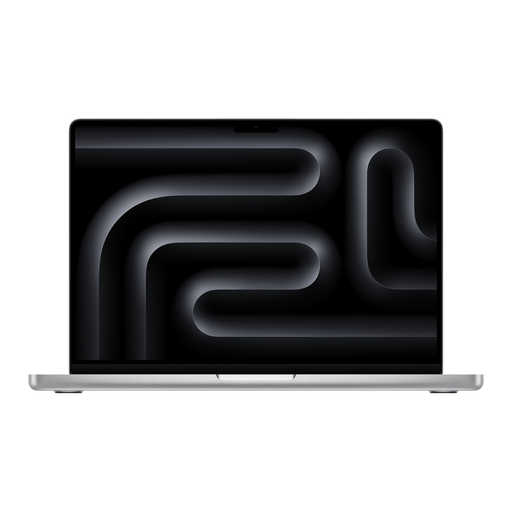
Apple MacBook Pro 14-inch with M5 Max, 36 GB RAM and 2 TB SSD, Silver, German QWERTZ keyboard

Apple MacBook Pro 14-inch (M5 Max, 2026), 36 GB RAM, 2 TB SSD, QWERTZ

A macOS option for desktop Word, provided the version you need is compatible with the installed macOS.

The product name lists M5 Max, 36 GB memory, a 2 TB SSD and a German QWERTZ keyboard.

A power adapter is not included, so you'll need to arrange one separately.

View at Joybuy

Apple MacBook Pro 14-inch with M5 Pro, 24 GB RAM and 1 TB SSD, Space Black, German QWERTZ keyboard

Apple MacBook Pro 14-inch (M5 Pro, 2026), 24 GB RAM, 1 TB SSD, QWERTZ

This macOS configuration could suit desktop Word, provided the version you need is compatible with the installed macOS.

The product name lists M5 Pro, 24 GB memory, a 1 TB SSD and a German QWERTZ keyboard.

A power adapter is not included, so you'll need to arrange one separately.

View at Joybuy

Frequently asked questions

Is Word for the web enough to track changes to a guide?

Word for the web supports Track Changes and comments, but Microsoft says it has fewer features than the desktop app. Before choosing a device, check that its review features meet the needs of your contributors.

Can I install the Windows or Mac version of Word on a Chromebook?

No. Microsoft says the Windows and Mac desktop versions of Microsoft 365 cannot be installed on a Chromebook. If you're considering a Chromebook, check whether Word in a browser offers all the features your workflow needs.

How can I set up a fixed workspace for longer sessions?

At a fixed workspace, if it suits your setup, you can raise your laptop and use an external keyboard and a separate monitor. The German Federal Institute for Occupational Safety and Health describes this as one option; check which ports you'll need first.

Are tracked changes in Word deleted when I select ‘No Markup’?

No. Microsoft says ‘No Markup’ only hides changes temporarily. To remove them, you need to accept or reject them.

What rights do I have if a laptop is faulty or I buy one online in Germany?

When you buy from a business seller in the EU, you generally have a two-year legal guarantee from the date you receive the goods. This is separate from any voluntary warranty. For online orders, you generally have a 14-day right to cancel from the date you receive the goods, although exceptions and the terms of the specific purchase may apply. The EU and the German consumer advice centre explain these rights. The right to cancel because you've changed your mind is separate from claims relating to faulty goods.