For writing seminar questions between client appointments, start by checking the keyboard, display and compatibility with your work software; extra processing power is not the priority for this kind of writing task. If you carry your laptop around frequently or work away from a power socket, compare the weight and independent battery tests for the specific configuration. Also check that your templates, software and, where relevant, requirements for handling client data are compatible with the operating system and your workflow.
Who is a laptop for writing during breaks suited to?
Frequent writers between appointments
If you regularly draft and revise questions, look for a keyboard and display that make it easy to work on longer texts. The specifications for a particular model tell you about its features, not how comfortable it feels to type on.
Seminar planners who are always on the move
If you often carry your laptop from one appointment to the next and don't always have access to a power socket, compare the weight of the exact variant. A manufacturer's maximum battery-life claim is no guarantee of how long it will last during your working day.
Writers who need to follow workplace requirements
If you need to use specific documents or software, or follow organisational requirements, check that they are compatible with the operating system. If your questions include clients' personal data, the right way to work also depends on the data and how it will be used; the Federal Commissioner for Data Protection and Freedom of Information recommends assessing each case individually.
What should you look for when buying?
| Consideration |
What to check before buying |
Who it matters most to |
| Keyboard and text display |
Check the keyboard layout and display on the exact variant. Lenovo lists a backlit German keyboard and a matte 14-inch display for the ThinkPad X1 Carbon 21NX008PGE; Apple specifies a 13.6-inch display for the 13-inch MacBook Air M5. |
When I'm drafting and revising questions during short breaks, I want a keyboard and display that are comfortable to work with. Around 31% of consumers put typing comfort first. |
| Weight and working away from a power socket |
Compare the weight of the specific configuration and independent battery tests under similar usage conditions. ASUS lists the Zenbook A14 UX3407QA-QD313W at 980 g; Apple's claim of up to 18 hours for the MacBook Air is a manufacturer's figure. |
If I often carry my laptop between appointments and can't reliably charge it, weight and battery life in everyday use matter. Around 25% of consumers put portability first. |
| Work software and offline files |
Test your software, templates and work accounts on the operating system you want. Microsoft Support explains local storage options and the requirements for cloud AutoSave; test an authorised file in advance without an internet connection. |
If I need to work on my seminar questions while travelling without internet access, I want to make sure my software and files work with my workflow. Around 19% of consumers prioritise software and working offline. |
| Confidentiality |
If your questions include personal data, check with the relevant organisation which devices, storage locations and accounts are permitted. Assess the type of data and working environment in each case rather than making general assumptions about mobile working. |
If my questions could include identifiable client details, I want to work on them only within an authorised and secure workflow. Around 13% of consumers put confidentiality first. |
| Cost and features |
Check the full configuration, what's included in the box and the service terms for the specific offer; don't compare model names alone. |
If I'm mainly writing, I want to pay for the features I need and avoid unnecessary extras. Around 12% of consumers prioritise cost and features. |
Pitfalls when buying a laptop for writing on the go
-
Assuming a claimed maximum battery life is guaranteed writing time
A manufacturer's figure doesn't tell you how long the device will last with your apps open and your connection settings in use.
Look for independent battery tests of the exact configuration and plan where you can charge during the working day.
-
Buying based on the model range rather than the configuration
Features and what's included can vary between model variants. Dell notes that changing your selection can affect the specifications and delivery date; HP also lists configuration differences.
Compare the full model number, keyboard layout, memory, storage and what is included in the specific offer.
-
Assuming cloud AutoSave guarantees you can work offline
Microsoft Support explains that AutoSave is for files on OneDrive or SharePoint; saving files locally is a different workflow.
Before your next appointment, test an authorised file that is available locally: open it offline, save your changes and then check that they sync.
-
Confusing a voluntary warranty with your statutory rights for faulty goods
A warranty is an optional extra service with its own terms. Your statutory rights if goods are faulty are subject to the applicable conditions and are separate from a warranty.
Check the seller, contract terms and warranty cover separately before relying on a particular service route.
Useful brands to consider
Lenovo
The ThinkPad X1 Carbon is an example of a lightweight Windows business laptop for frequent writing.
- For configuration 21NX008PGE, Lenovo lists a matte 14-inch WUXGA display, a backlit German keyboard and Windows 11 Pro.
- The memory on this variant is soldered. Lenovo marked it as sold out on its own product page; this does not indicate availability from other retailers.
Apple
The 13-inch MacBook Air M5 is a macOS option, provided it works with the software you need for work.
- Apple lists a 13.6-inch display, with configurations starting at 16 GB of memory and a 512 GB SSD.
- The claim of up to 18 hours is a manufacturer's figure and doesn't show how long the battery will last when writing between appointments.
ASUS
The Zenbook A14 UX3407QA-QD313W is an example of a lightweight Windows on Arm option.
- For this variant, ASUS lists a weight of 980 g, a 14-inch WUXGA OLED display, Snapdragon X, 16 GB of RAM and a 1 TB SSD.
- Before buying, check that the specific platform works with the software and devices you need; the specifications alone don't confirm compatibility.
HP
The EliteBook 8 G1i 13 is an example of a compact business laptop available with Windows.
- HP describes configuration AD3G6ET#ABD as having Windows 11 Pro, 32 GB of RAM, a 1 TB SSD and a 13.3-inch WUXGA display.
- HP notes that features vary by configuration; these specifications do not automatically apply to every EliteBook 8.
Dell
The Pro 13 Premium PA13250 is an example for buyers looking to configure a Windows business laptop to their needs.
- Dell offers several processor and system options; the configuration shown includes a charger, according to Dell.
- Dell says that changing your selection can affect the specifications and delivery date. Check the full offer rather than just the model name.
Joybuy laptops for writing between appointments
The Joybuy offers below include compact Windows laptops and a MacBook Air for writing on the go. For each model, check that the operating system, keyboard and what's included meet your work requirements.
 Image unavailable
HP OmniBook Ultra Flip 14-fh0670ng, 2-in-1
A 2-in-1 may suit you if you want to use other modes as well as laptop mode for your writing.
14-inch touchscreen, Intel Core Ultra 7 258V, 32 GB RAM, 1 TB SSD, 2.8K OLED and Windows 11 Home.
View at Joybuy
 Image unavailable
Apple 13-inch MacBook Air M5, 16 GB/512 GB, Sky Blue
This variant may suit you if your work software and templates run on macOS and you need a German QWERTZ keyboard.
16 GB of memory, 512 GB SSD and German QWERTZ keyboard layout. According to the offer details, a power adaptor is not included.
View at Joybuy
 Image unavailable
ASUS Zenbook 14 UX3405CA-QD1303W, 16 GB/1 TB
A backlit German keyboard may be useful for writing during breaks on the go; check that this variant meets your work requirements.
14-inch WUXGA OLED display, Intel Core Ultra 7 255H, 16 GB RAM, 1 TB SSD and Windows 11.
View at Joybuy
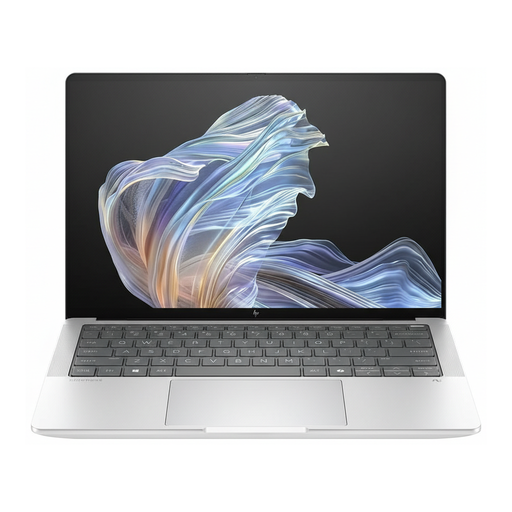 Image unavailable
HP EliteBook Ultra G1a 14, B66PTES
This business laptop variant may suit you if Windows 11 Pro is required for your work.
14-inch OLED display, Snapdragon X Elite, 16 GB RAM, 512 GB SSD and Windows 11 Pro.
View at Joybuy
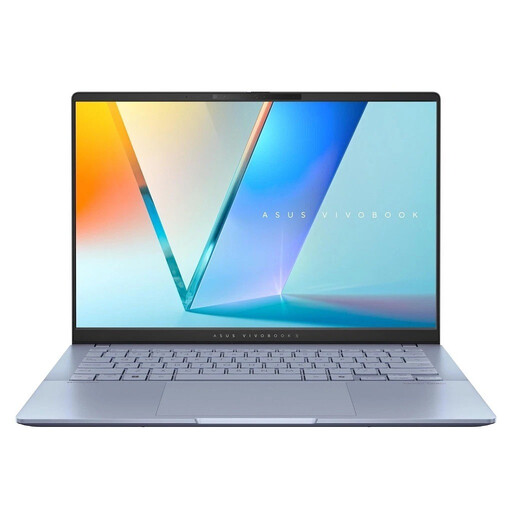 Image unavailable
ASUS Vivobook S 14 OLED S5406SA-QD006W
A backlit keyboard can be useful for writing between appointments; check that Windows 11 Home and the specifications meet your work requirements.
14-inch WUXGA OLED display, Intel Core Ultra 7 256V, 16 GB RAM, 1 TB SSD and Windows 11.
View at Joybuy
Frequently asked questions
How can I prepare seminar questions for a break without internet access?
Before you need to work offline, test whether your approved storage location, templates and word-processing software work with a file already open. Microsoft Support describes local storage and cloud AutoSave for files on OneDrive or SharePoint as different workflows.
Will the advertised battery life be enough for my working day?
A claimed maximum battery life is no guarantee of how long your laptop will last during your working day. Apple's claim of up to 18 hours for the MacBook Air M5 is a manufacturer's figure; actual battery life depends on how you use it. Where possible, compare independent tests of the relevant configuration and plan where you can charge it.
Can I handle personal information in seminar questions between client appointments?
Working on the go is not automatically prohibited. If the questions include personal data, you need to assess the type of data, how it will be used and the appropriate safeguards for your specific workflow; check your organisation's requirements. Simply visiting clients does not mean you have to use a particular type of laptop.
Are a warranty and statutory rights for faulty goods the same thing?
No. A warranty is an optional extra service with its own terms. Your statutory rights if goods are faulty are separate and subject to the applicable conditions. If you're buying for work, check which contract and service terms apply in your situation.
Can I cancel an online laptop purchase in Germany within 14 days?
Consumers generally have a right to cancel a distance contract, and the usual cancellation period is 14 days. The Federal Ministry of Justice and the Federal Office of Justice set out the period in § 355 BGB; exceptions and when the period starts depend on the contract. Whether a purchase counts as a consumer purchase or is made as part of a professional or business activity must be determined on a case-by-case basis.


