Who is this laptop guide for?

Prolific writers

If you spend long sessions working on chapters in progress, the keyboard and text display should suit your writing setup. Lenovo lists a backlit German keyboard for the ThinkPad E14 Gen 7 21SX000RGE; the BAuA notes that the total weight of your work equipment also matters when working in different locations.

Writers who edit with notes

If you compare drafts, make notes or incorporate feedback, check the specific features of your writing software. Scrivener describes its revision mode differently from Word’s Track Changes.

Writers on the move

If you often change where you write, weigh up screen space, device weight, ports and working without a mains connection together. The BAuA highlights the total weight of your work equipment as a relevant factor when changing work locations.

What should you look for when choosing?

Traditional Windows laptop

A good fit if: you use a Windows version of your writing software and want a particular keyboard or a matte display. Lenovo lists these features for the specific ThinkPad E14 Gen 7 21SX000RGE configuration.

Keep in mind: Check the software licence, ports and specifications of the exact version on offer.

MacBook Air

A good fit if: you want to use macOS and are choosing between the 13- and 15-inch MacBook Air M5 models.

Keep in mind: A Scrivener licence for macOS does not unlock the Windows version; Apple lists two Thunderbolt 4 ports for the 13-inch model.

Windows convertible

A good fit if: you like reading or editing notes directly on a touchscreen. HP lists a 360-degree hinge and a 14-inch touchscreen for the OmniBook 5 Flip 14-fp0770ng.

Keep in mind: A touchscreen and hinge alone are no guarantee of a better writing experience, nor that a stylus is included with the specific offer.

Chromebook for browser-based writing

A good fit if: you mainly work in Google Docs; Google explains how to edit files offline after preparing them in advance.

Keep in mind: The Scrivener desktop versions offered by Literature & Latte are designed for macOS and Windows. Test your writing software’s offline workflow before travelling.

Purchasing priority What to look for Who is this particularly important for?
Keyboard and writing setup Check the keyboard layout of the exact model and the ports you need for your existing input devices. When I write long chapters, I want a layout that suits me and, at my desk, the option to position the screen separately from my input device. This applies to around 33% of consumers who prioritise writing comfort above all else.
Editing notes and drafts Work out whether you need to accept and reject changes or mainly compare your own drafts; check the software version and screen space. When I incorporate feedback, I need the specific change-tracking features in my writing software and enough room for text and notes. Around 27% of consumers put editing features first.
Portability and working away from a mains socket Compare the device’s size and total weight with the accessories you need. Consider battery-life figures in the context of the manufacturer’s test conditions. If I often change where I write, I want to carry my device and accessories easily and understand the battery-life figure in relation to how I use it. Around 20% of consumers name portability as their top priority.
Backing up your manuscript and planning costs Check storage, suitable ports and whether you need software or backup media; set up separate backups and test that you can restore them. When my work in progress matters to me, I want to back it up independently of my laptop and factor in software and any accessories I need. Around 20% of consumers prioritise backups and overall costs.

Which mistakes should you avoid?

  • Confusing revision mode with full change tracking

    Scrivener does not describe its revision mode as a change-tracking feature that lets you accept or reject individual changes. This can make your workflow harder if you need to deal with feedback in exactly that way.

    Try out the editing workflow you want in your writing software before choosing a laptop.

  • Relying on version history as an independent manuscript backup

    Earlier drafts within a project do not automatically protect you against device failure, theft or problems with a cloud account. The Federal Office for Information Security recommends keeping independent backup copies.

    Back up the entire project separately from your laptop and check that you can restore the files.

  • Looking only at the device specifications

    A software licence tied to a particular platform and what comes with the specific offer can affect your workflow. According to Literature & Latte, a Scrivener licence for macOS does not unlock the Windows version.

    Check the operating system, existing licences, ports you need and what is included with the exact offer.

Which brands offer suitable options?

Lenovo

The ThinkPad E14 Gen 7 21SX000RGE is a Windows option with a German keyboard and a matte 14-inch display.

  • Lenovo lists 16 GB RAM, a 512 GB SSD and a backlit German keyboard for this configuration.
  • These specifications apply to the configuration named here; check the features of the exact version on offer.

Apple

The MacBook Air M5 offers a macOS option in 13- and 15-inch models, giving you different amounts of screen space on the move.

  • Apple lists a 13.6-inch display and two Thunderbolt 4 ports for the 13-inch model.
  • Check that you have the right software licence and the ports you need; stated battery life applies to Apple’s defined usage scenarios.

HP

The OmniBook 5 Flip 14-fp0770ng is a Windows convertible with touchscreen controls and a foldable display.

  • HP lists 16 GB RAM, a 1 TB SSD, a 14-inch touchscreen and a 360-degree hinge for this model.
  • These specifications do not prove it has an advantage over a traditional laptop keyboard; check which accessories are included with the specific offer.

Asus

Asus features in Notebookcheck’s ranking of affordable office laptops with the ExpertBook PM3406 and Vivobook S16 S3607QA.

  • These models give you more options to assess against your writing software and the configuration you need.
  • Notebookcheck’s ranking, dated 27 August 2026, is limited to the devices tested there. It does not confirm the specifications of every Asus model or its suitability for your writing software.

Joybuy products for writing and editing

The following Joybuy offers are Windows laptops and convertibles. Before buying, check that your writing software is compatible with the Windows version listed.

Acer TravelMate TMP216-41-TCO, 16-inch

Acer TravelMate TMP216-41-TCO, 16-inch WUXGA, Ryzen 3 PRO 7335U, 16 GB DDR5, 512 GB SSD, Windows 11 Pro Education

A Windows option if you want to view text and notes on a larger display.

16-inch WUXGA IPS display; 16 GB DDR5; 512 GB SSD; AMD Ryzen 3 PRO 7335U; Windows 11 Pro Education.

View at Joybuy
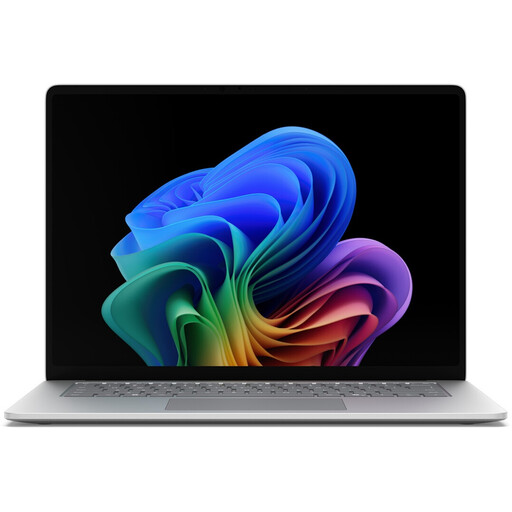
Microsoft Surface for Business 8th Edition, 15-inch touchscreen

Microsoft Surface for Business 8th Edition, 15-inch touchscreen, Intel Core Ultra 5 335, 16 GB RAM, 512 GB SSD, Windows 11 Pro, German

The Windows configuration and touchscreen may suit you if you want to edit text and notes on a larger display.

15-inch touchscreen; 3270 × 2180; 120 Hz; 16 GB RAM; 512 GB SSD; Intel Core Ultra 5 335 at 2.2 GHz; Windows 11 Pro.

View at Joybuy

MSI Prestige N16 Flip AI+ C1XMT-027Y, 16-inch convertible

MSI Prestige N16 Flip AI+ C1XMT-027Y, 16-inch 2-in-1, 128 GB DDR5, 2 TB SSD, Windows 11 Pro

A Windows convertible for writers who want to work with notes on a touchscreen.

16-inch 2-in-1 laptop; 128 GB DDR5; 2 TB SSD; Windows 11 Pro.

View at Joybuy

11.6-inch YOGA convertible with 360-degree touchscreen

11.6-inch YOGA convertible, 360° touchscreen, Intel Pentium Gold 6500Y, 8 GB RAM, 256 GB SSD, Windows 11 Pro

This compact convertible may suit you if you want a foldable touchscreen for working with notes.

11.6-inch touchscreen; Intel Pentium Gold 6500Y; 8 GB RAM; 256 GB SSD; Windows 11 Pro.

View at Joybuy

HP OmniBook Ultra Flip 14-fh0670ng, 14-inch convertible

HP OmniBook Ultra Flip 14-fh0670ng, 14-inch 2-in-1, 32 GB RAM, 1 TB SSD, 2.8K OLED, Windows 11 Home

A Windows convertible with a touchscreen if you want to view text and notes with the device folded back.

14-inch touchscreen; 32 GB RAM; 1 TB SSD; 2.8K OLED; Windows 11 Home.

View at Joybuy

Frequently asked questions

Do I need a particularly powerful graphics card for editing notes?

The text-based tasks described here do not call for any specific graphics card. Scrivener offers a revision mode and snapshots of earlier document versions; Word lets you accept or reject tracked changes.

How can I set up my laptop for longer writing sessions at a desk?

An external keyboard lets you position the screen separately from your input device. The BAuA describes this as an ergonomic option; it does not mean that everyone writing at home needs to buy one.

Are snapshots from my writing software enough as a backup?

No. Snapshots help you keep earlier drafts within a project, but they are not an independent backup against device failure, theft or problems with a cloud service. The Federal Office for Information Security recommends keeping independent backup copies; you should also test that you can restore them.

What else should I check besides the laptop?

Check what is included with the specific offer, as well as the software licences and backup options you need. Scrivener has separate licences for macOS and Windows; do not assume that details for one version of an offer apply to other versions.

What rights apply when buying a laptop online in Germany for personal use?

According to Germany’s consumer advice centres, consumers can generally cancel an online purchase from a retailer within 14 days of receiving the goods; exceptions and the specific contract terms should be taken into account. If new goods are faulty, consumers can generally assert their statutory rights against the seller within two years. This is separate from any voluntary manufacturer’s guarantee.