First, choose a device on which your preferred writing software offers the outlining features you need for your guide. After that, the main considerations are screen space and typing comfort, balanced against weight and portability; there’s no evidence that this task requires a particularly powerful graphics solution. Before you buy, check the exact operating system and device configuration, as well as the software you need and what’s included.
Which working styles suit different writers?
Writers using multiple levels of headings
If you’re editing a long guide and often move between main points and subpoints, your preferred writing software should offer suitable heading and navigation features. Microsoft Support explains these features for Word, while Google Docs Editors Help covers the document outline in Google Docs.
Writers doing extensive research
If you often compare notes with your draft as you write, having more screen space visible can be helpful. Published model specifications show a range of display sizes, but don’t tell you how comfortable a particular keyboard will feel to use.
Writers working in different places
If you move between desks or locations, you’ll need to balance compact dimensions against the workspace available. Treat published battery figures as manufacturer claims for specific usage scenarios, not as a guaranteed runtime when writing.
What matters when you buy?
Windows with desktop Word
A good fit if: you use Word for Windows and want to access headings in the navigation pane.
Consider: The documented Word guide applies to Windows; check the display size and software costs separately for the specific device.
macOS with MacBook Air
A good fit if: you prefer macOS and want a compact device for writing in different places.
Consider: The Word guide for Windows doesn’t confirm that the same workflow applies on Mac; check how you’ll work with your specific documents.
Browser-based work with Google Docs
A good fit if: you mainly use Google Docs and want to display headings in the document outline and use them to navigate.
Consider: The outlining feature alone doesn’t tell you whether a particular configuration will also meet your needs for other programmes or offline use.
The percentages refer to consumers choosing a laptop specifically for this writing task; each figure reflects their main purchasing priority.
| Priority |
What to look for when buying |
Who will find this particularly important |
| Writing software and outlining |
Create a test document in your preferred programme; if using Word, check that it’s the Windows version. |
If I want to create nested headings reliably and find them quickly when editing, I’ll first check the features in my editor. Around 36% of consumers are likely to have this as their main priority. |
| Writing space and typing comfort |
Check the display size and layout of the version on offer; try the keyboard yourself if possible. |
If I want to keep my draft and research notes in view while writing, I’ll compare the usable screen space. Around 29% of consumers are likely to prioritise this writing space above all else. |
| Portability and power |
Check the weight and what’s included; don’t assume the manufacturer’s runtime figures will match your own usage. |
If I edit my guide in different places, weight and charging options will be among my key considerations. Around 21% of consumers are likely to have portability as their main priority. |
| Overall cost and features |
Check the model number, operating system, RAM, storage, power adapter and writing software you need. |
If I only want to pay for the features I need for my writing workflow, I’ll also check the software and what’s included. Around 14% of consumers are likely to prioritise getting the right features for the overall cost. |
Which buying mistakes should you avoid?
-
Confusing bold text with proper headings
The navigation and numbering features described rely on heading styles. Simply making a line bold or larger may not be enough.
Before choosing a device, test your preferred editor with a short sample guide containing several heading levels.
-
Taking a manufacturer’s battery-life claim as guaranteed writing time
Apple distinguishes between different types of use in its battery-life figures, such as video streaming and wireless browsing. These figures don’t necessarily reflect the time you’ll spend editing your document.
Compare the stated usage scenario with the way you plan to work, and take your programmes and settings into account.
-
Overlooking the operating system, model variant and what’s included
Specifications and pre-installed operating systems can vary within a product range. A Joybuy listing for a MacBook Air M5 also notes that a power adapter isn’t included.
Before you buy, check the full model number, operating system and what’s included.
Which brands can help guide your choice?
Acer
The Aspire Go 15 NX.J7WEG.007 is an example of a Windows model with a 15.6-inch display, suited to a more fixed writing space.
- For this version, Acer lists Windows 11 Home, an IPS display with a resolution of 1920 × 1080 pixels, 16 GB RAM and a 512 GB SSD.
- The display specifications don’t indicate how comfortable the keyboard will feel to you; check the exact configuration.
Apple
The 13-inch MacBook Air with M5 is designed for a compact macOS workflow.
- For the 13-inch model, Apple lists a weight of 1.23 kg and a base configuration with 16 GB of unified memory and a 512 GB SSD.
- Apple gives battery-life figures for specific usage scenarios; the Word guide for Windows doesn’t confirm that the same workflow applies on Mac.
HP
The OmniBook 3 16-bu0752ngx is an example of a larger 16-inch Windows model; ProBook is a separate range of business devices.
- For the OmniBook model mentioned, HP lists Windows 11 Home, 8 GB RAM and a 512 GB SSD.
- These specifications apply to the configuration mentioned and aren’t an independent test of writing or battery performance.
Lenovo
The ThinkPad E14 Gen 7 Intel family is one possible business laptop option if ports are important at a fixed workstation.
- Lenovo’s PSREF lists USB-A, HDMI and Ethernet among the ports available in this family.
- Lenovo notes that a port may differ depending on the model variant; family specifications don’t confirm the configuration of a specific device.
ASUS
The Vivobook 15 X1504 family offers another Windows-focused option in the 15-inch category.
- The family includes several sub-models and a range of configurations.
- ASUS also lists versions without a pre-installed operating system, so check the model number and included system.
Suitable laptops at Joybuy
This selection includes Windows laptops with larger displays for a fixed writing space, plus a compact macOS option for working in different places.
 No image available
Lenovo ThinkBook 16 Gen 9 16″
The 16-inch model is worth considering if you want more screen space for your draft and research, and plan to use Windows 11 Pro.
Intel Core Ultra 5 325, 32 GB DDR5 RAM, 512 GB PCIe SSD, WUXGA IPS display, German keyboard layout and 1.7 kg.
View at Joybuy
 No image available
HP ProBook 4 G1a 16″ Business Laptop
This Windows model is an option if you’re looking for a larger screen and a German keyboard layout for working on longer documents.
AMD Ryzen 5 230, 16 GB DDR5 RAM, 512 GB SSD, WUXGA IPS display, AMD Radeon 760M Graphics and Windows 11 Pro; stated weight: 1.75 kg.
View at Joybuy
 No image available
Apple 13-Inch MacBook Air (M5, 2026), Sky Blue
This compact macOS model is worth considering if you’ll be carrying your device around often and want to use your document workflow on this operating system.
10-core CPU, 8-core GPU, 16 GB unified memory, 512 GB SSD, 13.6-inch display, 1.23 kg and German QWERTZ keyboard. The product description states that a power adapter isn’t included and must be purchased separately.
View at Joybuy
 No image available
Lenovo IdeaPad Slim 5 16IPH11
This Windows 11 Home model is an option if you want a larger display for writing and comparing your research.
Core Ultra 5 322, 16 GB RAM, 1 TB SSD and 16-inch WUXGA OLED display; stated weight: 1.69 kg.
View at Joybuy
 No image available
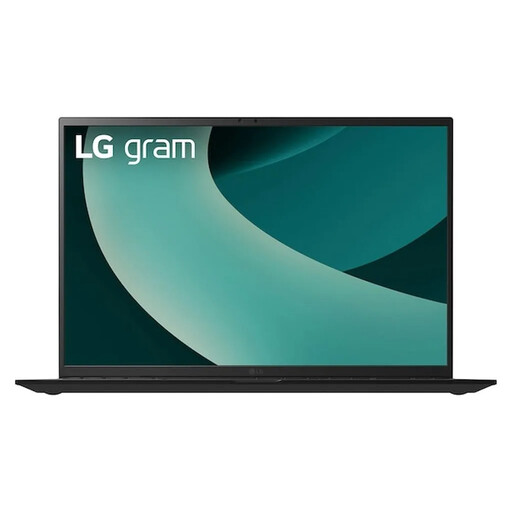
LG Gram 17Z90TL-G.AU78G
The 17-inch model is an option if plenty of screen space matters to you and the stated weight suits where you plan to use it.
WQXGA IPS display, Intel Core Ultra 7 256V, Intel Arc Graphics 140V, 16 GB RAM, 1 TB SSD, Windows 11 Home and 1.39 kg.
View at Joybuy
Frequently asked questions
Do I need a particularly powerful laptop for nested headings?
For the outlining and navigation features described, your writing software is the first thing to consider. Then check the requirements of your other programmes and how comfortable the specific configuration is to use; the writing task alone doesn’t mean you need a dedicated graphics solution.
How can I keep my guide’s outline useful while editing?
Use proper heading styles rather than simply making text larger or bold. For Word on Windows, Microsoft Support explains how to show these headings in the navigation pane and number them using styles and multilevel lists; Google Docs can display headings in the document outline.
What should I test at my writing space before getting started?
Create a test document with several heading levels and open the outline view in your preferred programme. Check whether you can see your document and research notes clearly on the display you’ve chosen; a model’s stated screen size doesn’t tell you how comfortable it will be for your own work.
What ongoing costs and protections should I consider when buying a laptop?
Check which writing software you need and what’s included, including whether you’ll need to buy a power adapter separately. For consumer purchases in Germany, the Federal Government generally describes a two-year statutory retailer liability for defects; this is separate from a voluntary manufacturer’s warranty. If you’re buying for your own studio business as an entrepreneur, don’t assume consumer rights apply without checking.


