Word users who need outlining features
You want to find and move sections and subsections in the Navigation pane. Microsoft Support describes this Word feature for Windows, so check that the Word version you need is compatible with your device.


First, choose your writing software and use a test document to check whether the heading levels you need appear in its document outline. You’ll need a Windows or Mac laptop for the installed desktop version of Word; a Chromebook may suit you if your writing workflow is browser-based. On a Mac, check the specific outlining features in your software rather than assuming that instructions for Word on Windows also apply.
You want to find and move sections and subsections in the Navigation pane. Microsoft Support describes this Word feature for Windows, so check that the Word version you need is compatible with your device.
You mainly write in Google Docs or Word on the web and want to make sure that headings and the document outline support your workflow. Google Docs Help explains how formatted headings appear in the document outline.
You move between places to write and want to access drafts and sources even without a reliable internet connection. Consider the display and weight, and set up offline access and the files you need in advance; Google lists specific requirements.
First decide whether you need a desktop application or a browser-based workflow, then compare the keyboard, screen space and portability. Microsoft Support describes the Word Navigation pane for Windows; Google Docs Help explains the document outline and offline access in Google Docs.
A good fit if: You want to use the desktop version of Word and its Navigation pane to organise headings.
Check: The exact Office licence, Windows version and keyboard layout of the configuration you choose.
A good fit if: You mainly use Google Docs or Word on the web and have already checked that they support the outlining features you need.
Bear in mind: Microsoft Support says the Windows or Mac desktop version of Microsoft 365 cannot be installed on a Chromebook. To use Google Docs without an internet connection, you’ll need to set up offline access.
A good fit if: You prefer macOS and the writing software and outlining features you need on a Mac suit your workflow.
Check: The Windows instructions for the Word Navigation pane don’t confirm that it works the same way on a Mac. What’s included may also vary by configuration.
| Priority | What to check before buying | Who is this especially important to? |
|---|---|---|
| Writing software and outlining | Word desktop or browser-based software; test the heading levels in the programme you use with a sample document. | If I want to organise main headings and subheadings reliably in my writing software, choosing the right programme comes first. Around 36% of consumers prioritise outlining and software. |
| Keyboard and screen space | Compare the German keyboard layout, screen size, resolution and finish on the specific model. | For longer writing and research sessions, I want to type comfortably and read my draft and sources easily. Around 29% of consumers prioritise typing comfort and screen space. |
| Portability and working offline | Check the weight and charging equipment; set up the files you need and offline access before working without an internet connection. | When I research in different places, I want to access my draft even without a reliable internet connection. Around 21% of consumers prioritise portability and offline working. |
| Overall costs and service | Check what’s included, the software licence you need and any optional warranty separately. | I want to know what comes with the device and what recourse I have if it develops a fault before I buy. Around 14% of consumers prioritise what’s included, potential extra costs and service. |
According to Microsoft Support, you can access Microsoft 365 on the web using a Chromebook, but you can’t install the Windows or Mac desktop version. If your workflow specifically requires that desktop version, you may need a different device or to change how you work.
Test the styles and outlining steps you need in the web application you actually plan to use.
A line of large or bold text isn’t automatically a heading that appears in the document outline. The outline depends on whether you use the appropriate heading styles.
Apply the right styles to main headings and subheadings, then check the document outline that appears.
Apple says that the MacBook Air configuration reviewed here does not include a power adaptor. An optional warranty is also separate from your statutory rights against the seller, as explained by the Verbraucherzentrale (German Consumer Advice Centre).
Check what’s included with the specific configuration and read the warranty terms separately from your statutory rights.
If you don’t already have a compatible power adaptor, you’ll need to factor in the cost of powering the device separately.
The ThinkPad E14 Gen 7 21SX000RGE is a specific Windows example for a workflow using the Word desktop app.
The Chromebook Plus 514 NX.J5ZEG.002 is a specific ChromeOS example for browser-based writing.
The 13-inch MacBook Air with M5 is a macOS option if the writing software you want to use is compatible.
The Galaxy Book4 NP750XGK-KB2DE is a Windows example with a larger built-in display.
The ExpertBook PM3406 is a business laptop range that has been reviewed; its extra features aren’t necessarily needed just for writing a guide.
The Joybuy devices below include Windows laptops and MacBooks for research and writing. Before you buy, check that your writing programme supports the outlining features you need on the device’s operating system.
 No image available
If you want to use the Word desktop app on Windows, check that Windows 11 Home and the Office licence you need are right for you.
14-inch, 2.8K OLED touchscreen, Intel Core Ultra 7 258V, 32 GB RAM, 1 TB SSD, Windows 11 Home.
 No image available
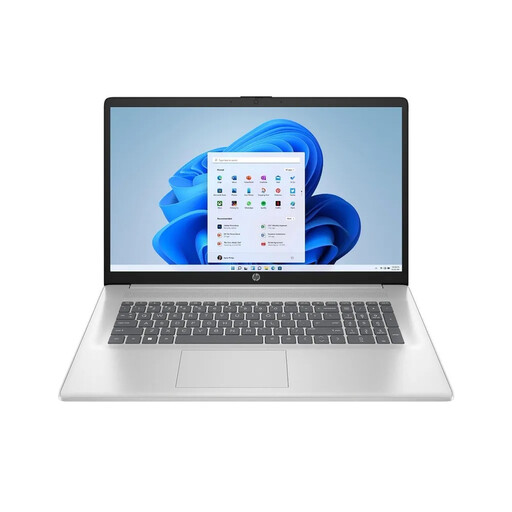
If you prefer a large built-in screen for writing and research, the 17.3-inch display is a useful feature to consider. Bear in mind the stated weight of 2.07 kg if you’ll be carrying it around often.
17.3-inch, Full HD IPS, AMD Ryzen 7 7730U, 16 GB RAM, 512 GB SSD, Windows 11 Home.
 No image available
If your writing software and its outlining features work well on macOS, this model could suit a Mac-based workflow.
10-core CPU, 8-core GPU, 16 GB, 512 GB SSD, German QWERTZ keyboard layout. According to the product listing, no power adaptor is included.
 No image available
If you want to use macOS and prefer a larger built-in screen, check that your writing software’s outlining features work as you need them to on a Mac.
10-core CPU, 10-core GPU, 16 GB RAM, 512 GB SSD, German QWERTZ keyboard layout. The stated weight is 1.51 kg; according to the product listing, no power adaptor is included.
 No image available
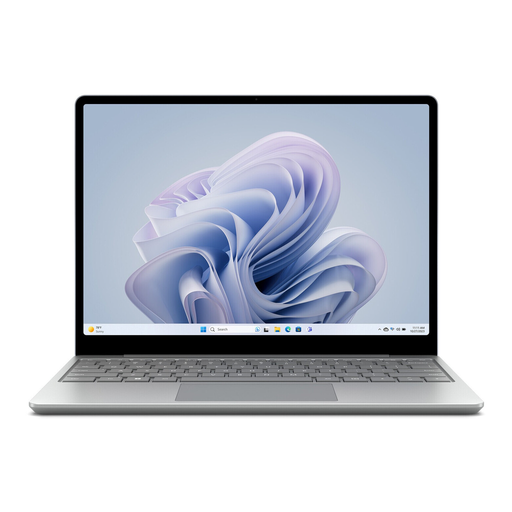
If you’ll often carry a Windows device between places where you write, its stated weight of 1.13 kg is worth considering.
12.45-inch touchscreen in a 3:2 format, Intel Core i5, 8 GB RAM, 256 GB SSD, Windows 11 Home.
For the outlining features described, the most important things are your writing programme and the right heading styles. Create a test document with the levels you need and check the document outline; the features described don’t require a particularly powerful graphics card.
Set up offline access in Chrome or Edge while you have an internet connection. Google Docs Help also lists the enabled “Google Docs Offline” extension, enough free storage space and using the service outside Incognito mode as requirements. Check that the files you need are available offline.
Your statutory rights against the seller are separate from any voluntary warranty. New goods generally come with a two-year statutory period, as explained by the Verbraucherzentrale (German Consumer Advice Centre). For an online purchase from a trader as a private consumer, you generally have a 14-day right to cancel, which you must notify the trader about.
The European Commission gives 28 April 2026 as the date when common charging requirements begin to apply to laptops covered by the rules. For a specific device, the scope of the rules and when it was first placed on the EU market also matter; this doesn’t mean every laptop must come with a power adaptor.