If you regularly want to see dialogue and a reference scene at the same time while revising, the usable screen space is a good place to start. Test both text areas at your usual font size in the writing software you plan to use. If you often write on the go, a more compact device may suit your routine better, but it might offer less room for two readable text areas. Also check the keyboard layout, operating system, software licence and what’s included with the specific configuration.
Which writing style is right for you?
Revise scenes side by side
If you want to keep dialogue open alongside earlier scenes or notes in a second editor pane, the key is whether both text areas remain readable at your usual font size. Literature & Latte describes Scrivener’s split-editor view; Dell Germany offers a 16-inch configuration of the Dell 16 DC16250.
Type a lot of dialogue
For longer passages, the keyboard layout should suit the way you write. The German Lenovo configuration of the ThinkPad E14 Gen 7 AMD lists a backlit keyboard with a German layout.
Write for longer stretches on the go
If you often change where you write, you’ll need to weigh screen space against portability and working away from a socket. Apple quotes up to 18 hours of battery life for the MacBook Air. This is a manufacturer’s claim, not a measurement taken while writing.
What should you look for when buying?
First, check whether your preferred editor can display two text areas clearly in the layout you want. Then consider the keyboard, portability, software and what’s included.
| What matters when buying |
What to check |
Who should consider this? |
| Readable split-editor view |
Open two panes in the app you plan to use; check the font size and width of both columns. |
If I keep dialogue and a reference scene open at the same time, both should be readable at my usual font size. Around 29% of consumers put the readability of both areas first. |
| Keyboard for long dialogue passages |
Check the layout and key mapping of the specific variant; try typing a longer passage. |
For long stretches of dialogue, I want a layout and key mapping I’m comfortable with. Around 23% of consumers say the keyboard matters most when writing. |
| Writing on the go |
Compare the dimensions and weight of the specific variant; don’t treat the manufacturer’s battery-life claim as guaranteed writing time. |
If I often change where I write, having a device that’s easy to carry matters to me. Around 18% of consumers put portability first. |
| Software and operating system |
Check the writing software’s system requirements, licensing platform and required output format. |
If I want to keep using my writing software, I’ll check the operating system and licence first. Around 18% of consumers put software compatibility first. |
| What’s included and ongoing costs |
Check whether a required charger is included and whether your existing software licence covers the operating system. |
If I’m planning for the device, software and any necessary accessories together, I want to know what I’ll need overall. Around 12% of consumers prioritise potential ongoing costs. |
Avoiding buying and usage pitfalls
-
Confusing side-by-side windows with a split project editor
Scrivener can split the editor horizontally or vertically. Arranging two separate windows is a different way of working and may not give you the same overview of your project text.
Try your preferred layout in the app you plan to use to write your play.
-
Assuming every model in a range has the same specifications
With the Dell 16 DC16250, the options you choose can affect the specifications and what’s included.
Before buying, compare the full configuration, including the display, keyboard layout and what’s included.
-
Assuming a software licence and charger come with the laptop
According to Literature & Latte, a Scrivener licence is valid for one platform only. A Joybuy product page for a MacBook Air 13-inch M5 explicitly states “No charger”. This applies to that specific offer, not to all MacBooks.
Check your software licence and accessory requirements separately from the laptop purchase.
You may need to make additional purchases, such as a licence for another platform or a required charger.
Key brands to consider
Apple
The MacBook Air is a macOS option; Apple offers 13- and 15-inch models.
- Apple lists a 13.6-inch display for the 13-inch model and up to 18 hours of battery life for the range.
- The battery-life figure is a manufacturer’s claim, not a measurement taken while writing. Check whether your preferred font size fits on screen in two editor panes.
Lenovo
The ThinkPad E14 Gen 7 AMD is a more compact Windows option; a German configuration is listed under part number 21T0CTO1WWDE5.
- This configuration lists a 14-inch anti-glare display with 1,920 × 1,200 pixels and a backlit keyboard with a German layout.
- These details apply to the configuration listed. The smaller screen may limit the width of two text columns.
Dell
The Dell 16 DC16250 is a configurable Windows option with more screen space.
- Dell offers a 16-inch display with 1,920 × 1,200 pixels as a configuration option for this model.
- Specifications and what’s included can vary depending on the configuration you choose, so check the specific options.
HP
HP offers 16-inch versions of the HP 200 G2a and ProBook 4 G2a ranges as Windows options.
- The German HP Store lists versions with a 16-inch WUXGA display.
- The operating system and memory vary between versions. Check the specific specification rather than assuming every model in a range is the same.
Joybuy laptops with more screen space
The Joybuy picks below focus on laptops with larger displays for digital writing. Screen size alone doesn’t tell you whether two text areas will be comfortable to read at your chosen font size.
 No image available
Lenovo ThinkBook 16 Gen 9, Intel Core Ultra 5 325, 32GB DDR5, 512GB PCIe SSD, Windows 11 Pro
The 16-inch display is a good starting point for working with two text areas; check how readable they are in your writing software.
Listed specifications include 1,920 × 1,200 pixels, 32GB DDR5 and a 512GB PCIe SSD.
View at Joybuy
 No image available
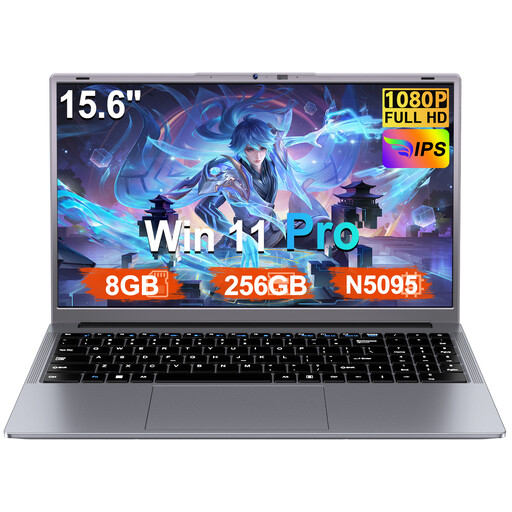
Ruzava laptop, 15.6-inch, N5095, 8 GB RAM, 256 GB SSD
If you’re looking for a larger screen for writing, check whether the 15.6-inch display makes your editor layout easy enough to read.
The title also lists Windows 11 Pro and an SSD that can be expanded to up to 1 TB.
View at Joybuy
 No image available
16-inch laptop with FHD display, Intel Core i5-8210Y, 16 GB RAM, 512 GB SSD
The 16-inch format may suit you if you want to view text side by side; check that it’s readable in your preferred layout before buying.
Windows 11 Pro is listed as the operating system.
View at Joybuy
 No image available
Ninkear A15 Pro, 16-inch, 16 GB DDR4, 1 TB SSD
If you want to work on scenes and notes on a larger display, check how your text areas look on this 16-inch device.
The title also lists Windows 11 and a weight of 1.8 kg.
View at Joybuy
 No image available
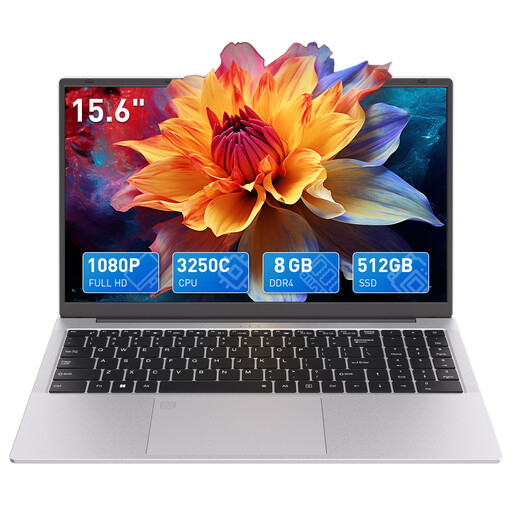
Auusda T156A, 15.6-inch, 8 GB DDR4, 512 GB SSD
A backlit keyboard may be a useful feature for longer writing sessions; check that the layout suits your routine.
The title lists a 15.6-inch FHD display and a backlit keyboard.
View at Joybuy
Frequently asked questions
Do I need a 16-inch laptop to use two text areas?
No. Scrivener can split its editor horizontally or vertically. What matters is whether both areas are readable at your chosen font size on the specific screen. Try the layout before deciding.
How do I set up two writing areas?
According to Literature & Latte, in Scrivener you can choose a horizontal or vertical split under “View > Editor Layout”. For separate windows, Windows 11 offers Snap layouts; this is a different way of working from a split editor.
Can I keep using my Scrivener licence if I switch from Windows to macOS?
According to the provider, a Scrivener licence is valid for one platform only. If you change operating system, check which licence you’ll need.
What are my rights in Germany if a new laptop is faulty?
The Verbraucherzentrale explains that if you buy a new product and it is faulty, you can generally assert your statutory warranty rights against the seller within two years of receiving it. A voluntary guarantee is separate from these rights.
Can I put an old laptop in household waste in Germany?
No. Under § 10 ElektroG, old electrical equipment must be collected separately from unsorted municipal waste.


