What should you look for when buying?
Start with a typical working day. Decide whether a permanent desk or carrying your laptop between locations matters more, then check the software, ports and what’s included with the specific model.
| Buying priority |
What to look for |
Who it matters most to |
| Comfortable writing at a desk |
Check the screen and keyboard layout, along with the ports for external input devices and a monitor. For longer periods of work, the DGUV recommends using an external keyboard and mouse, as well as an external monitor wherever possible. |
If I write at the same desk for long periods, I want to be able to position my screen and input devices comfortably. Around 36% of consumers put comfortable typing first for longer sessions. |
| Research and drafting workflow |
Check that the operating system supports the programmes and file formats you need, and look at the RAM, SSD and backup method you prefer. According to Microsoft, AutoSave in Microsoft 365 requires the file to be stored on OneDrive or SharePoint. |
If I use drafts, sources and images at the same time, the software and saving process need to fit the way I work. For around 29% of consumers, this research workflow is the main priority. |
| Taking your laptop between locations |
Consider the weight of the device and its accessories, and weigh this against the screen space you need. Also check whether your existing devices will work with the ports on the specific model. |
If I regularly take my laptop with me, I want the total weight to be manageable day to day without giving up the screen space I need at home. Around 14% of consumers prioritise being able to move between work locations. |
| The laptop and any extras you need |
Check what’s included, whether you’ll need a power adapter, keyboard, mouse or monitor, and what’s required for software and backing up your data. You don’t automatically need extra storage or a service just to write text. |
If I mainly want to keep an eye on the cost of the laptop and the accessories I really need, I need to consider everything required for my workspace. Around 21% of consumers put total costs and necessary extras first. |
Joybuy laptops for writing and research
Depending on their specifications, the following Joybuy models are suited to longer writing sessions at a desk, occasional trips between locations or using different modes. Make sure the operating system, ports and specific configuration suit the way you work.
 No image available
Lenovo ThinkPad E16 Gen 3 21ST, Ryzen 7 250, 32 GB RAM, 1 TB SSD
For longer writing sessions at a desk and researching with several windows open, this configuration has a 16-inch anti-glare WUXGA display, 32 GB RAM and a 1 TB SSD.
Windows 11 Pro; ports listed in the product details: USB4-C, USB-A, HDMI 2.1 and RJ45. At 1.71 kg, its weight is worth considering if you regularly carry it with accessories.
View at Joybuy
 No image available
HP OmniBook Ultra Flip 14-fh0670ng, Core Ultra 7 258V, 32 GB RAM, 1 TB SSD
This model is a good fit for writers looking for a Windows 2-in-1 with a touchscreen and several modes.
14-inch 2.8K OLED touchscreen, 32 GB RAM, 1 TB SSD and Windows 11 Home. The stated weight is 1.34 kg.
View at Joybuy
 No image available
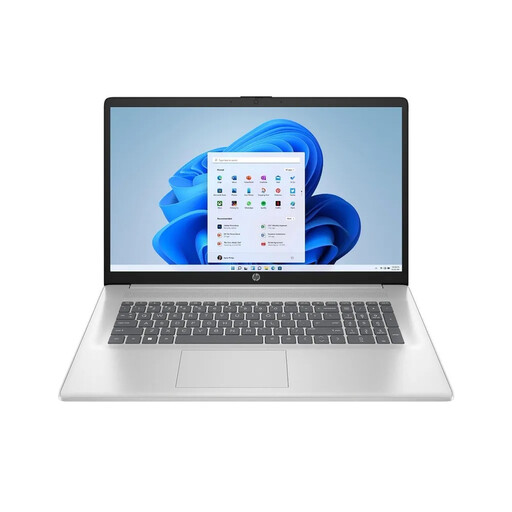
HP Laptop 17-cp3770ng, Ryzen 7 7730U, 16 GB RAM, 512 GB SSD
For a mainly fixed workspace, this configuration offers a 17.3-inch Full HD IPS display with plenty of screen space built in.
Windows 11 Home, 16 GB RAM and a 512 GB SSD. Its stated weight of 2.07 kg is worth bearing in mind if you plan to take it with you.
View at Joybuy
 No image available
HP ENVY x360 16-ac0473ng, Core Ultra 7 155U, 16 GB RAM, 512 GB SSD
If you’ll actually use tablet or tent mode as well as writing, this 2-in-1 configuration’s 360° hinge gives you several ways to position the device.
16-inch WUXGA IPS touchscreen, 16 GB RAM, 512 GB SSD and Windows 11 Home. The stated weight is around 1.87 kg.
View at Joybuy
 No image available
Apple 13-inch MacBook Air (M5, 2026), 16 GB, 512 GB SSD, German QWERTZ keyboard
This compact model is worth considering if you regularly take your laptop with you and may want to use an external monitor at home.
13.6-inch display, macOS, 16 GB RAM and a 512 GB SSD. It weighs 1.23 kg and has two Thunderbolt 4 ports; check that it’s compatible with your software and existing devices. The product description states that no power adapter is included.
View at Joybuy
Frequently asked questions
Do I need a particularly large laptop for long writing sessions?
Not necessarily. Your workspace set-up matters too. For longer periods of work, the DGUV recommends using an external keyboard and mouse, as well as an external monitor wherever possible. Before buying, check that the laptop has the ports you need.
How can I back up my draft while I’m working?
Word for Microsoft 365 can save automatically if you have an active subscription and the file is stored on OneDrive or SharePoint. On a Mac, Time Machine can create backups using a set-up external storage device. Choose a method that suits the way you work, and check that you can restore a backup.
Are a warranty and statutory rights the same thing?
No. Your statutory rights are a legal claim against the seller; a warranty is a voluntary promise with its own terms and conditions. If a product is faulty, the seller may first have to repair it or provide a replacement. For the usual claims relating to defects under sales law, Section 438 of the German Civil Code generally sets a period of two years from delivery; the type of contract and individual circumstances should also be taken into account.
Can I return a laptop bought online for personal use in Germany?
According to the Verbraucherzentrale, consumers generally have a right to cancel an online consumer contract, usually within 14 days of receiving the goods. You must notify the retailer that you wish to cancel. Whether you qualify as a consumer for a particular purchase, and whether an exception applies, needs to be checked separately.
Can an old laptop go in household waste?
No. The German Environment Agency advises against putting waste electrical equipment in household rubbish. It lists recycling centres and suitable take-back options at retailers among the alternatives. Remove your personal data before handing the laptop in.


