Writers with limited desk space
If you write longer passages and want to keep room for notes beside your laptop, compare the actual dimensions and try the keyboard on the specific model to see how it feels to type.


For writing a short story at a small desk, a compact device is a good fit if its dimensions, keyboard and display suit your workspace. If you often research while you write, a 14-inch model may give you more screen space. RTINGS.com highlights the overall writing experience over especially high processor performance. So check that the operating system works with your writing software, and that you can read your text and sources in the layout you want.
If you write longer passages and want to keep room for notes beside your laptop, compare the actual dimensions and try the keyboard on the specific model to see how it feels to type.
If you switch between your manuscript and sources while editing, check whether the screen size and resolution suit your preferred window layout. RTINGS.com highlights the overall writing experience over especially high processor performance.
If you don’t always work at a desk, factor in the weight and battery-life figures, along with the conditions under which they were measured. Apple Support says you can set up Time Machine for Mac backups using an external storage device.
First, measure the available desk space and decide whether you want to view your manuscript and sources at the same time. Then compare the specific keyboard and display, and check that the platform supports the writing software you need.
| Consideration | What to look for | Who considers this important? |
|---|---|---|
| Space and typing comfort | Compare the laptop’s width and depth with the available desk space; check the keyboard on the specific model. | If I want to keep room for notes beside my laptop, size and typing comfort matter to me. Around 33% of consumers prioritise desk space and typing. |
| Writing and research | Check the display format and resolution with two windows open at your preferred text size. | If I want to read my manuscript and sources side by side, usable screen space is key. Around 27% of consumers have this as their main concern. |
| Working in different places | Factor in the weight of the laptop and any charging equipment you need; compare battery-life figures only when you know the test conditions. | If you write in different places, you’ll need to carry both the laptop and any necessary charging equipment. Around 20% of consumers prioritise portability and battery life. |
| Backups and additional costs | Check that the backup method and ports work with your existing storage devices; check what’s included with the specific offer. | If I want to be able to access my manuscript if something goes wrong with my device, I factor in backups and any necessary accessories. Around 20% of consumers have this as their main concern. |
The diagonal measurement won’t tell you whether the laptop will fit on your desk or whether its keyboard will feel comfortable during longer writing sessions.
Measure the space available and compare it with the dimensions of the specific model. If possible, try the keyboard and trackpad using your usual text size, too.
Manufacturers’ figures vary depending on how a laptop is used, for example, between wireless web browsing and video playback. A power adapter is also not included with one of the MacBook Air variants described here.
Compare battery-life figures only after checking the test conditions, and see what’s included with the specific offer.
If no power adapter is included, you’ll need to have a suitable one already or buy one separately.
Microsoft Support notes that OneDrive also syncs changes and deletions. According to Apple Support, Time Machine uses an external backup volume that you set up.
Set up a clear backup routine and check whether you can restore an earlier version of your text.
You may need an external storage device to keep a separate local backup.
The 13-inch MacBook Air with M5 is a macOS option for small desks and writing on the go. Apple lists a 13.6-inch display for the range.
The ThinkPad X13 range includes compact Windows laptops. For the German configuration 21RM002NGE, Lenovo lists a matte display and a German keyboard.
The Aspire 14 AI range is a 14-inch Windows option if you often keep sources open alongside your manuscript.
The Joybuy models below include compact laptops and 14-inch options for writing and occasional research. Compare the dimensions of the specific model with your desk.
 No image available
For writing and occasional research if you’re considering a 14-inch laptop.
14-inch touchscreen; Intel Core Ultra 7 258V, 32 GB RAM, 1 TB SSD, 2.8K OLED and Windows 11 Home.
 No image available
A 14-inch option for short stories and occasional research; check that its dimensions fit your desk.
FHD display, N5095 processor up to 2.9 GHz, 8 GB RAM and 256 GB SSD; the title mentions an upgrade option up to 1 TB.
 No image available
For a compact workspace if you want a German QWERTZ layout.
13-inch model with M5, 16 GB, 512 GB SSD, 10-core CPU and 8-core GPU. The product details state that no power adapter is included; check whether you already have a suitable one.
 No image available
For limited desk space if a compact laptop with a German QWERTZ layout suits your needs.
13-inch display, 8 GB, 256 GB SSD, 6-core CPU and 5-core GPU. The title states that it has no Touch ID; the product details also say no power adapter is included.
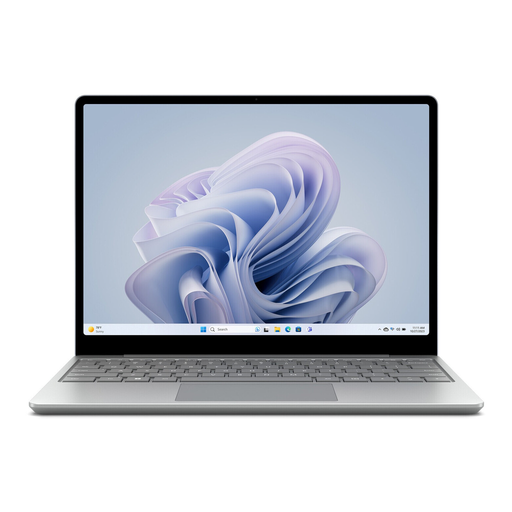 No image available
For limited desk space if you’re considering a smaller display.
12.45-inch touchscreen in a 3:2 format, Intel Core i5, 8 GB RAM, 256 GB SSD and Windows 11 Home.
For everyday word processing, especially high processor performance isn’t the most important factor. RTINGS.com highlights the overall writing experience. Focus on the keyboard and display, and check that text is easy to read at your usual font size.
On a Mac, Apple Support says you can set up Time Machine for automatic backups using an external storage device. Microsoft Support says OneDrive syncs files between your computer and the cloud, including changes and deletions. So check your backup routine and whether you can restore earlier versions of your text.
It depends on the specific offer. The product details for one 13-inch MacBook Air variant state that no power adapter is included; don’t assume the same applies to other models. A voluntary warranty is separate from your statutory rights against the seller.
According to the German Federal Ministry of Justice, consumers generally have a 14-day right to cancel a distance-selling contract with a business. You must notify the business that you wish to cancel; your specific circumstances and the applicable requirements will determine how this applies.
The seller is generally responsible for your statutory consumer rights. The German Federal Ministry of Justice distinguishes this obligation from a manufacturer’s voluntary warranty, which is subject to its own terms.