A laptop for writing a speech in a café should have a comfortable keyboard and a case that fits on your table. Then check that your writing software works on it and that the battery will last for your session. Manufacturer battery-life claims don’t guarantee a certain amount of writing time, and a more compact laptop leaves more room for notes or a drink.
Who writes speeches in cafés?
People who write a lot
If you write and edit longer passages, a comfortable keyboard and an easy-to-read display are especially important. Apple, ASUS and Dell list specific features for their devices, but you’ll need to try the typing experience for yourself.
Writers without a power socket
If you want to work without a charger during your café session, treat advertised battery life as a manufacturer’s claim, not a guarantee of writing time. Apple and ASUS publish battery-life figures for specific models or ranges.
Writers short on table space
If you need room for notes or a drink as well as your laptop, weigh up a more compact case against having a larger display. The Apple, Dell and Lenovo configurations described here differ in several ways, including screen size.
What to look for when buying
| Criterion |
What to check before buying |
Who it matters most to |
| Typing comfort and readability |
Try the German keyboard layout, keys and touchpad; check the screen size and finish of the specific model. |
If I’m editing longer passages, I want to type comfortably and read my draft easily; around 31% of consumers put typing comfort and readability first. |
| Working without a power socket |
Check the battery-life claim and test conditions for the exact model; try the laptop with your usual settings and applications. |
If you’re writing in a café without a power socket, you’ll want to keep working throughout your session; around 25% of consumers prioritise not needing a power connection. |
| Space and portability |
Compare the case dimensions, not just the screen size, and factor in the accessories you regularly carry. |
If you want room for notes and a drink as well as your laptop, the right size matters; around 19% of consumers focus mainly on space and portability. |
| Access to your draft |
Set up and test offline access in advance. Google says Docs requires prior setup and a supported browser, among other things. |
If the Wi-Fi drops out, I want to be able to open and edit my speech; around 13% of consumers prioritise access to their file. |
| Upfront and ongoing costs |
Check what’s included and the cost of any accessories and writing software you actually need. |
If you’re weighing up the cost, you’ll want to include any necessary accessories; around 12% of consumers put the total cost, including essential equipment, first. |
Common buying mistakes
-
Assuming maximum battery life means guaranteed writing time
Manufacturers’ maximum battery-life claims don’t translate directly into your own writing routine. Settings and applications affect how long the laptop lasts.
Compare the conditions behind the battery-life claims, then test the laptop with your usual writing software and settings.
-
Assuming a power adapter is included
The specified Dell 14 Plus configuration and the MacBook Air described on the Joybuy page are both listed as not including a power adapter.
Check what’s included with the exact model and how much charging power you’ll need.
-
Relying on a cloud file without setting up offline access
You may need to set up offline access in advance, depending on your writing application. Microsoft says AutoSave is available for Microsoft 365 when the file is stored in certain cloud locations.
Before your session, try opening and editing the draft without an internet connection, and check that it saves to the location you expect.
An overview of relevant laptop brands
Apple
The MacBook Air is a compact macOS option for writers whose software works with macOS.
- Apple lists a 13.6-inch display and 16 GB of unified memory for the MacBook Air with M5. Its claimed battery life of up to 18 hours is a manufacturer’s figure.
- Check that your writing software is compatible and see what’s included with the specific offer. The battery-life figure doesn’t guarantee it will last for a particular café session.
ASUS
The Zenbook 14 OLED UX3405 is a Windows option with a 14-inch display.
- ASUS advertises a weight of 1.2 kg and battery life of up to 15 hours for the UX3405 range.
- Specifications can vary across the range. Check the display and other features against the specific model; the battery-life figure is a manufacturer’s claim.
Dell
The Dell 14 Plus DB14250 is a Windows alternative with a 14-inch display.
- The configuration described by Dell includes 16 GB of memory, a 512 GB SSD and a non-touch QHD+ display.
- A power adapter isn’t listed as included with this configuration. Check the details for the model you’re considering.
Lenovo
The Yoga Slim 7a Gen 11 is available in a described configuration with a 14-inch display.
- Lenovo lists a backlit German keyboard and a 70-Wh battery for this configuration.
- The OLED display is glossy and the memory is soldered. These details apply to the configuration described, not every Yoga model.
HP
According to HP, the OmniBook ranges include different screen sizes and performance levels.
- The different ranges offer a choice of sizes and specifications.
- For any specific model, check the screen, keyboard and battery life for that exact configuration rather than applying details to the whole range.
Joybuy laptops for writing in a café
The following compact Windows laptops are worth considering for writing and editing a speech at a café table. Make sure the keyboard, display and software you need suit the way you work.
 No image available
Lenovo Yoga Slim 7i Aura Edition, 14-inch
At 1.14 kg, with a 14-inch screen, this is a compact choice if you regularly take your laptop with you to write.
The description lists a 2.8K OLED display, a backlit German keyboard, a Core Ultra 7 355, 16 GB of memory and a 1 TB SSD.
View at Joybuy
 No image available
Microsoft Surface Laptop 8, Core Ultra 5, 24 GB, 1 TB
The 13-inch screen is a compact size for a small café table.
The description lists a 1920 × 1280-pixel touchscreen, 24 GB of memory, a 1 TB SSD and Windows 11 Pro.
View at Joybuy
 No image available
YOGA 11.6-inch with 360° touchscreen
Its 11.6-inch screen makes this a compact option when space on the café table is limited.
The description lists a 360° rotating touchscreen, an Intel Pentium Gold 6500Y, 8 GB of memory, a 256 GB SSD and Windows 11 Pro.
View at Joybuy
 No image available
HP OmniBook Ultra Flip 14-fh0670ng
The 14-inch screen and the different modes described could suit you if you like to change your working position at the table.
The product details list an OLED touchscreen, a 64-Wh battery, 32 GB of memory, a 1 TB SSD and Windows 11 Home.
View at Joybuy
 No image available
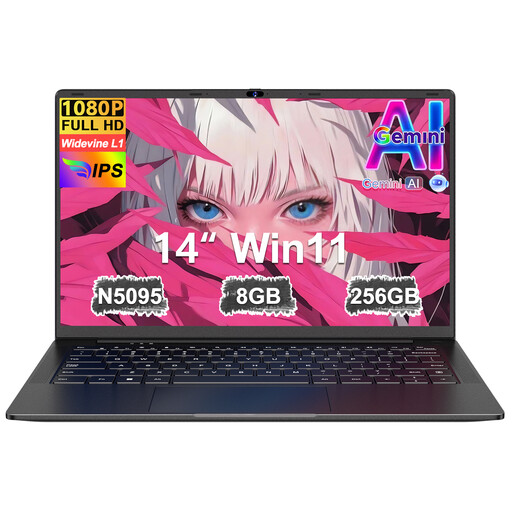
Ruzava 14-inch laptop, 8 GB, 256 GB SSD
The 14-inch screen is a compact size for using a laptop at a café table.
The description lists an FHD display, 8 GB of memory, a 256 GB SSD expandable to up to 1 TB, and an N5095 processor running at up to 2.9 GHz.
View at Joybuy
Frequently asked questions about writing in a café
Do I need to be online all the time to write my speech in a café?
Not necessarily. Google says you can edit Google Docs without an internet connection if you set up offline access in advance. Google lists supported browsers among the requirements, so try accessing your specific draft offline before you go.
Does Word save my draft automatically?
Microsoft says AutoSave is available for Microsoft 365 files saved in OneDrive or SharePoint. Check whether the feature is enabled for your application and storage location.
How should I use the café’s Wi-Fi?
Germany’s Federal Office for Information Security recommends avoiding access to confidential data over a public Wi-Fi network wherever possible. If you have to use one, the BSI recommends using a VPN if possible.
What are my rights when buying a laptop online in Germany?
According to the German consumer advice centre, consumers generally have a 14-day right to cancel an online purchase; you need to notify the seller that you wish to cancel. If a newly purchased item is faulty, you can generally assert your statutory rights against the seller within two years of delivery or receipt. A voluntary guarantee is separate from these rights.


