What should you look for when buying?
First, decide which writing software you want to use, then try it with two real text panes. Next, compare screen space, keyboard and weight against your own writing habits.
| What matters |
What to check before buying |
Who will value this? |
| Two readable text panes |
Try the editor view at your preferred font size; compare the resolution and screen format of the exact model. |
If I want to read my draft and character or scene notes at the same time, both need to be easy for me to see. Around 36 % of consumers put two readable text panes first. |
| A keyboard for long sessions |
Confirm the keyboard layout on the exact configuration and, if possible, write a longer passage on it. |
If I spend long hours working on my manuscript, I want a keyboard that feels right for me. Around 29 % of consumers prioritise typing comfort. |
| Portability |
Weigh the exact model’s weight and screen format against the space needed for two views. |
If I often change where I write, I want to be able to take my laptop with me without relying on a readable view that its screen can’t provide. Around 21 % of consumers put portability first. |
| Software and manuscript backup |
Check the writing software’s operating system requirements and licence terms; plan to keep a separate backup copy. |
If my manuscript takes shape over a long period, I want suitable software and a backup method that doesn’t rely solely on my laptop. Around 14 % of consumers prioritise software and backup considerations. |
Joybuy laptops with more screen space
The following Joybuy models have a larger built-in display and could suit you if you want a split writing view on your laptop. Try the exact device to check whether both text panes are easy to read in your preferred layout.
 No image available
Lenovo ThinkBook 16 Gen 9, Intel Core Ultra 5 325, 32 GB DDR5, 512 GB SSD
The 16-inch format could suit you if you want to view your manuscript and notes side by side on the built-in display. Try it at your preferred font size to check readability.
Windows 11 Pro; 16 inches; 32 GB DDR5; 512 GB PCIe SSD.
View at Joybuy
 No image available
Laptop with 16-inch FHD display, Intel Core i5-8210Y, 16 GB RAM, 512 GB SSD
The 16-inch display gives you the option of working with two text panes. You’ll need to try it yourself to see whether they’re readable in your preferred layout.
Intel Core i5-8210Y; 2 cores and 4 threads, up to 3,6 GHz; 16 GB RAM; 512 GB SSD; Windows 11 Pro.
View at Joybuy
 No image available
Ninkear A15 Pro, 16 GB DDR4, 1 TB SSD
If you’re considering a split view on the built-in screen, check whether both text panes are easy to read on the 16-inch display at your preferred font size.
16-inch FHD IPS display; 16 GB DDR4; 1 TB SSD; 1,8 kg; Windows 11.
View at Joybuy
 No image available
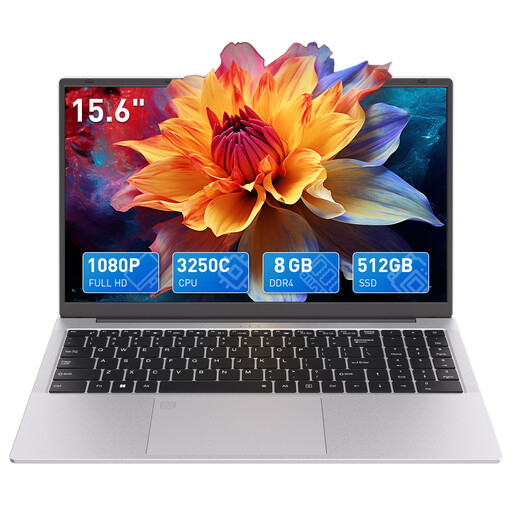
Auusda T156A, AMD 3250C, 8 GB DDR4, 512 GB SSD
The 15.6-inch display is an option if you want to try viewing two text panes on your laptop. Test the layout with your own documents and preferred font size.
15.6-inch FHD display; backlit keyboard; 8 GB DDR4; 512 GB SSD; Windows 11; wired mouse included.
View at Joybuy
 No image available
HONOR MagicBook X16 AMD 2025, German keyboard
If you write in German and want to use split view on the built-in display, check the keyboard and readability on the exact model.
16 inches; AMD R5 6600H; 16 GB RAM and 512 GB SSD; German keyboard.
View at Joybuy
Frequently asked questions
Do I need a 16-inch laptop to use two editor panes?
No. What matters is whether both text panes are readable on your display at your preferred font size. Scrivener lets you split the editor horizontally or vertically, and Windows also lets you arrange windows side by side. An external monitor is another option if you have a fixed workspace.
How do I open an earlier scene next to my draft in Scrivener?
According to Literature & Latte, in Scrivener you can choose the horizontal or vertical split under “View > Editor Layout”, then open the document you want in the second pane. Microsoft Support explains how to view two open files side by side in Word; this isn’t the same project view as Scrivener.
Can I keep using my Scrivener licence if I switch from Windows to macOS?
Not as a licence for the other platform: Literature & Latte explains that each Scrivener licence sold covers one platform only. Check the licence terms before switching operating systems.
Is automatic backup enough for my manuscript?
According to Literature & Latte, Scrivener automatically saves backups to a folder on your computer by default. For an important manuscript, you should also keep a copy somewhere else and check which backup folder is being used.
What should I check to make sure a laptop meets product compliance requirements?
The Bundesnetzagentur lists checks including correct CE marking, manufacturer details and the declaration of conformity. You can’t confirm that these details apply to a specific model based on its product category alone, so check the product documentation for the listing you’re considering.


