Choose a laptop with a keyboard you find comfortable to type on, and a size, weight and battery life to suit your usual train journey. Check that your writing software works offline, and make sure the keyboard layout and box contents are right for you. For shorter pieces of writing, you may not need extra processing power. The IT Service Centre at the University of Kassel recommends choosing a portable device and features to match your actual study needs.
Who is a laptop for writing on the train suitable for?
Frequent writers travelling by train
If you draft and revise questions during your journey, start by considering the keyboard, screen and space available at your seat. The IT Service Centre at the University of Kassel lists portability as an important factor for students. Deutsche Bahn describes the different table arrangements on its trains.
Travellers on longer journeys
If you want to keep working without access to a power socket or reliable Wi-Fi, battery capacity and files available offline matter. Deutsche Bahn notes that Wi-Fi availability varies depending on the type of train.
Budget-conscious seminar participants
If your main tasks are writing and research, compare the specific configuration with the software you need rather than paying for features you won't use. The IT Service Centre at the University of Kassel recommends choosing a device based on your actual needs.
What should you look for when choosing one?
First decide what matters most when writing at your seat. Then compare portability, offline working and features with the kind of journey you make.
| Your needs |
What to check before buying |
Who it's relevant for |
| Writing and reading |
Keyboard layout and typing feel; screen size and finish of the specific model. |
If you write questions at your seat and want to read sources alongside your draft, the keyboard and usable screen space are key. Around 33% of consumers put typing comfort and readability first. |
| Portability and battery life |
Weight of the exact configuration and battery tests carried out under comparable conditions; remember to consider charging needs. |
If you change trains often or can't count on having a power socket, light luggage and enough battery for the journey matter. Around 27% of consumers prioritise portability and battery life. |
| Working offline |
Check the offline features in your writing software; save any sources you need locally in advance and try opening them. |
If you need to access drafts and seminar materials even when your connection is unreliable, test your software's offline features before travelling. Around 20% of consumers prioritise being able to work without an internet connection. |
| Cost and what's included |
Compare the configuration, including any power adaptor you need; check the RAM, SSD and keyboard layout for the specific model. |
If you mainly write and research, you won't want to pay for unnecessary features, but you'll still need everything required to work. Around 20% of consumers prioritise the purchase price and what's included. |
Pitfalls when buying a laptop for train journeys
-
Assuming the manufacturer's battery life matches your own writing time
Apple's stated battery life for the MacBook Air differs for video streaming and wireless web browsing. Your usage may give different results.
Compare tests carried out under similar conditions where possible, and allow for some extra battery on longer journeys.
-
Assuming the power adaptor or keyboard layout from the product name
ASUS says that a power adaptor is not included with this ASUS Zenbook 14 UX3405CA-QL205W configuration. Check the keyboard layout and box contents against the full model variant too.
Before ordering, check the model number, keyboard layout and what's included.
You may need to buy a compatible power adaptor separately for the ASUS Zenbook 14 UX3405CA-QL205W.
-
Confusing statutory consumer rights with a guarantee
Statutory consumer rights apply to the seller, while a guarantee is an additional voluntary promise. The Verbraucherzentrale (German consumer advice centre) clearly distinguishes between these rights.
If something is faulty, check your statutory rights first and read the terms of any additional guarantee separately.
Brands and suitable product ranges
Apple
The MacBook Air with M5 is a compact macOS option if the writing software you need runs on macOS.
- For the 13-inch model, Apple lists a 13.6-inch display, 16 GB RAM and a 512-GB SSD in the base configuration.
- The claim of up to 18 hours of video streaming is a manufacturer figure, not a test on a train. Check what's included with the specific variant.
ASUS
The Zenbook 14 OLED UX3405CA-QL205W is a Windows option with a 14-inch display.
- ASUS lists a weight of 1.28 kg, 32 GB RAM and a 1-TB SSD for this configuration.
- ASUS says this variant doesn't include a power adaptor. These details don't automatically apply to other UX3405 models.
Acer
The Swift Go 14 AI SFG14-75-95TV is a Windows option with a 14-inch screen.
- For the NX.JNBEG.007 configuration, Acer lists 32 GB RAM and a 1-TB SSD.
- These specifications don't demonstrate any particular advantage for typing or battery life on the train.
Lenovo
The IdeaPad Slim 3 range includes compact Windows laptops.
- Lenovo's documentation for the 14IRH10 range includes USB-C with Power Delivery.
- Features and availability may vary by model and region. Check the keyboard, storage and box contents against the full model number.
HP
The Pavilion Aero 13 range offers a lightweight design that may suit you if you carry your laptop around frequently.
- HP's document for the 13-be1000 series lists a weight of less than 1.0 kg.
- The 2022 document notes that configurations vary and doesn't confirm the specifications of any particular offer.
Laptops for working on seminar questions on the train
This selection includes compact Windows laptops and 13-inch MacBooks for writing on the go. In particular, compare the keyboard layout, screen, local storage capacity and what's included with each variant.
 No image available
DELL Pro 14 Essential PV14255, Ryzen AI 7 350, 16 GB/1 TB
This 14-inch configuration is an option if you want to work on seminar texts and sources on a compact screen.
It is described as having an anti-glare FHD+ IPS display in a 16:10 format, 16 GB RAM, a 1-TB SSD, Wi-Fi 6E and Windows 11 Pro.
View at Joybuy
 No image available
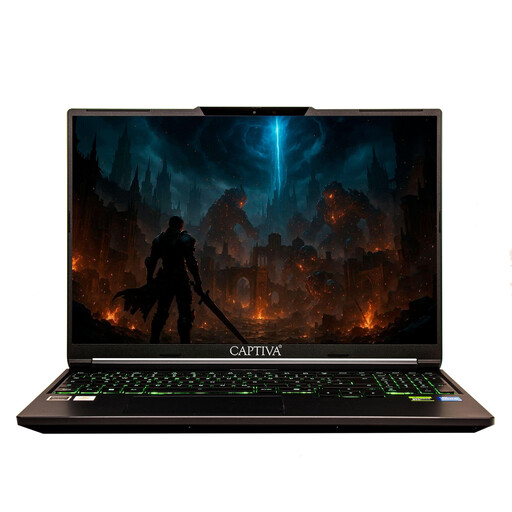
Captiva Power Starter 14, Ryzen 7 255, 16 GB/500 GB
The 14-inch size and stated weight may be worth considering if you take your laptop with you regularly.
The description lists an anti-glare FHD IPS display, 16 GB RAM, a 500-GB SSD, Windows 11 Home and a weight of 1.45 kg.
View at Joybuy
 No image available
Apple 13-inch MacBook Air M5, 16 GB/512 GB, Silver
The 13.6-inch display and German QWERTZ keyboard layout suit a compact writing set-up, as long as your software works with macOS.
It is described as weighing 1.23 kg, with 16 GB of unified memory and a 512-GB SSD. Apple states up to 18 hours of video streaming; according to the product description, a power adaptor is not included.
View at Joybuy
 No image available
Apple MacBook Neo A18 Pro, 8 GB/512 GB, Indigo
The 13-inch size and German QWERTZ keyboard layout are useful features if you're writing in a confined space.
The configuration described includes 8 GB of unified memory and a 512-GB SSD. The stated battery life of up to 16 hours of video streaming is a manufacturer figure. According to the product description, charging requires a USB-C power source of at least 20 W; a power adaptor is not included.
View at Joybuy
 No image available
ASUS Zenbook 14 UX3405CA-QD1303W, 16 GB/1 TB
This 14-inch configuration is a Windows option if you want to work on documents using an OLED touchscreen.
It is described as having a WUXGA OLED touchscreen, a German keyboard, 16 GB RAM, a 1-TB SSD and a weight of 1.22 kg.
View at Joybuy
Frequently asked questions
Can I rely on having Wi-Fi and a power socket to myself on the train?
No. Don't plan your work on that assumption alone. Deutsche Bahn says Wi-Fi is available across its ICE fleet, but only on some Intercity trains and selected regional services. In second class on ICE trains, there is generally one power socket per pair of seats; on selected models, there is one per seat. Save important files locally before you travel.
How should I prepare my laptop for working on seminar questions while travelling?
Before setting off, check that your writing software opens without an internet connection, and save the assignment, sources and draft locally. Try saving and syncing your work later using a file you don't need. Offline features vary depending on the software.
What should I consider when it comes to price and after-sales rights?
Compare the total cost, including the price of a power adaptor if one isn't included. For consumer purchases in Germany, statutory consumer rights against the seller are different from voluntary guarantees. Online purchases generally come with a 14-day right to cancel, although conditions and exceptions may apply in individual cases. The Verbraucherzentrale explains the difference between statutory rights and guarantees.
What USB-C requirements apply to laptops in Germany?
EU rules on a common charging interface have applied to covered laptops since 28 April 2026. This doesn't mean that every older or second-hand device is covered. For the specific offer, check the charging port, the power required and whether a power adaptor is included. The European Parliament's Research Service states when the rules began to apply to laptops.


