If you usually write in one place, a laptop with an external monitor could be a good fit, provided the specific configuration supports both displays at the same time. If you work in different places, consider a device with two built-in displays. Check the ports, display support and keyboard layout; for longer sessions, the DGUV recommends using an external keyboard and mouse.
Who are the different set-ups for?
Writers with a permanent workspace
If you want to see your draft and notes side by side and have room for an external monitor, check the laptop’s video output and the connection you’ll need. For longer sessions, the DGUV also recommends using an external keyboard and mouse.
Writers who work in different places
If you want a second screen without carrying a separate monitor, you could compare devices with two built-in displays. Lenovo and ASUS offer models with this design; pay particular attention to the keyboard layout and ease of use of the specific version.
Budget-conscious writers
Compare the cost of the complete writing set-up, not just the laptop. This may include the operating system, monitor, cables or adapters, and a power adapter. The HP Store Germany lists FreeDOS 3.0 and a separately available power adapter for the HP Laptop 15-fd1771ngx. This applies to that listing, not to HP laptops in general.
Which buying considerations matter most?
First decide whether you want to connect an external monitor or use two built-in displays. Then check the ports, workspace comfort and everything you’ll need for the complete set-up.
Laptop plus external monitor
A good fit if: you mainly write at a desk and want to display your draft and notes separately.
Bear in mind: a monitor and its connection need space; for longer sessions, the DGUV also recommends an external keyboard and mouse.
Laptop with two built-in displays
A good fit if: you want to use two screens in different places without a separate monitor.
Bear in mind: compare the keyboard layout, set-up and ease of use of the specific version with a conventional laptop and monitor.
| Buying priority |
What to look out for |
Who is this especially important to? |
| Two usable displays |
Check that the specific configuration supports both displays at the same time, as well as the video output, monitor input and connection required. |
If I want to see my draft and notes at the same time, both displays need to work in practice; around 33% of consumers put display compatibility first. |
| Comfort during longer writing sessions |
Consider the keyboard and screen position. For longer periods of work, the DGUV recommends an external keyboard and mouse. |
For long writing sessions, being able to position the keyboard comfortably matters to me; around 27% of consumers prioritise typing comfort. |
| Two screens on the go |
For dual-display devices, check the keyboard layout and whether you can comfortably arrange the device in your preferred working position. |
If I don’t want to carry a separate monitor, I look for two built-in displays; around 20% of consumers prioritise using two screens on the go. |
| Complete writing set-up |
Check the operating system and what’s included, and whether you’ll need a monitor, cables, adapters or a power adapter for your set-up. |
I want to know before buying whether I can use the device as supplied or need to add anything; around 20% of consumers prioritise ready-to-use software and the overall cost. |
What should you look out for when buying?
-
USB-C doesn’t automatically mean monitor support
For a second screen, what matters is the video output supported by the specific configuration, not just the shape of the port.
Before buying, match the video output to the monitor input and check which connection you’ll need.
Key brands to consider
Lenovo
Lenovo offers both laptops with two built-in displays and conventional models designed to connect to an external monitor.
- Lenovo describes the Yoga Book 9i Gen 10 as having two displays and lists a separate keyboard for the German configuration reviewed.
- Lenovo lists HDMI and USB-C with DisplayPort for the ThinkPad E14 Gen 6 (AMD).
- Specifications and what’s included vary by model and configuration. Check that the ports and display set-up suit your needs.
Apple
The MacBook Air (15-inch, M4, 2025) is an option for writers who use macOS and want to connect an external monitor.
- Apple Support says this model can use its built-in display at the same time as up to two external displays.
- Check that the ports and monitor are right for your set-up. Apple’s video-streaming battery-life figure is not a measure of how long you can write.
ASUS
The Zenbook DUO range offers another design with two built-in screens.
- ASUS describes the range as dual-display laptops.
- Performance and battery-life figures are provided by the manufacturer. For the specific version, pay particular attention to the keyboard and how the device is set up.
HP
HP offers conventional laptops; check the display connections and specifications for the specific model.
- The HP Store Germany lists FreeDOS 3.0 for the HP Laptop 15-fd1771ngx.
- A power adapter is sold separately with this offer. The listing does not confirm that the model supports the external display you want to use.
Suitable laptops on Joybuy
This selection includes laptops suited to workspaces where you may want to use an external screen. For each model, check that the specific configuration supports your monitor and the laptop display at the same time.
 No image available
Lenovo ThinkBook 16 Gen 9 (Intel Core Ultra 5 325)
The listed video ports may suit a workspace with an external monitor; check that the displays you want to use are supported at the same time.
16-inch WUXGA IPS display in a 16:10 format, 32 GB DDR5, 512 GB PCIe SSD and Windows 11 Pro.
HDMI 2.1 and Thunderbolt 4 are listed as video outputs.
View on Joybuy
 No image available
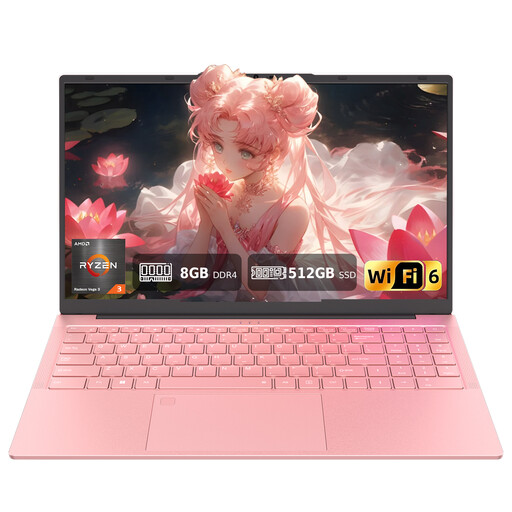
Auusda T156A Laptop (AMD 3250C)
If you want to use this model with an external screen, check that the listed video ports are compatible with your monitor.
15.6-inch Full HD display, 8 GB DDR4 and 512 GB SSD.
USB-C with video output and an HDTV port are listed. The keyboard has a US QWERTY layout.
View on Joybuy
 No image available
HONOR MagicBook X16 AMD 2025 (R5 6600H)
This model has a German keyboard; before buying, check its video output and whether it supports both displays at the same time.
16-inch display, 16 GB RAM and 512 GB SSD.
View on Joybuy
 No image available
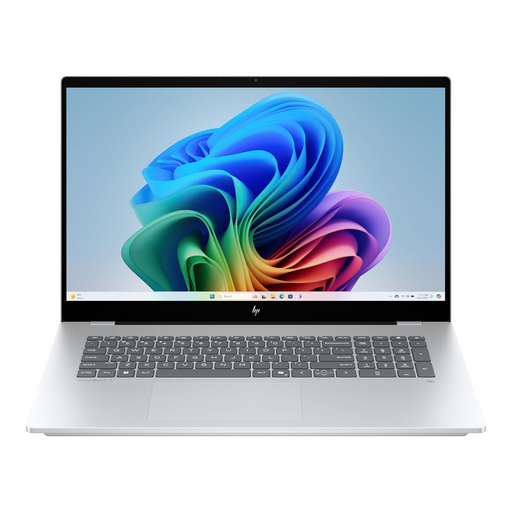
HP OmniBook X Flip 16
This convertible laptop is designed to switch between different working modes. Check that it supports your external monitor at the same time as its own display.
WUXGA touchscreen, Intel Core Ultra, 16 GB RAM, 512 GB SSD and Windows 11.
Thunderbolt 4, USB-A and HDMI are listed; USB-C Power Delivery is also mentioned in the product name.
View on Joybuy
 No image available
HP ENVY x360 16 (16-ac0473ng)
HDMI 2.1 and two Thunderbolt 4 ports are listed for connecting an external display; check that the combination you want is supported at the same time.
WUXGA IPS touchscreen, Intel Core Ultra 7 155U, 16 GB RAM, 512 GB SSD and Windows 11.
The description lists a German QWERTZ keyboard and a weight of around 1.87 kg.
View on Joybuy
Frequently asked questions
How do I set up a laptop and external screen for writing?
Connect the devices using a compatible video connection. Once Windows detects both displays, you can identify and arrange them to match their positions under Settings > System > Display; Microsoft Support explains how to arrange your displays.
Do I need a separate keyboard for longer writing sessions?
For longer periods of work in particular, the DGUV recommends an external keyboard and mouse and, where possible, an external screen. This is ergonomic advice, not a general requirement for writing at home.
Does a power adapter have to be included when buying online in Germany?
Not necessarily: EU rules allow certain devices to be sold without a charger. So check what’s included and the charging details in the specific offer.
Does USB-C mean I can connect a monitor through it?
No. USB-C alone does not confirm that video output is supported. Check whether the port on the specific configuration supports video signals and whether your monitor and connection are compatible.
What are my rights if the laptop I bought online isn’t suitable or is faulty?
Online purchases generally come with a right to cancel, usually within 14 days of receiving the goods, although some exceptions may apply. If an item is faulty, statutory consumer rights are separate from a voluntary guarantee, as explained by the Verbraucherzentrale.


