The right features for different needs

Event planners on the move

If you move between your desk, meetings and library rooms, weight, typing comfort and the battery life you can realistically expect in your day-to-day work are key considerations. Bitkom and Notebookcheck offer guidance on what to look for and reviews of tested office laptops.

Planners working with detailed lists

If you usually work on schedules and budgets at a fixed desk, look for a comfortable amount of screen space and suitable office software. Microsoft provides Excel templates for schedules and event plans.

On-site coordinators

For discussions and presentations, the connections available on the day are what matter. If you handle registration data, you’ll also need to consider suitable safeguards; the Federal Commissioner for Data Protection and Freedom of Information explains the requirement to put appropriate technical and organisational measures in place.

What to consider when choosing

Compact Windows laptop

A good fit if: You often take your laptop with you and rely on existing Windows software or a specific connection. Lenovo lists a matte 14-inch display, HDMI and USB-C for the ThinkPad L14 Gen 5, model 21L50014GE.

Trade-off: A smaller display leaves less room to view several lists side by side. Lenovo also lists this exact model as discontinued.

Larger office laptop

A good fit if: You mostly work at a desk with schedules, budgets and attendee lists, and would like more screen space. Notebookcheck’s German office laptop review also features models with 15.3- and 16-inch displays.

Trade-off: Check the weight of the exact configuration if you regularly carry the laptop between rooms.

MacBook Air with macOS

A good fit if: Your planning software works with macOS and you can connect to the presentation equipment available. Apple lists two Thunderbolt 4 ports for the MacBook Air with M5 chip in Germany.

Trade-off: If you’re using an HDMI projector, check how to connect it, perhaps with a suitable adapter. Apple’s battery-life claim of up to 18 hours is a manufacturer figure, not a guarantee for your event day.

Priority What to check before buying Who it matters most to
Features and budget Check that the software you need is compatible with the operating system, keyboard and display, and review the memory and storage in the exact configuration. If I want to work on schedules and budgets using the software I need without losing sight of what I can afford, getting the right core features is my priority. Around 31% of consumers prioritise work-ready features within their budget.
Portability and power Check the weight of the exact device, as well as the power adapter and charging options available on site. Don’t assume the manufacturer’s battery-life claim will reflect your own use. If I carry my laptop and paperwork between meetings and the event space, I want to plan ahead for weight and charging. Around 25% of consumers focus mainly on portability and power.
Presentations and connections Compare the connection on the projector or display you’ll be using with HDMI and the exact laptop model’s potential USB-C video output. Check whether you’ll need a suitable adapter. If I need to present in a library room, I want to be able to connect my laptop to the equipment there. Around 25% of consumers prioritise having the right connections for presentations.
Coordination and data protection Check that calendar and conferencing software is compatible with the operating system. If you handle personal data, discuss safeguards with the organisation responsible. If I coordinate meetings and registrations, I want to use suitable software and protect personal data appropriately. Around 19% of consumers prioritise collaboration and the protection of registration data.

Avoid common selection mistakes

  • Treating a price limit in a ranking as a current budget guarantee

    Notebookcheck’s office laptop list uses a price limit from the time it was last updated. It doesn’t confirm a current sale price or today’s stock levels.

    Use the review rankings as a guide, then check the specification and condition of the exact offer.

  • Assuming USB-C will automatically connect to the projector

    Connections vary by model. USB-C alone doesn’t confirm that video output is supported or that the laptop will connect directly to the library projector.

    First find out which connection the presentation equipment uses, then check that it matches the video output on the exact laptop model.

    Depending on the connection, you may also need a suitable adapter.

  • Planning your event day around the highest battery-life claim

    Manufacturers may quote maximum battery life under specific test conditions. Actual battery life also depends on how you use the laptop and the conditions it’s used in. Acer also notes that features vary by model and region.

    Plan to take the power adapter and make sure you can access a socket, rather than relying on a manufacturer’s maximum figure.

  • Confusing a manufacturer’s warranty with your statutory rights

    The consumer advice centre explains that statutory rights relating to faulty goods apply against the seller. Which consumer rights apply also depends on who legally buys the laptop.

    Check who the buyer and seller are, and what additional warranty terms are offered.

An overview of relevant brands

Lenovo

The ThinkPad L range is a line of business laptops, with models designed for different work locations.

  • For model 21L50014GE, Lenovo lists a matte 14-inch display, HDMI, USB-C and a German keyboard.
  • Lenovo marks this exact model as discontinued. This doesn’t tell you whether a particular retailer has it in stock or what condition it’s in.

HP

HP positions ProBook and EliteBook as business laptop ranges for different feature and budget requirements.

  • The manufacturer’s descriptions can help when comparing business laptop ranges.
  • HP says that security features, camera and weight depend on the model and its configuration. This positioning isn’t an independent performance test.

ASUS

According to ASUS, the ExpertBook P3 range includes a variety of display, storage and connection configurations.

  • The PM3406CKA specification sheet lists HDMI, USB-A and USB-C with video output.
  • The specification sheet covers different variants, including configurations without a pre-installed operating system or power adapter. Check the exact product number.

Acer

Acer describes the TravelMate P2 as a business laptop range for fixed or changing work locations.

  • On its German TravelMate P2 15 page, Acer lists features including network connections and a 15.6-inch display.
  • Acer notes that specifications vary by model and region. The product range doesn’t refer to one specific configuration.

Apple

The MacBook Air is a macOS option, provided the software you need and the presentation equipment are compatible.

  • Apple lists two Thunderbolt 4 ports for the MacBook Air with M5 chip in Germany.
  • Apple doesn’t list an integrated HDMI port among these connections. Its battery-life claim of up to 18 hours is a manufacturer figure, not a guarantee for your specific use.

Joybuy products for planning

The Joybuy products below include compact Windows laptops for changing work locations and larger office laptops for working with lists at a desk.

HP ZBook 8 G1i 14, Ultra 9 285H, 64 GB RAM and 1 TB SSD

HP ZBook 8 G1i 14, Ultra 9 285H, 64 GB RAM, 1 TB SSD

The 14-inch configuration is worth considering if you need to plan on the go and Windows software and HDMI suit your workflow.

Listed specifications include Windows 11 Pro, 64 GB RAM, 1 TB SSD, a 14-inch 16:10 IPS display and HDMI 2.1. The stated weight is 1,43 kg.

View at Joybuy
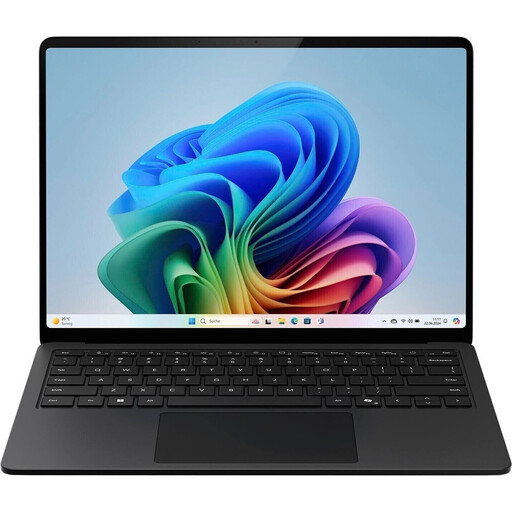
Microsoft Surface Laptop for Business, 7th Edition, 15 inch, Core Ultra 7 266V, 16 GB RAM and 512 GB SSD

Microsoft Surface Laptop for Business, 7th Edition, 15 inch

The larger display could suit you if you mainly work on schedules and budget lists at a desk and need a Windows laptop.

Listed specifications include Intel Core Ultra 7 266V, Windows 11 Pro, 16 GB RAM and 512 GB SSD. The 15-inch touchscreen has a 3:2 aspect ratio, with USB-C/Thunderbolt 4 and USB-A connections. The stated weight is approximately 1,66 kg.

View at Joybuy
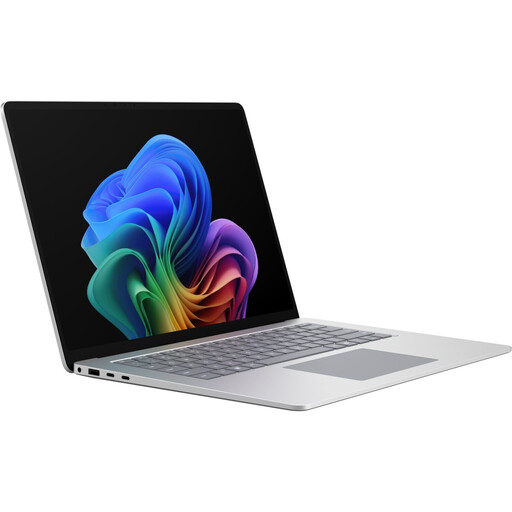
Microsoft Surface Laptop 8 for Business, 15 inch, Core Ultra X7, 16 GB RAM and 512 GB SSD

Microsoft Surface Laptop 8 for Business, 15 inch, Core Ultra X7

The 15-inch format is an option if you work on lists at a desk and are looking for a Windows business laptop.

Listed specifications include Windows 11 Pro, 16 GB RAM and 512 GB SSD. The touchscreen has a 3:2 aspect ratio, with two USB 4.0 ports and Thunderbolt 4. The stated weight is approximately 1,66 kg.

View at Joybuy

HP OmniBook Ultra Flip 14-fh0670ng, 14-inch 2-in-1 with 32 GB RAM and 1 TB SSD

HP OmniBook Ultra Flip 14-fh0670ng, 14-inch 2-in-1

The compact 2-in-1 design is an option if you need a laptop for different locations and Windows 11 Home meets your software needs.

Listed features include a 14-inch OLED touchscreen, 32 GB RAM, 1 TB SSD and a stated weight of 1,34 kg. The product description says a USB-C to HDMI 2.0 adapter is included.

View at Joybuy

HP ProBook 4 G1a, 16 inch, Ryzen 5 230, 16 GB RAM and 512 GB SSD

HP ProBook 4 G1a, 16 inch, Ryzen 5 230

The larger display could be useful for viewing budgets and schedules at a desk, as long as you’re comfortable carrying the extra stated weight.

Listed specifications include Windows 11 Pro, 16 GB RAM, 512 GB SSD and a 16:10 WUXGA IPS display. HDMI 2.1 and RJ45 are also listed; the stated weight is 1,75 kg.

View at Joybuy

Frequently asked questions

Does my laptop need an HDMI port to connect to the library projector?

Only if the projector or the available connection requires HDMI. Lenovo lists HDMI on the ThinkPad L14 Gen 5, model 21L50014GE; Apple lists two Thunderbolt 4 ports for the MacBook Air with M5 chip in Germany. If you’re using USB-C or Thunderbolt, check that the exact configuration supports video output and find out which adapter will work with the projector.

How should I prepare my laptop for the first planning meeting?

Before the meeting, check the files and software you’ll need, as well as the camera, microphone and video output through the connection you plan to use. Microsoft provides guidance on scheduling meetings in Teams; that doesn’t mean Teams is used in every library.

What are my rights if the laptop arrives faulty or I buy it online?

Consumer rights for the sale of consumer goods apply when a consumer buys from a business. The consumer advice centre explains your statutory rights against the seller and the usual 14-day right to cancel online contracts. If a library or association makes the purchase, its status as the buyer needs to be checked separately; consumer rights don’t automatically apply to purchases made by organisations.

What data protection issues should I consider when keeping registration lists on a laptop?

If personal registration data is processed, the organisation responsible must assess the appropriate legal basis and put suitable technical and organisational safeguards in place. The Federal Commissioner for Data Protection and Freedom of Information explains the requirement to provide appropriate protection. The legal basis in each case depends on the event organiser and how the data is processed.

What does CE marking on a laptop mean?

The Federal Network Agency explains that products covered by relevant EU harmonisation legislation must carry CE marking when placed on the EU market. A CE marking alone doesn’t confirm that a specific offer has been checked or that the laptop is compatible with the library’s equipment.