iPhone Safari debugger
If you want to inspect web content on a real iPhone or iPad, Apple’s documented Web Inspector workflow uses a connected Mac.


Both Windows laptops and MacBooks can work well for responsive views in a desktop browser, depending on their specifications. For Apple’s documented Web Inspector workflow with a connected iPhone or iPad, you’ll need a Mac. Then consider how much room you need for your editor and DevTools, along with the ports you actually use. A simulated mobile view is no substitute for testing on a real device.
If you want to inspect web content on a real iPhone or iPad, Apple’s documented Web Inspector workflow uses a connected Mac.
If you keep your editor, browser and DevTools open at the same time, compare the specific memory and screen configuration you need for your workspace, rather than focusing only on the processor name.
If you want to inspect a locally developed page on a real Android device, Google documents remote debugging from your development computer.
A good fit if: you want to inspect Safari web content on a connected iPhone or iPad using Apple’s Web Inspector.
Things to consider: Plan for the connections you need for your phone, display and other peripherals, and allow for adapters if necessary.
A good fit if: your focus is on responsive views in a desktop browser or remote debugging an Android device.
Things to consider: Ports such as USB-A, HDMI or Ethernet depend on the specific configuration. This option does not cover Apple’s documented iPhone Web Inspector workflow.
| Priority | What to check before buying | Who is it important for? |
|---|---|---|
| iPhone and Safari workflow | Check whether you need to inspect a connected iPhone or iPad using Apple’s Web Inspector, and make sure the operating system and connection support this. | If I need to check Safari content on a real iPhone or iPad, the documented device workflow matters to me. Around 36% of consumers base their choice primarily on this. |
| Working with several tools at once | Match the RAM and SSD in the specific model to your editor, browser and project files. | If I have several development tools open at once, I want to compare the exact configuration, not just the product range. Around 29% of consumers put this priority first. |
| Workspace | Check the display size and resolution. If you plan to use an external monitor, make sure it supports the connection you need. | If I want to view code, DevTools and a preview side by side at my desk, available workspace is crucial. Around 21% of consumers prioritise this. |
| Connecting an Android device | Check that the laptop has suitable ports and allow for a data cable. Enable the required debugging settings on the device. | If I want to inspect a live page on a connected Android device, I need a suitable debugging workflow. Around 14% of consumers make this their top priority. |
Google points out that code in Device Mode still runs on your laptop. Behaviour on a real mobile device may differ.
Use emulation to narrow down the issue initially, then test device-specific problems on the phone concerned.
Display, memory and port specifications can vary within a range. For example, Lenovo notes that some ports on its ThinkPad E14 reference are available only on selected models.
Before buying, check the exact model number and the specifications of the configuration on offer.
Apple’s documented inspection of a connected iPhone and Chrome’s remote debugging for Android involve different devices and workflows.
First, make a note of the mobile devices and browsers you need to test. Then choose your operating system and ports accordingly.
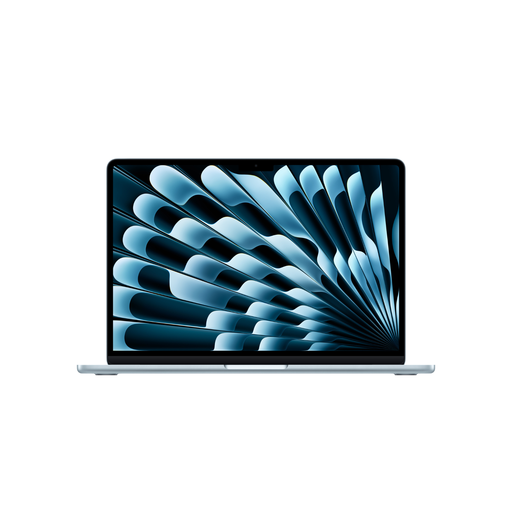
The MacBook Air is a macOS option for workflows using Apple’s Web Inspector with connected iPhones or iPads.
The ThinkPad E14 Gen 7 (Intel) is a Windows laptop range to consider for a workspace with wired peripherals.
The Galaxy Book6 Pro is a Windows option for buyers considering a larger built-in display.
It’s worth comparing the display and memory options carefully when considering the ExpertBook B5 (B5405).
The Joybuy laptops below include Windows and MacBook configurations for development work at a home-office desk. The MacBook is an option for the Web Inspector workflow with a connected iPhone or iPad.
 No image available
A Windows option if you’re looking for Android remote debugging and a specific configuration for working with several development tools at once.
14-inch display; 64 GB RAM; 1 TB SSD.
 No image available
A Windows configuration with a larger built-in display if you want more room to work at your desk.
16 inches; 32 GB DDR5; 512 GB SSD; Windows 11 Pro.
 No image available
A 16-inch option if a larger built-in workspace matters more to you than a more compact format.
16 inches; 16 GB RAM; 512 GB SSD; German keyboard.
 No image available
A macOS option if you want to inspect Safari web content on a connected iPhone or iPad using Apple’s Web Inspector.
15.3-inch display; 16 GB unified memory; 1 TB SSD; two Thunderbolt 4 ports; German QWERTZ keyboard.
The product description says that a power adapter is not included. Make sure you have a compatible one.
 No image available
A Windows option if you’re considering a larger display configuration and wired peripherals for your workspace.
15.6 inches; 32 GB RAM; 1 TB SSD; Windows 11 Pro.
No. Google describes Device Mode as an approximation; the code does not run on a mobile device. Use the view to check screen sizes and start troubleshooting, then test on the real device as well if its behaviour matters.
Google documents remote debugging with USB debugging enabled and an Android device connected. For pages on a local development server, Google also describes USB port forwarding. Use a data cable that supports data transfer.
For Apple’s documented workflow, you need a Mac connected to the iPhone or iPad. You’ll also need to enable Web Inspector on the mobile device.
Your statutory rights against the seller are separate from any voluntary guarantee. Under the relevant EU rules, for consumer purchases the seller is generally liable for defects that become apparent within two years of delivery. When buying online, consumers usually have a 14-day right to cancel; the type of contract and any exceptions should be considered in each case. If you’re buying as a business, don’t assume these consumer rights apply without checking.