What to look for when buying
First, consider how long you’ll need to carry the laptop and work without access to a plug socket. Then check that you can access your files offline and that the input method suits the way you read and write.
| Priority |
What to check before buying |
Who it matters most to |
| Carrying the laptop and working without a plug socket |
Weight of the specific configuration, including the power adapter you’ll need; battery-life claims and their test conditions. |
If I’ll be carrying the laptop for a long time and can’t count on finding a plug socket at my destination, weight and battery life are key. Shoppers with this portability priority make up roughly 31 %. |
| Access without an internet connection |
File format and access permissions, the offline setting for the specific file, and whether the writing app works when tested without a connection. |
If I might be offline where I’m going, I want to be able to open and edit the chapter and my notes in advance. Shoppers who prioritise offline access make up roughly 31 %. |
| Readability and input |
Display size and finish for the specific version, space to view the chapter and notes, and confirmed stylus support if needed. |
If I want to read and annotate the chapter directly on screen, I need a suitable display and my preferred input method. Shoppers who prioritise reading and input make up roughly 23 %. |
| Overall cost and useful life |
Writing software and licence included, any additional licence costs, and the update schedule for the specific Chromebook model. |
If I’m weighing up the purchase price and potential ongoing software costs, I want to know which licence is included and how long the device will receive updates. Shoppers with this cost priority make up roughly 15 %. |
Joybuy laptops for on the go
This selection includes Windows laptops and a 2-in-1 for reading and summarising a textbook chapter while you’re out and about.
 No image available
Microsoft Surface Laptop 7 Snapdragon X Plus, 16 GB RAM, 512 GB SSD, Black
For working on chapters and notes on a Windows device; the listing gives the weight as 1,34 kg.
13,8-inch touchscreen with a resolution of 2.304 × 1.536 pixels, Windows 11 Pro, 16 GB RAM and 512 GB SSD.
Joybuy
 No image available
Microsoft Surface Laptop 8 Core Ultra 5, 24 GB RAM, 1 TB SSD, Platinum
The listed 1 TB SSD gives you space to store chapters and summaries locally.
13-inch touchscreen, Windows 11 Pro, 24 GB RAM and 1 TB SSD.
Joybuy
 No image available
HP OmniBook Ultra Flip 14-fh0670ng, 14-inch, 2-in-1
The 2-in-1 design, touchscreen and included stylus make this a good fit if you want to annotate chapters or take handwritten notes. The listing gives the weight as 1,34 kg.
Windows 11 Home, Intel Core Ultra 7 258V, 32 GB RAM, 1 TB SSD and 2,8K OLED display; laptop, tablet, stand and tent modes.
Joybuy
 No image available
Ruzava 14-inch laptop, N5095, 8 GB RAM, 256 GB SSD
The listing gives the screen size as 14 inches and the weight as 1,39 kg for taking it out and about.
FHD IPS display, Windows, 8 GB RAM and 256 GB SSD; the stated battery life is up to 7 hours.
Joybuy
 No image available
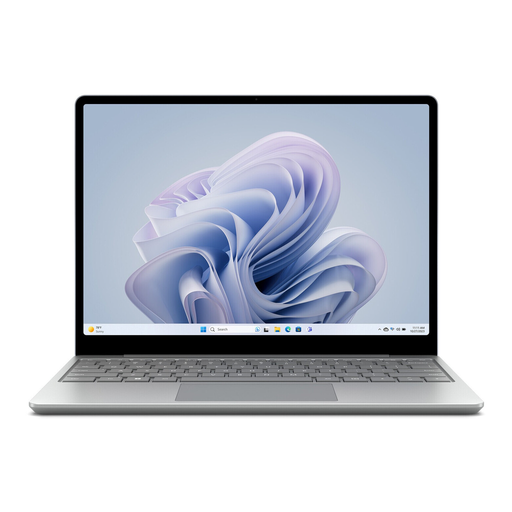
Microsoft Surface Laptop Go 3, 12,45-inch, 8 GB RAM, 256 GB SSD, Platinum, 2023 model
The listing gives the weight as 1,13 kg, which could matter if you’ll be carrying the laptop for a long time.
12,45-inch 3:2 touchscreen, Windows 11 Home, 8 GB RAM and 256 GB SSD.
Joybuy
Frequently asked questions
How do I prepare a chapter and summary for somewhere without internet?
Save the book file and your notes locally in advance, or mark the file as available offline in Google Drive on your Chromebook. Then test both without an internet connection. Google points out that some apps don’t work offline.
Do I need a touchscreen laptop for summarising?
No, not if you’ll mainly be typing. In that case, prioritise the keyboard and readability. Touch or stylus input is worth considering if it suits the way you annotate and is confirmed for the specific model.
Does the laptop come with a perpetual Office licence?
Not necessarily. Microsoft offers free web apps, subscriptions and one-off purchases of Office versions. Check which licence is included with the specific product and whether you can use the desktop features you want without it.
What are my rights in Germany if my laptop is faulty?
Your statutory rights against the seller are separate from any voluntary guarantee. If there’s a fault, you should first ask the seller to put it right. Your specific rights depend on the purchase and the nature of the fault. The Verbraucherzentrale explains the difference.
Is the CE mark on a laptop an independent quality mark?
No. According to the Bundesnetzagentur, the manufacturer uses the CE mark to declare, under its own responsibility, that the product meets the relevant EU requirements. It doesn’t prove that the keyboard is a particular quality or that the battery will last long enough for your outing.


